6
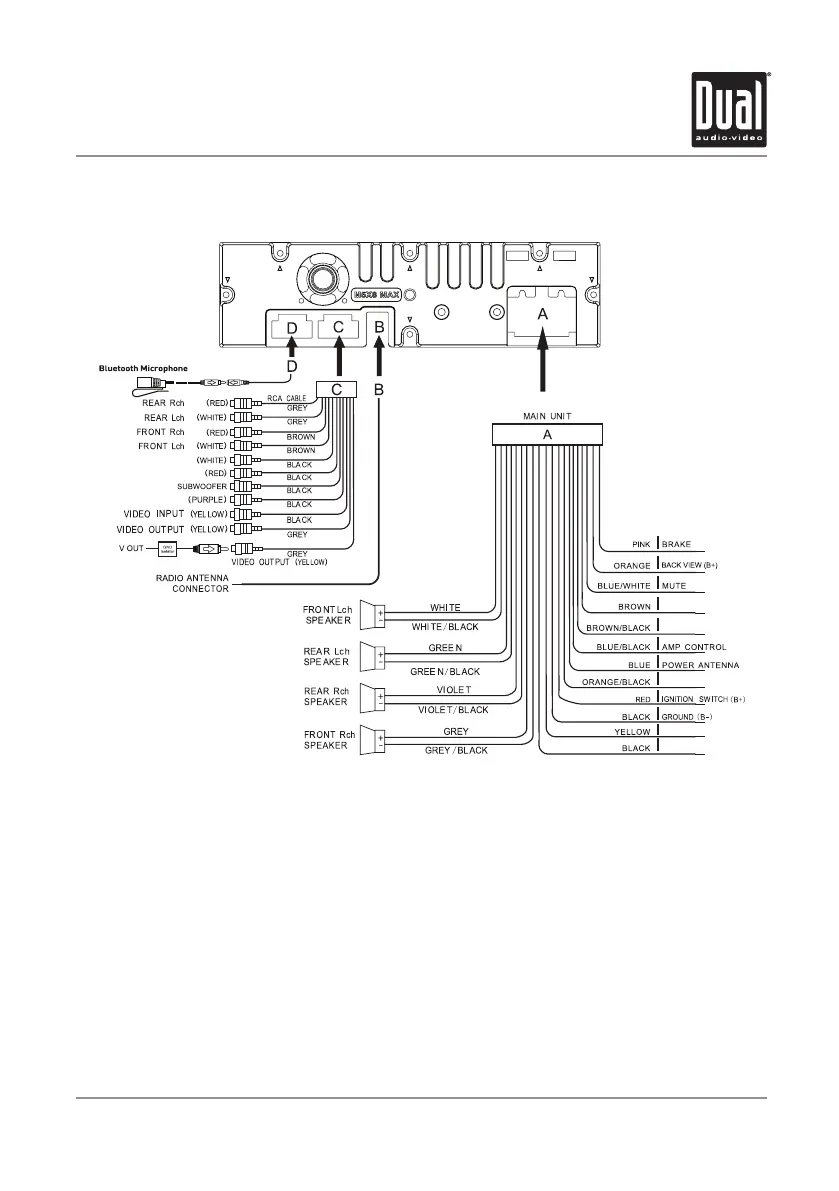
Wiring Diagram - Inputs/Outputs
DV704Bi INSTALLATION
Wiring Notes:
Subwoofer output
The Subwoofer preamp audio output (black jacket with green RCA) is active in all audio modes.
Rear camera input
A rear view camera (not included) can be used with the Camera input. Refer to page 29 for details.
Connecting an iPod/iPhone device
To play music from an iPod/iPhone device, connect the original iPod connection cable to the DV704Bi. Once
connected, playback will begin automatically.
Note:
When replacing a fuse, make sure to use the correct type and amperage. Using an incorrect fuse could damage
the unit. The DV704Bi uses (1) 15 amp ATC mini style fuse located on the back of the unit.
CK-UP CAMERA INPUT
ILLUMINATION CONTROL
12V BATTERY
AUX IN L
AUX IN R
STEERING WHEEL SWC1
STEERING WHEEL SWC2
STEERING WHEEL SWC-GND



 To Next Page