EasyManua.ls Logo

Dual XIA2460 - User Manual

Dual XIA2460
12 pages
Print Icon
To Next Page IconTo Next Page
Loading...
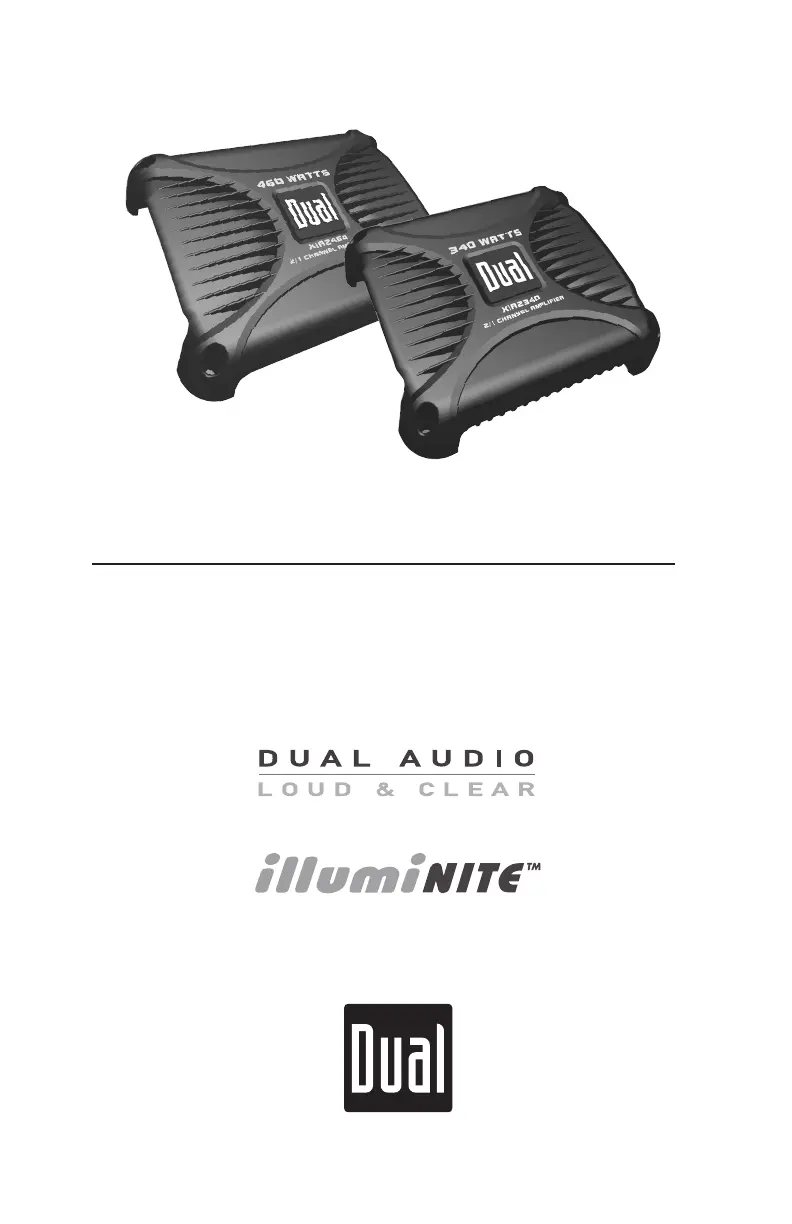
INSTALLATION/OWNERS MANUAL
Mobile Power Amplifiers
XIA SERIES
XIA2340
XIA2460

Questions and Answers

  • S
    samuelwardAug 13, 2025
    What to do if my Dual XIA2460 Amplifier will not turn on?
    • W
      williamsjudyAug 13, 2025
      If your Dual Amplifier is not turning on, there are several potential causes: * The +12V wire or REM wire may not be connected, or the voltage may be incorrect. Ensure connections have the proper voltage (11~16VDC). * The GND wire might not be connected. Check the connection to ground. * The fuse(s) may be blown. In this case, replace the fuse(s).
  • A
    antonioscottAug 17, 2025
    Why does my Dual XIA2460 have power but no sound?
    • A
      Angela OconnorAug 17, 2025
      If your Dual Amplifier has power but no sound, consider the following: 1. Speaker wires might not be connected. Check the connections at the speakers. 2. Speaker wires may be touching each other or the chassis ground. Insulate all bare speaker wires from each other and the chassis ground. 3. The input signal may not be connected. Check the high or low level inputs for proper connection.
  • W
    Walter AlvaradoAug 21, 2025
    What causes engine noise in my Dual XIA2460 Amplifier and how to fix it?
    • L
      Luke WhiteAug 21, 2025
      Engine noise in your Dual Amplifier can be caused by: * A bad ground connection. Make sure the amplifier is grounded to clean, bare metal. * A signal ground loop or RFI (radio frequency interference). Try re-routing the RCA cables away from existing high current wiring.
  • M
    Melissa WilliamsAug 25, 2025
    What to do if my Dual Amplifier blows fuses?
    • D
      dale13Aug 25, 2025
      If your Dual Amplifier is blowing fuses, it could be due to: * An incorrect fuse rating. Use fuses with the correct rating. * The +12V wire touching the chassis ground. Check for a pinched wire. * Defective or damaged speakers. Check or replace the speaker(s).
  • T
    Tracy JohnsonAug 28, 2025
    Why is the LED on my Dual XIA2460 red (protect mode)?
    • S
      saraharnoldAug 28, 2025
      A red LED (protect mode) on your Dual Amplifier indicates: * Speaker wires touching each other or the chassis ground. Insulate all bare speaker wires from each other and the chassis ground, then reset the amplifier. * Defective or internally shorted speakers. Check or replace the speaker(s). * A speaker load less than 2 ohms (stereo) or less than 4 ohms (bridged). Adjust the speaker load; the amplifier will not operate at less than 4 ohms when bridged.
  • D
    Dawn SchultzSep 1, 2025
    Why is my Dual XIA2460's audio output distorted?
    • A
      Angelica ChambersSep 1, 2025
      Distorted audio output from your Dual Amplifier can be caused by an incorrect input signal type or an input level that is too high. Check the connections and reduce or adjust the input level.
  • R
    Ryan PetersonSep 5, 2025
    What causes low audio output in my Dual Amplifier?
    • J
      Jennifer ThompsonSep 5, 2025
      Low audio output from your Dual Amplifier may be due to an incorrect input signal type or a low input level. Check the connections and increase or adjust the input level.
  • R
    Robert HenrySep 8, 2025
    Why is there no illuminite output (no lights) on my Dual XIA2460?
    • J
      Jason EsparzaSep 9, 2025
      If there's no illuminite output (no lights) on your Dual Amplifier, the possible causes are: * A blown fuse or the illuminite output (+12VDC) wire touching the chassis ground. Check or replace the fuse. * The illuminite (+) or (-) wires are not connected. Check the connections at the speakers. * Incorrectly wired illuminite connections (reverse polarity). Reverse the (+) and (-) connections, observing correct polarity. * Defective or damaged illuminite speaker(s). Check or replace the speaker(s).

Summary

Preparation

Before You Start

Steps to take before beginning amplifier installation, including disconnecting the battery and choosing a safe location.

Mounting Location

Guidance on selecting an optimal mounting position for the amplifier, ensuring proper airflow and avoiding moisture.

Connection Descriptions

Power Wire (+12 V)

Instructions for connecting the +12V power wire from the battery to the amplifier, including fuse placement and wire routing.

Ground Wire (GND)

Details on properly connecting the ground wire to a clean, unpainted metal surface or vehicle chassis for optimal performance.

Remote Turn-on Wire (REM)

How to connect the remote turn-on wire to the head unit's output or a switch for amplifier on/off control.

Speaker Wires

Guidance on connecting speaker wires, emphasizing polarity and avoiding grounding or connecting speaker wires together.

Features and Control Locations

Amplifier Controls and Indicators

Overview of the amplifier's controls, including input level, crossover, bass boost, and the LED indicator.

Connections and Power Components

Identification of power connections, fuses (main and illuminite), and speaker/illuminite output terminals on the amplifier.

Typical Wire Routing

Main Power Connections

Guidance on connecting the main power, ground, and remote turn-on wires, including fuse placement for protection.

Fuse Rating

Information on selecting the correct fuse type and amperage for replacing fuses to prevent amplifier damage.

Power;Ground Wire Size

Recommendations for wire gauge sizes for power, ground, and illuminite circuitry to ensure optimum performance.

Iluminite Output Connections

Iluminite Speaker Wiring

Detailed instructions for connecting DUAL illuminite speakers to the amplifier's output, emphasizing polarity and avoiding damage.

Iluminite Current Requirements

Table listing current requirements for various DUAL illuminite speaker models when connecting to the amplifier's output.

Amplifier Connections

Speaker Connections

Guidelines for connecting speakers in stereo or bridged modes, noting impedance limits and wiring precautions.

Low Level Input (RCA)

Information on using low-level RCA inputs for best performance, including recommended cable lengths and types.

High Level Input (Speaker Wire)

Instructions for using high-level inputs when RCA outputs are unavailable, including wiring details and ground connection considerations.

Configuration;Setup

Input Level Control

How to adjust the input level (gain) to match the head unit output for optimal audio performance without distortion.

Crossover Mode

Explanation of how to select the crossover mode (LP, HP, FULL) based on speaker type for frequency filtering.

Crossover Frequency Control

Details on using the crossover frequency control for precise adjustment of frequency filtering for speakers.

Bass Boost

Information on adjusting the bass boost feature at 45Hz, with a caution for potential speaker damage from improper use.

Limited One-Year Warranty

Warranty Coverage

Details on what the warranty covers (defects in material/workmanship) and what it does not cover (installation, misuse).

How to Obtain Service

Instructions for obtaining warranty service within the USA, including packing, shipping, and required documentation.

Specifications

XIA2340 Specifications

Detailed technical specifications for the XIA2340 amplifier, including power output, frequency response, and dimensions.

Specifications

XIA2460 Specifications

Detailed technical specifications for the XIA2460 amplifier, including power output, frequency response, and dimensions.

Troubleshooting

Unit will not turn on

Diagnosing and resolving issues where the amplifier fails to power on, checking voltage and connections.

Unit has power (but no sound)

Troubleshooting steps for when the amplifier powers on but produces no audio output, checking speaker connections.

Unit blows fuse(s)

Identifying causes for blown fuses, such as incorrect rating or short circuits, and recommended actions.

LED illuminates red (protect mode)

Resolving protect mode issues indicated by a red LED, typically caused by speaker wiring shorts or improper loads.

Dual XIA2460 Specifications

General IconGeneral
Channels2
Input Impedance10k Ohms
Input Sensitivity200mV-6V
Crossover TypeVariable
Low-Pass Crossover Frequency50 Hz - 250 Hz
High-Pass Crossover Frequency50 Hz - 250 Hz
Fuse Rating25A
Signal-to-Noise Ratio (SNR)90dB
Bass Boost0 dB - 12 dB

Related product manuals