EasyManua.ls Logo

Dual Compact Series - User Manual

Dual Compact Series
12 pages
Print Icon
To Next Page IconTo Next Page
Loading...
INSTALLATION / OWNER'S MANUAL
Mobile Power Amplifiers
COMPACT SERIES
DA560D
All manuals and user guides at all-guides.com
all-guides.com

Questions and Answers

  • C
    Charles PriceAug 13, 2025
    What to do if Dual Amplifier LED illuminates red (protect mode)?
    • C
      chodgesAug 13, 2025
      If the LED on your Dual Amplifier illuminates red, indicating protect mode, it could be due to several reasons. First, check if any speaker wires are touching each other or the chassis ground; if so, insulate all bare speaker wires. Second, your speakers might be defective or internally shorted, so inspect and replace them if necessary. Finally, the speaker load might be less than 2 ohms stereo or less than 4 ohms bridged. In this case, you should adjust the speaker load, as the amplifier will not operate at less than 4 ohms when bridged.
  • S
    Susan SingletonAug 17, 2025
    Why Dual Amplifier unit will not turn on (no power LED indicator)?
    • J
      Jennifer SmithAug 17, 2025
      If your Dual Amplifier isn't turning on and the power LED isn't lit, there are a few potential causes. First, the 6 WIRE might not be connected, or the voltage might be incorrect. Check the connections for proper voltage. Second, the WIRE might not be connected, so check the connection to ground. Finally, the fuse might have blown, so replace the fuses.
  • D
    Dominique SmithAug 20, 2025
    What to do if Dual Amplifier unit blows fuse(s)?
    • N
      Nicholas JamesAug 20, 2025
      If your Dual Amplifier keeps blowing fuses, here's what to check: Ensure you are using fuses with the correct rating. An incorrect fuse rating can cause this issue. Also, inspect the wiring for any pinched wires that may be touching the chassis ground. Lastly, defective or damaged speakers can also cause fuses to blow, so check and replace the speakers if needed.
  • H
    hbrownAug 25, 2025
    How to fix engine noise in Dual Amplifier?
    • A
      Amanda AlvarezAug 25, 2025
      If you're experiencing engine noise with your Dual Amplifier, it's likely due to a bad ground connection. Make sure the amplifier is grounded to clean, bare metal. Another potential cause is a signal ground loop or radio frequency interference. Try re-routing the signal cables away from existing high-current wiring.
  • E
    epattersonAug 28, 2025
    What to do if Dual Amplifier has power but no sound?
    • C
      Colton CochranAug 28, 2025
      If your Dual Amplifier has power (LED is green) but no sound, consider these possibilities: 1. The speaker wires might not be connected. Check the connections at the speakers. 2. The volume might be turned all the way down. Increase the volume level at the head unit. 3. One or more speaker wires could be touching each other or the chassis ground. Insulate all bare speaker wires from each other and the chassis ground. 4. The speakers might be defective or damaged. Check and replace the speakers. 5. The input signal might not be connected. Check the high or low-level inputs for proper connection.
  • E
    ellisamandaAug 31, 2025
    Why is audio output distorted on Dual Amplifier?
    • S
      Scott WilliamsAug 31, 2025
      Distorted audio output from your Dual Amplifier can be caused by an incorrect input signal type or an input level that is too high. Check the connections and reduce and adjust the input level.
  • W
    wheelermaureenSep 4, 2025
    Why is the audio output low on Dual Amplifier?
    • Z
      zmillerSep 4, 2025
      Low audio output from your Dual Amplifier can be caused by an incorrect input signal type or an input level that is too low. You should check the connections and increase and adjust the input level.
  • K
    Kelsey PearsonSep 8, 2025
    Why Dual Amplifier has weak bass?
    • A
      Amanda PerrySep 8, 2025
      If your Dual Amplifier is producing weak bass, the speakers are possibly wired out of phase. Check and observe the correct polarity.

Summary

Dual COMPACT SERIES Installation Manual

Preparation for Installation

Read manual, professional installation recommended. Disconnect battery, avoid hazards.

Connection Descriptions and Guidelines

Details power, ground, remote, speaker, and input signal connections. Advise on noise reduction.

Audio Inputs and Control Features

Overview of amplifier controls: Gain, Crossover Mode, Crossover Frequency, Bass Boost, LED Indicators.

Power and Speaker Connection Diagram

Diagram illustrating speaker, +12VDC battery, ground connections, and fuse placement.

Typical Wire Routing Guide

Guide for routing power, ground, REM, and signal wires. Fuse placement and wire gauge advice.

Amplifier Input and Output Connections

Explains speaker connections (impedance) and input signal types (RCA, High-Level).

Configuration and Setup Options

Details input level, crossover, bass boost, subsonic filter settings, and LED indicators.

Troubleshooting Common Issues

Troubleshooting guide listing problems, causes, and actions for unit issues, noise, and output problems.

Product Specifications

Technical specifications: power output (RMS/Peak), signal-to-noise ratio, frequency response, dimensions.

One-Year Limited Warranty Information

Warranty terms, covered/excluded items, and service procedures. Contact information provided.

Overview

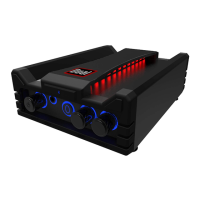
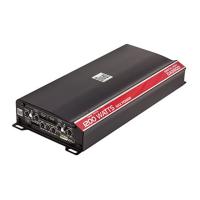
The Dual DA560D is a compact series mobile power amplifier designed to enhance the audio system in a vehicle. It is a 5-channel amplifier, meaning it can power multiple speakers and a subwoofer simultaneously.

Function Description:

The DA560D amplifier takes a low-level (RCA) or high-level (speaker wire) audio signal from a head unit and amplifies it to drive speakers and a subwoofer. It features various controls for audio customization, including high-pass and low-pass filters, crossover mode selection, gain control, and bass boost. The amplifier is designed for installation in a vehicle, typically under a seat or in the trunk, and requires proper power, ground, remote turn-on, and speaker connections.

Important Technical Specifications:

Channels 1, 2, 3, and 4 (Full Range):

  • Power Output (14.4VDC, 20Hz ~ 20kHz):
    • 60 Watts RMS x 4 channels @ 4 Ohms
    • 85 Watts RMS x 4 channels @ 2 Ohms
    • 200 Watts RMS x 2 channels @ 4 Ohms (bridged)
  • Peak Music Power Output: 400 Watts

Subwoofer (Channel 5):

  • Power Output (14.4VDC, 20Hz ~ 250Hz):
    • 450 Watts RMS x 1 channel @ 2 Ohms
  • Peak Music Power Output: 800 Watts

Overall System:

  • Total Peak Music Power: 1200 Watts
  • Signal to Noise Ratio: > 90dB (THD < 0.05% @ 4Ω, 14.4V)
  • Frequency Response: 10Hz-35kHz (-3dB)
  • Amplifier Dimensions: 1.6" (41mm) x 4.7" (119mm) x 10.2” (259mm)
  • Fuse Rating: 40A x 1
  • Power/Ground Wire Size: 4 Gauge (Ga)

Usage Features:

  • Input Level Control (Gain): This control matches the amplifier's input sensitivity to the head unit's audio output. Users should adjust it by turning it fully counterclockwise, increasing the head unit volume to about 3/4, and then slowly turning the gain clockwise until distortion is heard, backing off slightly for the best match. This process should be repeated for all input level controls.
  • Crossover Mode:
    • LPF (Low Pass Filter): Recommended for subwoofers, allowing only low frequencies to pass.
    • HPF (High Pass Filter): Recommended for midrange/tweeter combinations, allowing only high frequencies to pass.
    • FLAT: For coaxial-type speakers or when using the amplifier in stereo/bridged simultaneous mode with passive crossovers.
  • Crossover Frequency Control: Allows precise adjustment of the frequency point where the crossover filter takes effect.
  • Bass Boost: Provides an additional boost at 45Hz, specifically for subwoofers. This feature should be used with caution to prevent speaker damage.
  • Subsonic Filter: Limits harmful frequencies below a set point from reaching the subwoofer(s), protecting them from damage caused by frequencies they are not designed to handle.
  • LED Indicators:
    • Green LED (POWER): Illuminates during normal operation.
    • Red LED (PROTECT): Indicates a fault detected by the amplifier.
  • Input Signal Options: Supports both low-level (RCA) and high-level (speaker wire) inputs. Low-level inputs are preferred for best performance, while high-level inputs are useful when connecting to factory head units without RCA outputs. It is crucial not to use both input types simultaneously.
  • Mounting Flexibility: Can be mounted horizontally or vertically, with a recommendation for at least 1 inch of space around all sides for optimum performance.

Maintenance Features:

  • Fuse Replacement: When replacing fuses, it is critical to use the correct type and amperage (DA560D requires a 40A x 1 fuse). Using an incorrect fuse can damage the amplifier.
  • Troubleshooting Guide: The manual provides a comprehensive troubleshooting section to help diagnose common issues such as no power, no sound, blowing fuses, engine noise, protect mode activation, distorted audio, low audio output, and weak bass. This guide helps users identify causes (e.g., incorrect wiring, defective speakers, improper settings) and provides corresponding actions to resolve them.
  • Wiring Guidelines: Emphasizes proper wire routing to prevent induced noise, using grommets for wires passing through metal, and ensuring secure, clean ground connections. It also specifies fuse placement within 18 inches of the battery for electrical system protection.
  • Professional Installation Recommendation: Due to the technical nature of amplifiers, professional installation by a qualified technician or authorized dealer is highly recommended to ensure correct setup and prevent damage.
  • Warranty: The product comes with a one-year limited warranty covering defects in material and workmanship for the original purchaser. This warranty outlines what is covered, what is not, and the procedure for obtaining service, including contact information for customer support.

Dual Compact Series Specifications

General IconGeneral
BrandDual
ModelCompact Series
CategoryAmplifier
LanguageEnglish

Related product manuals