10
3
Bestätigen Sie Ihre Wahl mit der
Taste.MODE/OK
Confirm the setting with the
button.MODE/OK
Confirmez votre sélection avec la
touche .MODE/OK
2
2
°
C
28 23C C
MODE PROG
OK
ESC
2
°
C
13
:
55 30.07
MODE PROG
OK
ESC
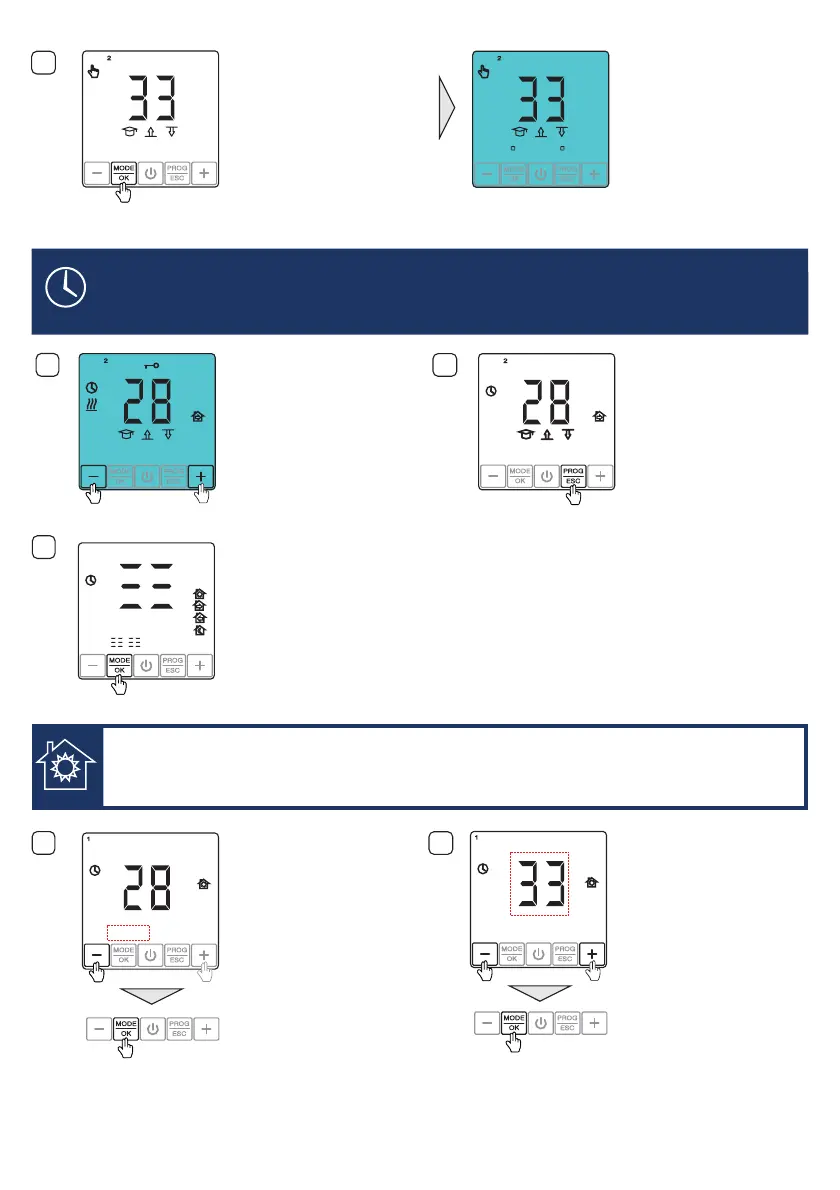
PROGRAMMIERUNG VON EREIGNIS ZEIT
EVENT TIME PROGRAMMING
PROGRAMMATION DE L'ÉVÉNEMENT TEMPS
1
2
Thermostat entsperren.
Unlock the thermostat.
Déverrouiller le thermostat.
Drücken und halten Sie die
Taste für 4 Sekunden.PROG/ESC
Press and hold the
button for 4 seconds.
PROG/ESC
Appuyez sur la touche
et maintenez-la appuyée pendant
4 secondes.
PROG/ESC
3
DrückenSie die Taste.MODE/OK
EREIGNIS AUFWACHEN
WAKE UP EVENT
ÉVÉNEMENT RÉVEIL
Press the button.MODE/OK
Appuyez sur la touche .MODE/OK
2
°
C
13
:
55 30.07
MODE PROG
OK
ESC
2
13
:
55 30.07
°
C
:
4
5
Die Uhrzeit beginnt zu blinken.
Stellen Sie Ihre Zeit mit
Hilfe der oder Taste ein.
Bestätigen Sie Ihre Wahl mit der
Taste.
AUFWACHEN
„ “ „ “
MODE/OK
+ -
The clock time begins to blink.
Set your time using the
oder button.
Confirm the setting with the
button.
WAKE UP
„ “ “–”+
MODE/OK
L'heure se met à clignoter. Réglez
l'heure à l'aide de la touche «
+ » ou « - ». Confirmez votre sélection
avec la touche .
RÉVEIL
MODE/OK
Stellen Sie Ihre
Temperatur mit Hilfe der
oder Taste ein. Bestätigen Sie
Ihre Wahl mit der Taste.
AUFWACHEN
„ “
„ “
MODE/OK
+
-
Set your temperature
using the oder button.
Confirm the setting with the
button.
WAKE UP
„ “ “–”+
MODE/OK
Réglez votre température de
à l'aide de la touche « + » ou
« - ». Confirmez votre sélection avec
la touche .
RÉVEIL
MODE/OK
07
:
00
1
°
C
MODE PROG
OK
ESC
MODE PROG
OK
ESC
MODE PROG
OK
ESC
06
:
30
°
C
1
MODE PROG
OK
ESC
MODE PROG
OK
ESC
MODE PROG
OK
ESC


 To Next Page