9
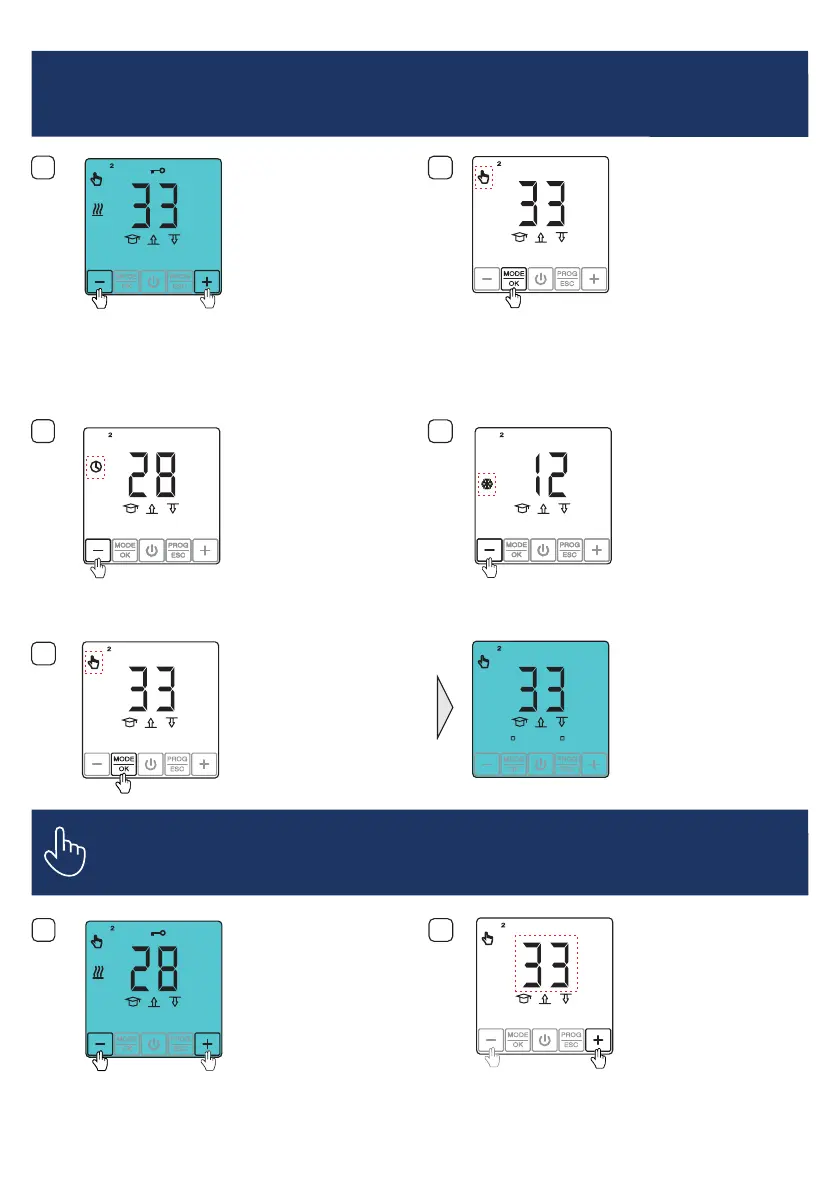
AUSWAHL BETRIEBSMODUS
OPERATION MODE SELECTION
SÉLECTION DU MODE DE FONCTIONNEMENT
1
2
Drü cken u nd hal ten Sie die
Taste für 4 Sek. Die
Betriebsmodusanzeige beginnt zu
blinken.
MODE/OK
Press and hold button
for 4 seconds. The operation mode
will start to blink on the display.
MODE/OK
Appuyez sur la touche
pendant 4 secondes. L'affichage du
mode de fonctionnement se met à
clignoter.
MODE/OK
3
4
Wählen Sie den Programmbetrieb
mit Hilfe der Taste.„–”
Choose the Programm Mode using
the button.“–”
Sélectionnez le mode
programmation à l'aide de la touche
.« – »
Thermostat entsperren.
Unlock the thermostat.
Déverrouiller le thermostat.
2
°
C
13
:
55 30.07
MODE PROG
OK
ESC
2
°
C
13
:
55 30.07
MODE PROG
OK
ESC
4s
2
°
C
13
:
55 30.07
2
°
C
13
:
55 30.07
MODE PROG
OK
ESC
MODE PROG
OK
ESC
Wählen Sie den Frostschutz Modus
mit Hilfe der Taste.„–”
Choose Frostprotection using the
button.“–”
Sélectionnez le mode de
protection contre le gel à l'aide de
la touche .« – »
MODE PROG
OK
ESC
MODE PROG
OK
ESC
5
Bestätigen Sie Ihre Wahl mit der
Taste.MODE/OK
Confirm the setting with the
button.MODE/OK
Confirmez votre sélection avec la
touche .MODE/OK
2
2
°
C
28 23C C
MODE PROG
OK
ESC
2
°
C
13
:
55 30.07
MODE PROG
OK
ESC
1
2
Thermostat entsperren.
Unlock the thermostat.
Déverrouiller le thermostat.
2
°
C
13
:
55 30.07
MODE PROG
OK
ESC
EINSTELLUNGEN VON MODUS TEMPERATUR HALTEN
MANUAL OPERATION MODE SETTINGS
RÉGLAGES POUR LE MODE MAINTENIR LA TEMPÉRATURE
DieBodentemperatur mit Hilfeder
oder Tasteeinstellen.„ “ “ – ”+
Set the floor temperature using the
oder button„ “ “–” .+
Réglez la température du sol à
l'aide de la touche ou .« + » « - »
2
°
C
13
:
55 30.07
MODE PROG
OK
ESC


 To Next Page