D CH Users Manual
U
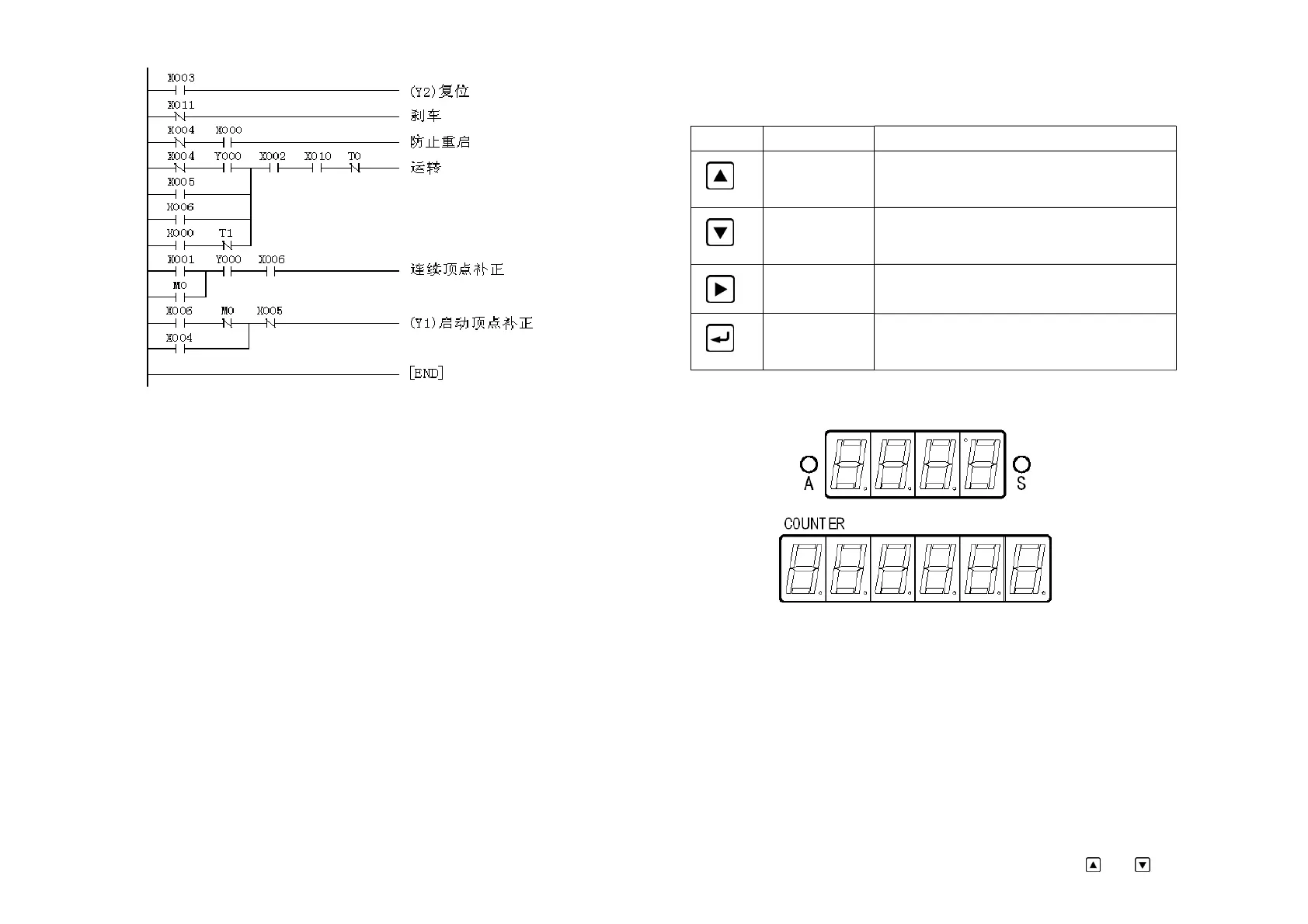
4.3.3 PLC program list
LD X003 LD X001
OUT Y002 OR MO
LDI X001 AND Y000
OUT TO K3 AND X006
LDI X004 OUT MO
AND X000 LD X006
OUT T1 K3 ANI MO
LDI X004 OR X004
OR X005 ANI X005
OR X006 OUT Y001
AND Y006 END
LD X000
ANI T1
ORB
AND X002
AND X010
ANI TO
OUT YO 11
V Parameter Setting
5.1 Key specification
Operation panel function table
Item
Name Function
Increase/Up Menu up or numerical value increase. When adjust
the numerical value, keep pressing it to make the
value increase quickly.
Reduce/Down Menu down or numerical value reduce. When
adjust the numerical value, keep pressing it to
make the value reduce quickly.
Enter/Shift Press this key to enter the menu. When adjust the
content,press it to shift.
Confirm/Exit Exit the setting or exit the submenu.
Keep pressing the key for more than 4 seconds to
reset the counter.
5.2 Digital display
The quaternion illuminant digital monitor upside is used to display the stroke/angle value:
In continuous mode, it displays stroke when the stroke is more than 20 times/minute, otherwise
it displays angle value. In other working modes it displays angle value. When it displays angle
value, the left indicating lamp A turns on and the right indicating lamp S extinguishes. When it
display stroke, the left indicating lamp A extinguishes and the right indicating lamp S turns on.
The hexad illuminant digital monitor downside is used to display the work count.
When braking test is over, the quaternion illuminant digital monitor upside displays braking
angle. The hexad illuminant digital monitor downside displays braking time.
In setting state the illuminant digital monitor displays multiple information the user needs.
The flashing point is the parameter focus. It indicates the position which cursor located.
5.3 Enter setting
When the device is free ( equipment in idle condition),press
and together for
12


 To Next Page