D CH Users Manual
U
more than 3 seconds to make the controller enters into setting status. Here, the digital
monitor will flash. Then press
or to select the menu. Press to enter into the
submenu.
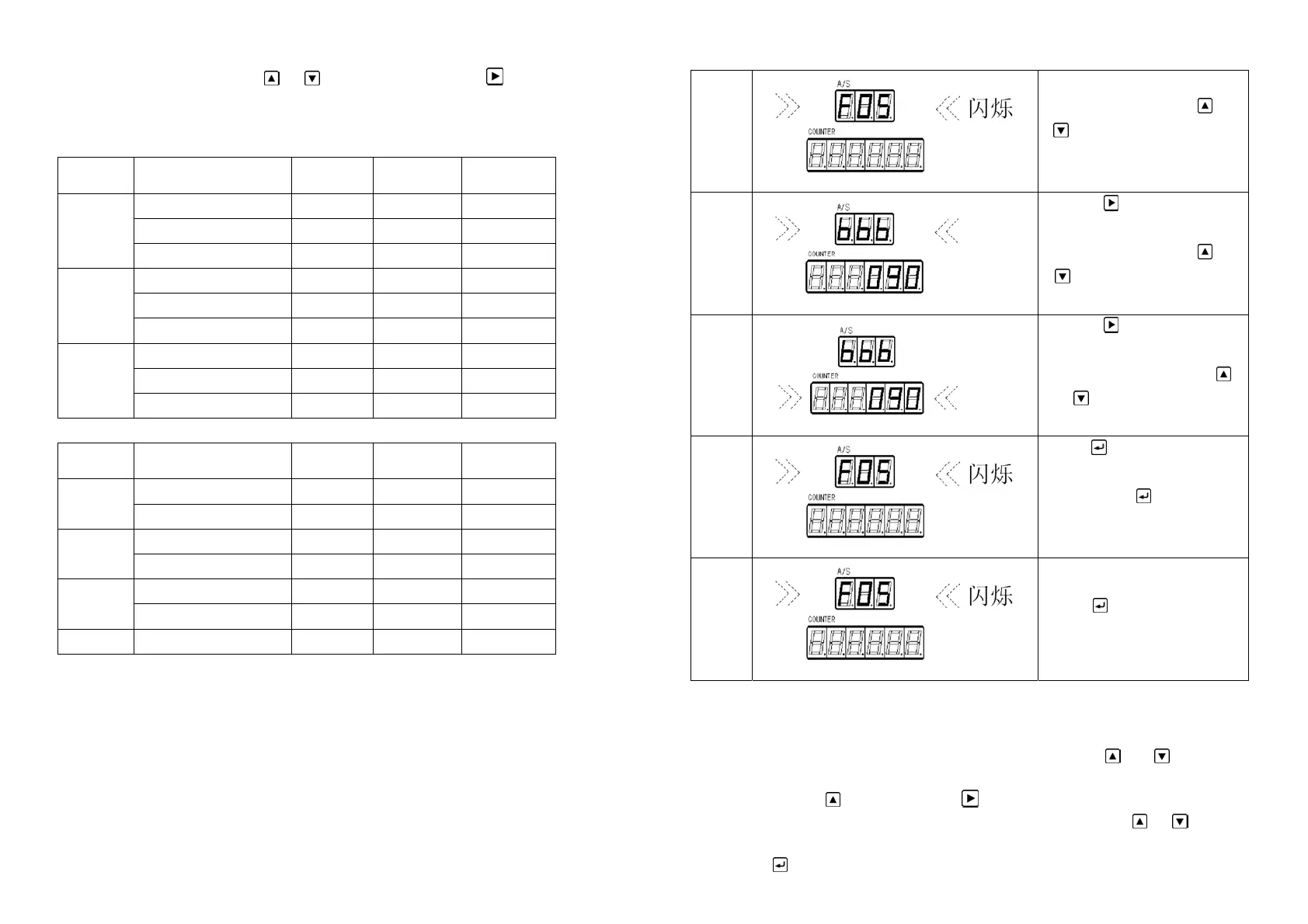
5.4 Cam parameter setting
Cutting Cam parameter setting:
Code Description Unit Range Default
On Angle Degree 0~359 0
Off Angle Degree 0~359 135
F01
Scissors Counter Times 2-6000 0
On Angle Degree 0~359 0
Off Angle Degree 0~359 135
…
Scissors Counter Times 2-6000 0
On Angle Degree 0~359 0
Off Angle Degree 0~359 135
F06
Scissors Counter Times ------ 0
F07-F12 Cam parameter setting:
Code Description Unit Range Default
On Angle Degree 0~359 0
F07
Off Angle Degree 0~359 135
On Angle Degree 0~359 0
…
Off Angle Degree 0~359 135
On Angle Degree 0~359 0
F12
Off Angle Degree 0~359 135
FC Production value Times 0-999999 0
13
Cam parameter setting steps::
1
Enter setting status. Press or
to select the cam code
which will be set.
2
Press
to enter the
submenu. Here item name in
submenu flashing, press
or
to select the item which
will be adjusted.
3
Press
to enter the
adjustment. Here item content
in submenu flashing, press
or
to select the parameter
which will be adjusted.
4
Press
to exit the parameter
adjustment. Back to submenu
and repress
to back to
main menu. Select other cam.
Repeat step2、3.
5
Parameter setting finished.
Press
to exit the setting.
System saves the data
automatically.
or setting steps take the scissors cam F05 as example. F05 parameter:Start Angle = 270°
End Angle = 90°
Scissors Count= 15
a. When the device is free ( equipment in idle condition),press
and together for
more than 3 seconds to make the controller enters into setting status. Here, the digital monitor
will flash. Than press
to select F05. Press to enter into the submenu.
b. Now the submenu starting angle value at right side will flash. Press
or to adjust
the parameter. Keep pressing it for a long time the value will change quickly. When it gets to
270, press
to back to submenu.
14


 To Next Page