12
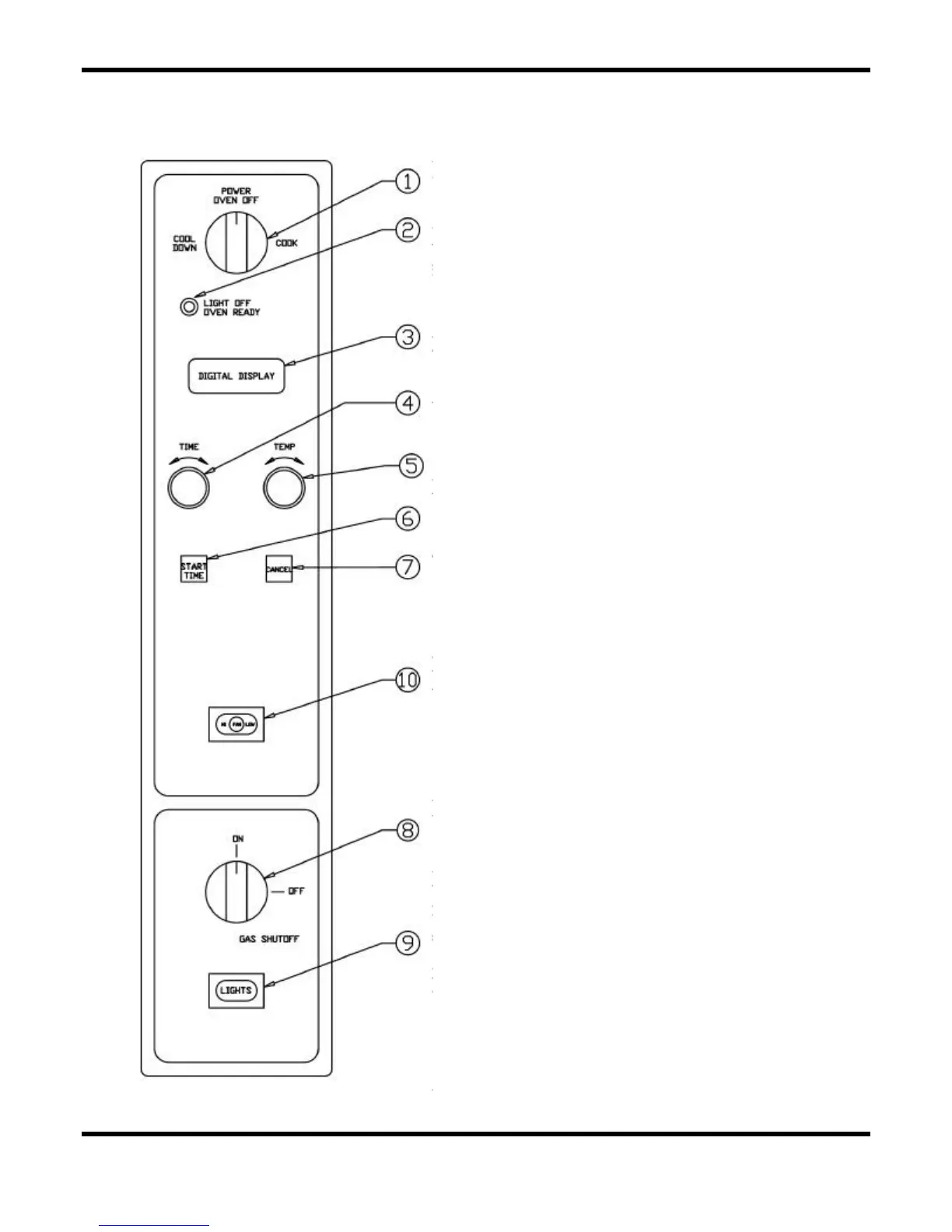
Oven Controls — Solid State Digital Controls
• 1. The Power Switch - Controls power to ON or
Cool Down function.
• 2. The Indicator Light - When lit indicates burners
are operating. When the light goes out, the oven
has reached its cooking temperature.
• 3. The Digital Display - Indicates time and/or
temperature.
• 4. The Time Dial - Sets countdown timer for cook
cycle.
• 5. The Temperature Dial - Sets cooking temperature.
• 6. The Start Time Button - Initiates timing cycle.
• 7. The Cancel Button - Cancels preset time and/or
temperature.
• 8. The Manual Gas Shut Off Valve - Turns gas
supply to oven controls on or off when service is
required.
• 9. The Light Switch (Optional) - Controls interior
lights.
• 10. The Fan Speed Switch (Optional) - Sets fan
speed to high or low.
“X” Controller


 To Next Page