32
Owner's Manual for Duke Flexbake 5
TM
Proof and Bake Oven with WiFi Connectivity
NETWORK CONFIGURATION cont.
e. Selecting ADVANCED from either the
ETHERNET or WIRELESS screen will allow setting of static IP.
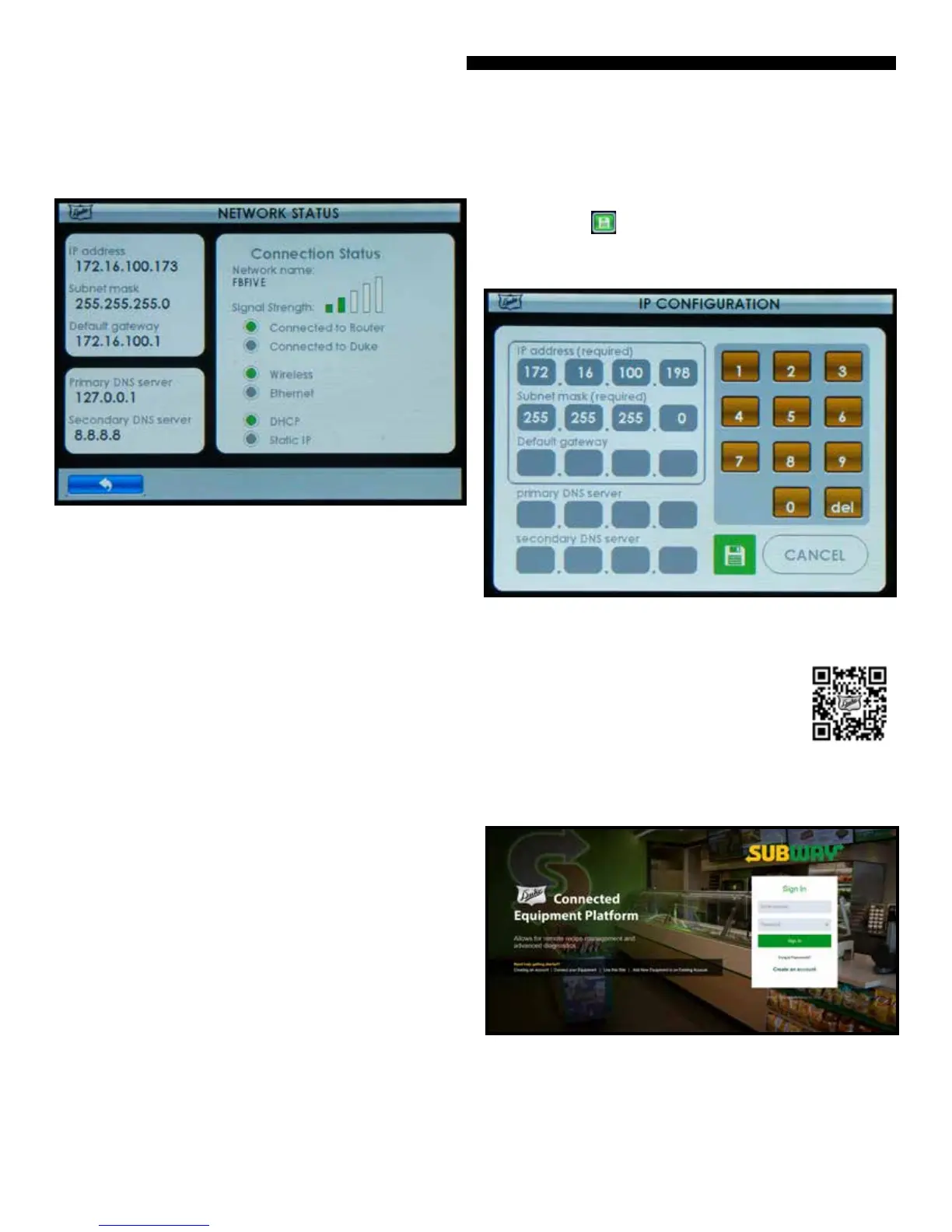
Touch elds and use keypad to enter
address. “SAVE” button after entering address sets unit
to static IP mode and attempts to connect. “CANCEL” button
returns to previous screen without changing settings:
Figure: IP Conguration
d. The current network conguration and connection
status is shown under the USER / NETWORK STATUS screen.
Figure: Network Status
• Green Dots or Bars - Indicate current status
• Connected to Router - Conrmed oven connection to in
store router
• Connected to Duke - Conrmed oven connection to the
cloud Duke Connected Equipment Platform
CONNECTED OPERATION AND AVAILABLE FEATURES
CREATE ACCOUNT AND/OR REGISTER
Scan the QR code below or visit the website:
https://connected.dukemfg.com/Subway
OVERVIEW
Once you have an account established and the oven is
registered, you will have following features available;
• Ability to remotely manage and update recipes on the
oven.
• Ability to remotely view the oven status, usage data and
diagnostics
• Ability to remotely receive rmware updates so your oven
always has the most up to features.
WEB APPLICATION
Once your unit is connected, you may access it remotely via a
computer, tablet, or other smart device. Go to:
https://connected.dukemfg.com/Subway
on your preferred device.
NOTE: Connectivity is Optional! The oven will function as
intended without connecting.
Login to your account and you will access the Web App
Dashboard.



 To Next Page