25
Owner’s Manual for Duke Flexbake 5
TM
Proof and Bake Oven with WiFi Connectivity
PROGRAMMING CONTROLS
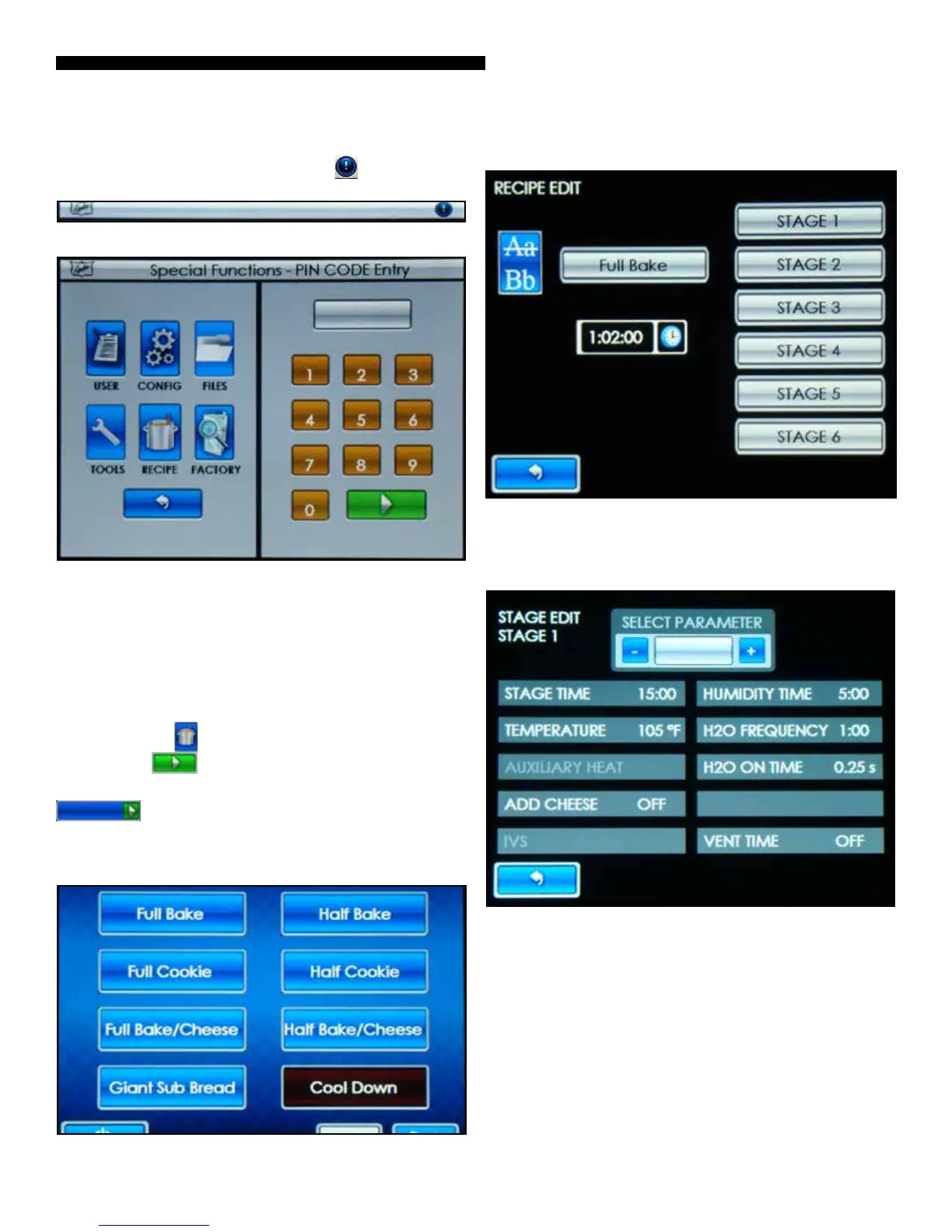
To access the SPECIAL FUNCTIONS, touch button on the
Main Tool Bar.
Figure: Main Tool Bar
Figure: Special Functions Screen
RECIPE EDIT PROGRAMMING INSTRUCTIONS
NOTE: Your Duke FlexBake 5
TM
oven has been factory
congured with the standard recipes. Therefore, changes
to these recipes should not be needed or should be
minimal; such as a ne adjustment on time for browning.
Step 1 Touch the
button and then enter pin code 5 6 7 8
and Touch the button when prompted.
Step 2 Touch the button for the recipe you want to edit (i.e.
FULL BAKE
).
NOTE: There are 7 baking recipes and 1 Cool Down function
single touch accessed from the main menu screen. There are
a total of 21 recipes available on consecutive screen pages.
Figure: Main Screen
Figure: Stage Edit Selection Screen
Step 3 Touch the stage you want to edit (STAGE 1).
Figure: Stage Edit Selection Screen



 To Next Page