18
6.1. Power-on Status Checking
Power-onthecharger.TheLEDindicatorshouldinitiateasashingwhite,1secondon;1secondoasthechargerisin
POST(Poweronself-test).
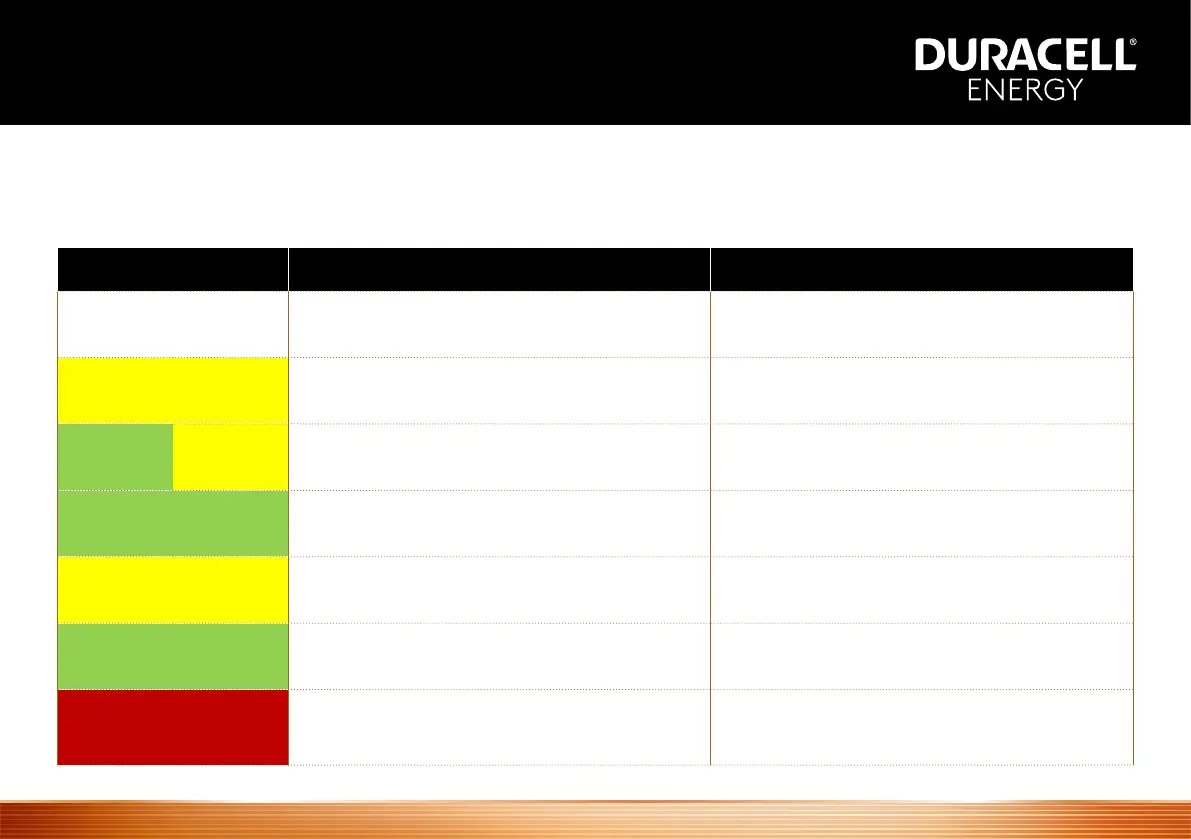
State LED Status Description
POST Flashing white, 1 second on; 1 second o Power on self-test
Tamper Detection Alarm Solid yellow
The security switch for Tamper
Detection is not activated
Flashing green 1 second, ashing yellow
1 second, then 3 seconds o
The charger has not been network congured
or the charger has no internet access.
Standby Flashing green, 1 second on; 3 seconds o Power-on, but not plugged into EV
Ready To Charge Flashing yellow, 1 second on; 3 seconds o
Gun is plugged in, but the charging
session hasn’t been initiated
Charging In Progress Breathing green, 1 second on; 1 second o Charging in progress
Fault Detected Flashing red or constantly red
An error/ fault state has been detected.
Please check the Troubleshooting section
for error code details/ resolution
No Internet
Access


 To Next Page