29
8
Foranexistinghomeowner,search
the Duracell Energy battery's
Inverter serial number and the
homeowner's name should appear
4.2. EV Charger - Modify the Existing Site
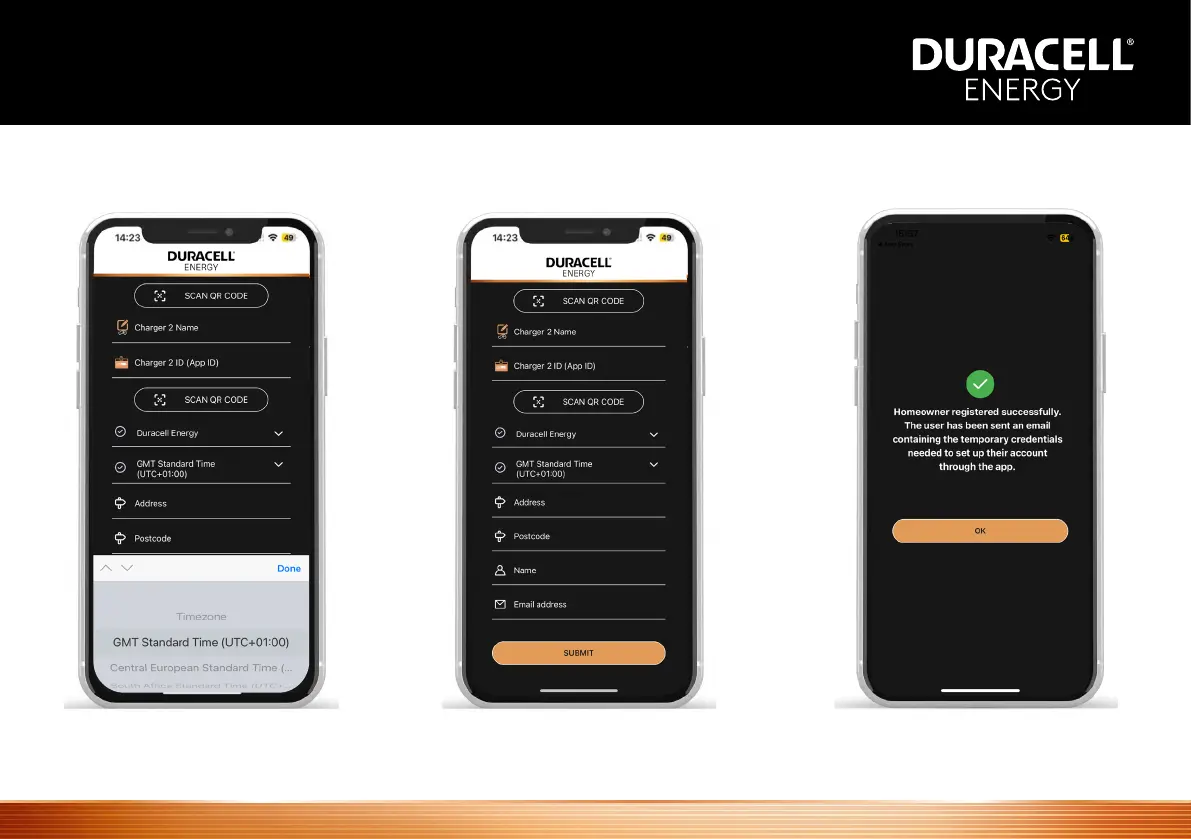
Selectthecustomerandll
the necessary details in the
registration page
Afterllingthisinselect‘submit’.
This sends an automated email
with temporary login credentials to
the homeowner
7
Fillthenecessarydetailsintheregistrationpageandsubmit.
The homeowner will get temporary login credentials.
Usingthosecredentials,thehomeownercanplacetheirown
passwords and use the app to monitor and control.
SelectTimeZone Afterllingthisinselect‘submit’.
This sends an automated email
with temporary login credentials to
Usingthosecredentials,the
homeowner can place their own
passwords and use the app to
monitor and control


 To Next Page