44
DuraLabel.com 800.788.5572
SPECIFICATIONS
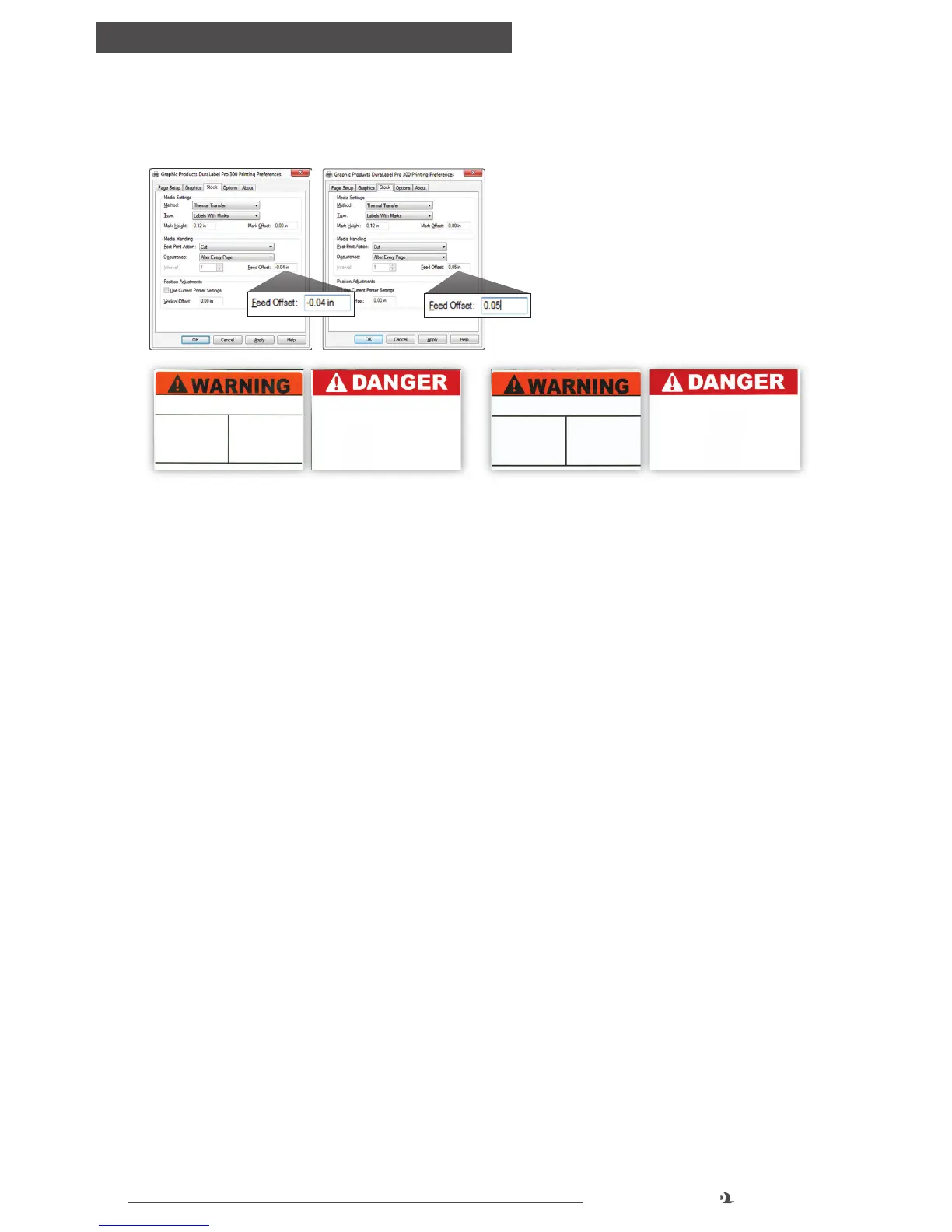
11.10.2 POSSIBLE CAUSE: Feed Offset is not on correct setting.
Solution: Adjust Feed Offset to correct setting.
Adjust Feed Offset to a setting where printer cuts die-cut
or B Mark labels correctly. The 0 default setting works
best for most label supply.
Die-cut and B Mark labels cut correctly (l) … and cut off-center (r)
12. Specications
12.1 Printer
Type: Thermal Transfer
Print Speed (DLP 300): Selectable, 2" or 3" per second
Print Speed (DLP): Selectable, 2" – 5" per second
Resolution (DLP 300): 300 dpi
Resolution (DLP): 203 dpi
Maximum Print Width: 4"
Maximum Print Length (DLP 300): 56"
Maximum Print Length (DLP): 118"
Ribbon Capacity: 984'
12.2 Indicators and Buttons
Indicators: LED (Green, Amber, Red)
Buttons: Power and Feed
12.3 Communication Interface
Communications: USB v1.1, RS-232C (max. baud rate 19,200 bps) and Centronics
Memory: 2 MB flash memory, 8 MB DRAM



 To Next Page