R
DURASTAR.COM
11
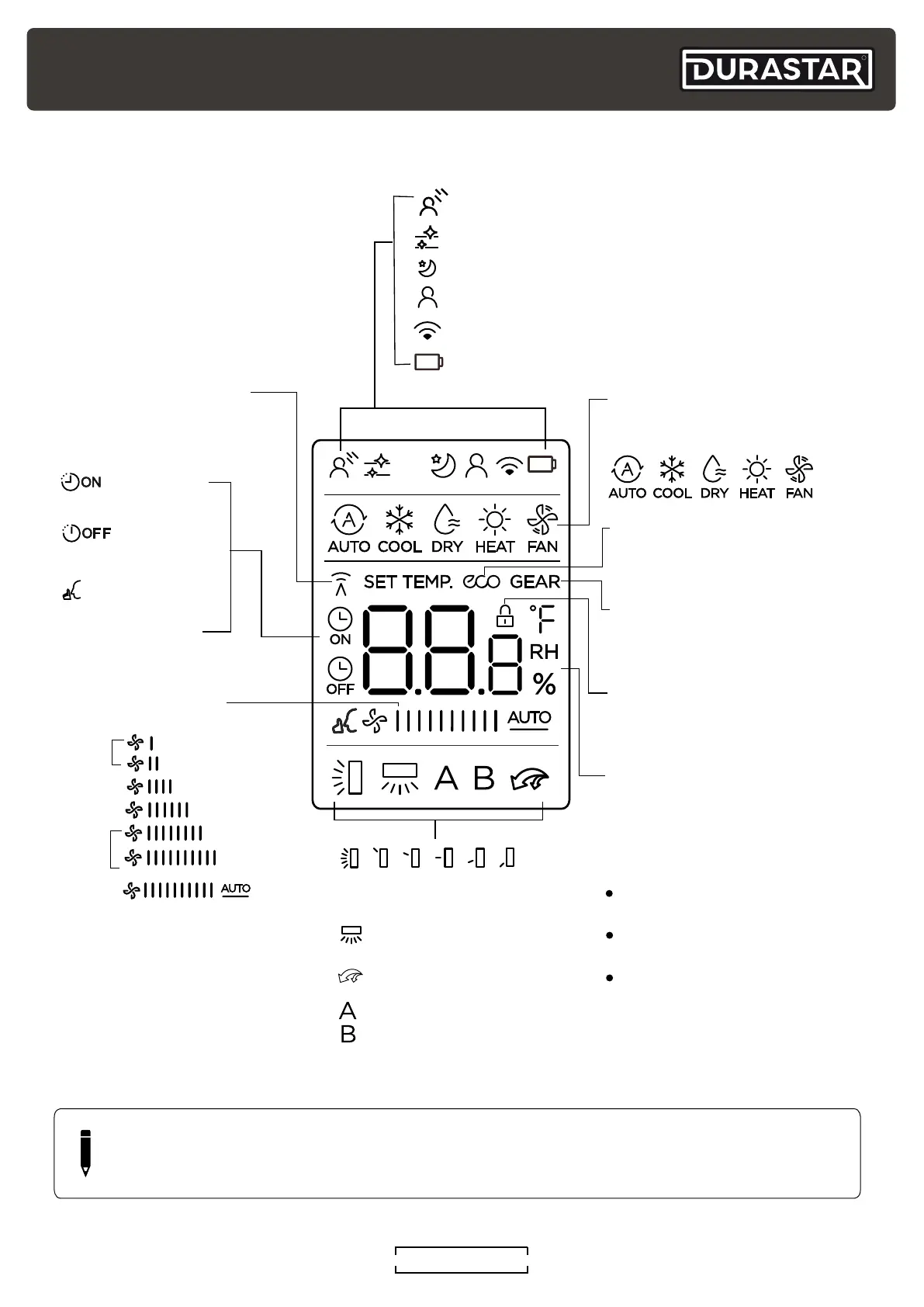
REMOTE CONTROL SCREEN INDICATORS
Note:
Not all the models can display
the fan speed values between
AUTO-100%.
GENTLE feature display
Transmission Indicator
MODE display
TIMER ON display
FAN SPEED display
TIMER OFF display
SILENCE feature
display
ECO display
GEAR display
LOCK display
Horizontal louver
swing display
Vertical louver swing
(not available on unit)
TURBO feature display
Not available for
this unit
Temperature/Timer/
Fan Speed % display
CLEAN feature display
SLEEP feature display
FOLLOW ME feature display
Network display (not available for this unit)
Low battery display (If flashing)
Displays when LOCK feature
is activated.
Silence
LOW
MED
HIGH
AUTO
Lights up when remote
sends signal to indoor
unit.
Displays selected fan speed:
Displays the current
including:
mode,
2%-20%
21%-40%
41%-60%
61%-80%
81%-100%
1%
The fan speed cannot be
adjusted in AUTO or DRY
mode.
Displays when ECO
feature is activated.
Displays when GEAR
feature is activated.
Displays the set temperature
unless the fan speed or timer
setting functions are in use.
TIMER ON/OFF functions.
Temperature range:
o
60-86°F (16-30°C)
Timer setting range:
0-24 hours
Fan speed setting range:
AUTO -100%
This display is blank when
operating in FAN mode.
NOTE
All indicators shown in the above figure are for purposes of clear representation. During
actual operation, only the relative indicators are illuminated in the display window.



 To Next Page