Owner’s Guide
7
General
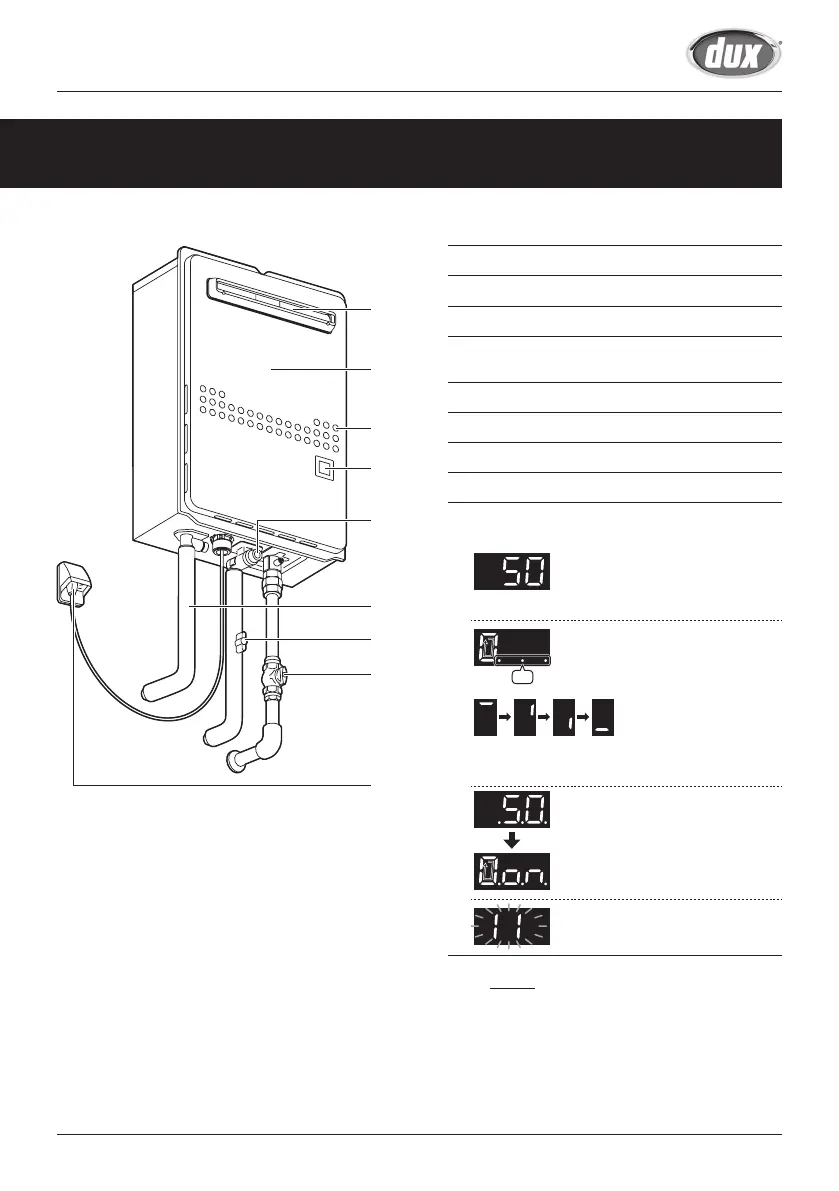
1. Flue Exhaust
2. Front Cover
3. Air Inlet
4. Inlet water filter
Inside Water Inlet (See page 20)
5. Hot Water Pipe
6. Water Supply Valve
7. Gas Supply Valve
8. External Weatherproof Power Point
9. (26ENG series only) Status Display
Indicate the status of Water Heater or error codes.
When water heater is initially
plugged into power, set
temperature is displayed for
approx. thirty seconds.
On
When water is flowing, the bar
rotates clockwise.
When the gas burner is on, three
dots are displayed.
When the gas burner is on, set
temperature is displayed for a
minute and then “on” is displayed.
If an error has occurred, a blinking
error code is displayed.
If the bar rotates slowly
while blinking, that
means that water flow
rate is insufficient to
turn on the burner.
This illustration shows an example of installation.
The exact installation configuration may be slightly
different.
NOTE
(For 26ENG series)
When using without remote
controller, check the set temperature
shown on the Status Display before
use.
(e.g. 26ENG5N)
1
2
5
4
3
9
6
7
8


 To Next Page