- 38 -
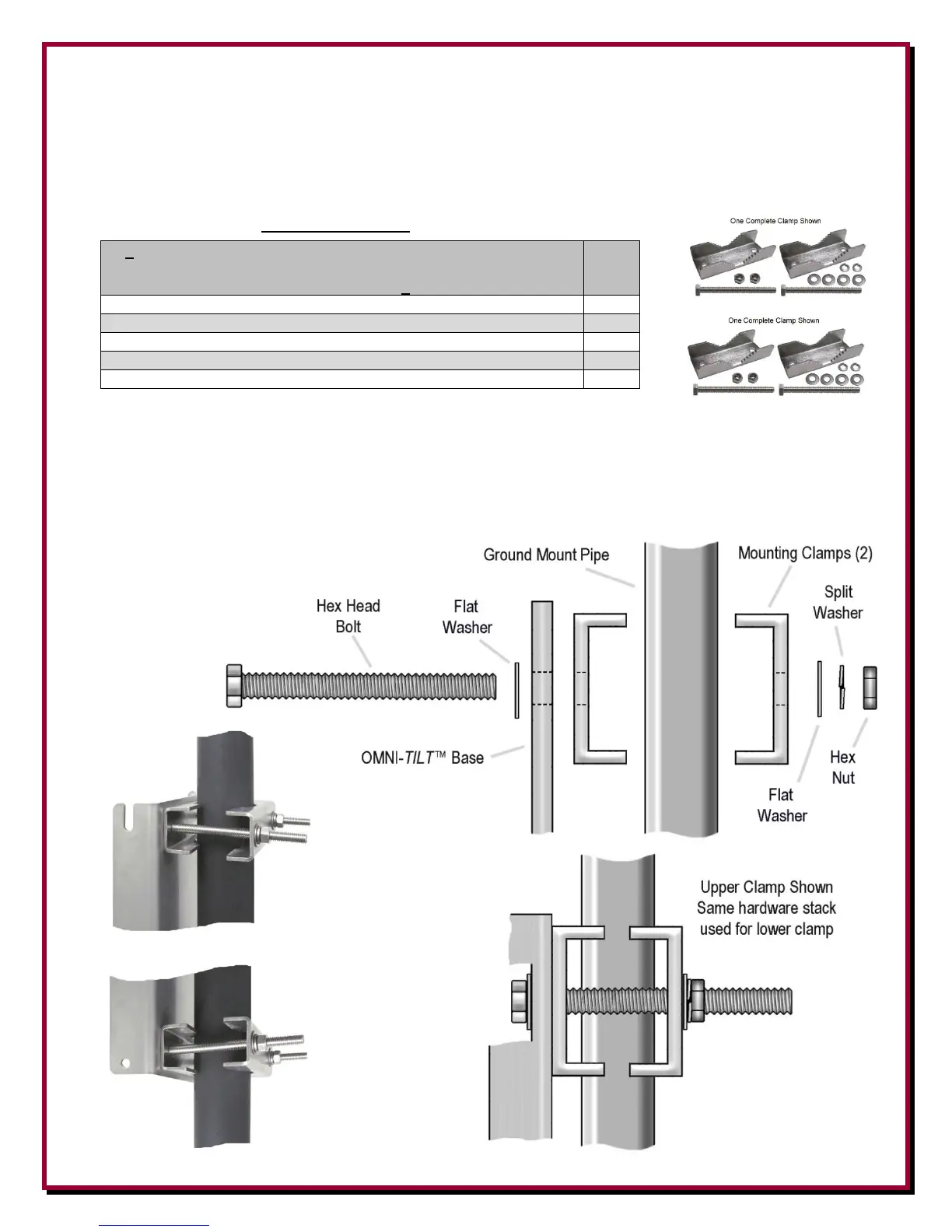
Mounting the OMNI-TILT™ to the Ground Mounted Pipe
Two DXE-OTMC-250P Mounting Clamp Kits are used to mount the OMNI-TILT™ Tilt Base to
the ground mounted mounting pipe.
DXE-OTMC-250P (Qty 2 are required) Mounting Clamps
2 - DXE-OTMC-250P Mounting Clamps with Hardware Kits
For mounting to a 1-1/4” to 2-1/2” Dia. Mounting pipe
(----- Parts list and picture show 2 clamp kits ----)
1-1/4” x 2-1/2” Saddle Clamp, Stainless Steel
5/16”-18 x 4-1/2” long Hex Head Bolt, Full Thread, Stainless Steel
5/16” Washer, Flat, Stainless Steel
5/16” Washer, Split Lock, Stainless Steel
5/16”-18 Hex Nut, Stainless Steel
1. Using the hardware supplied, attach the OMNI-TILT™ Tilt Base to the ground mounted
mounting pipe as shown. Slightly tighten the upper and lower clamps in place just enough to
hold the OMNI-TILT™ base. Once the antenna base is mounted, up or down positioning
adjustment can be made which ensures the tilting action does not interfere with the optional
radial plate. When placement is where you want it, tighten the hardware (do not overtighten).


 To Next Page