- 39 -
Mounting a Hustler BTV Vertical Antenna to the OMNI-TILT™ Tilt Base
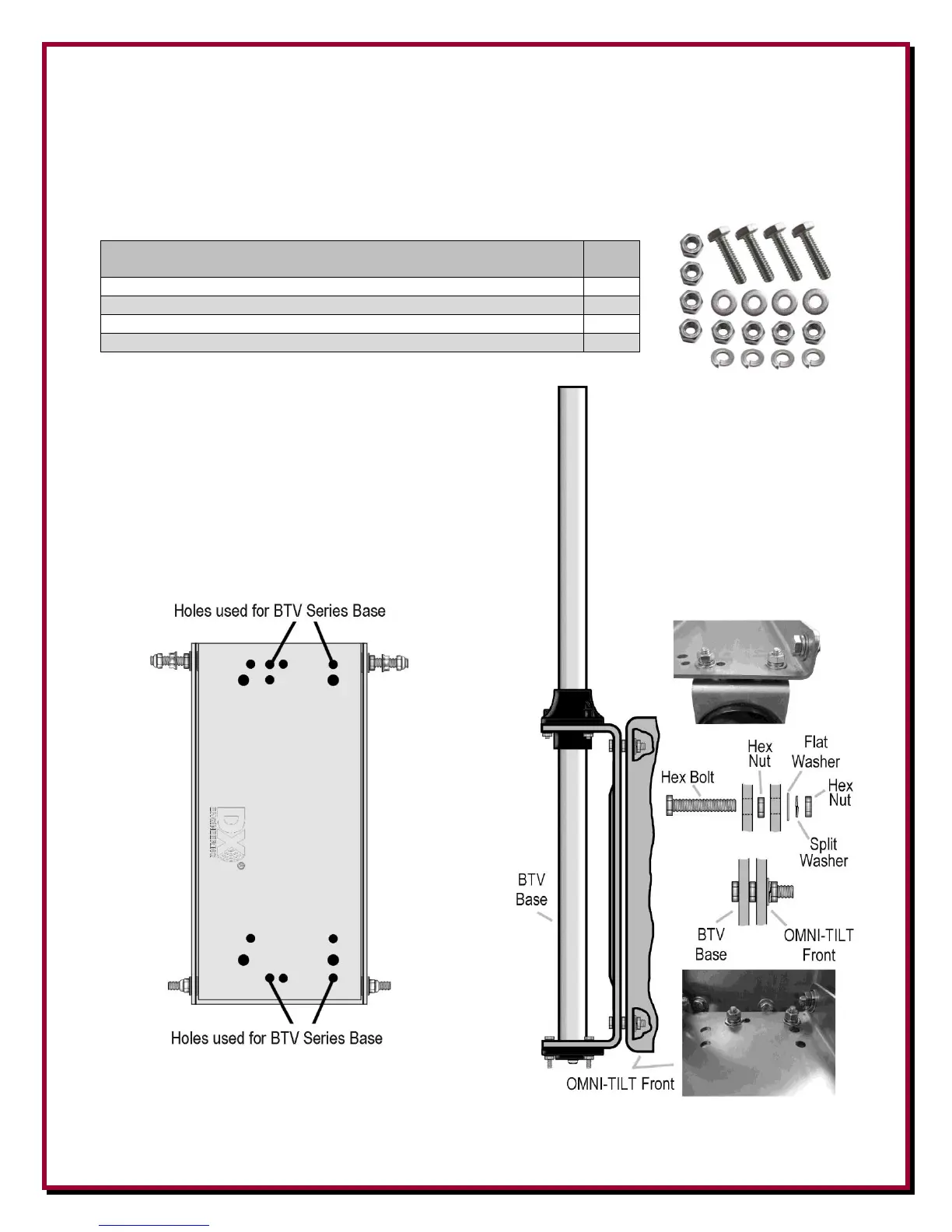
1. Mounting the Hustler BTV Series antenna to the OMNI-TILT™ Tilt Base requires installation
of four hex head bolts, Flat, Split Lock washers and Hex Nuts.
DXE-TVA-HWK Parts List
DXE-TVA-HWK Mounting Hardware Kit
For Trap Verticals (Hustler BTV series, Hy-Gain AVQ series)
1/4”-20 x 1” long Hex Bolt, Stainless Steel
1/4” Washer, Split Lock, Stainless Steel
1/4” Washer, Flat, Stainless Steel
1/4”-20 Hex Nut, Stainless Steel,
2. Position the BTV Base on the OMNI-TILT™
base. Align the Hustler BTV base with the
DXE-TVA-HWK mounting hardware and
installed the antenna base to the OMNI-
TILT™ base as shown. Install the flat
washers, split washers and hex nuts and
tighten in place.


 To Next Page