B3 ESS Unit User Manual
©Dyness reserves the copyright of this document.
When the batteries are connected in parallel, the master communicates with the slaves
through the CAN interface. The master summarizes the information of the entire battery
system and
communicates with the inverter through CAN or 485
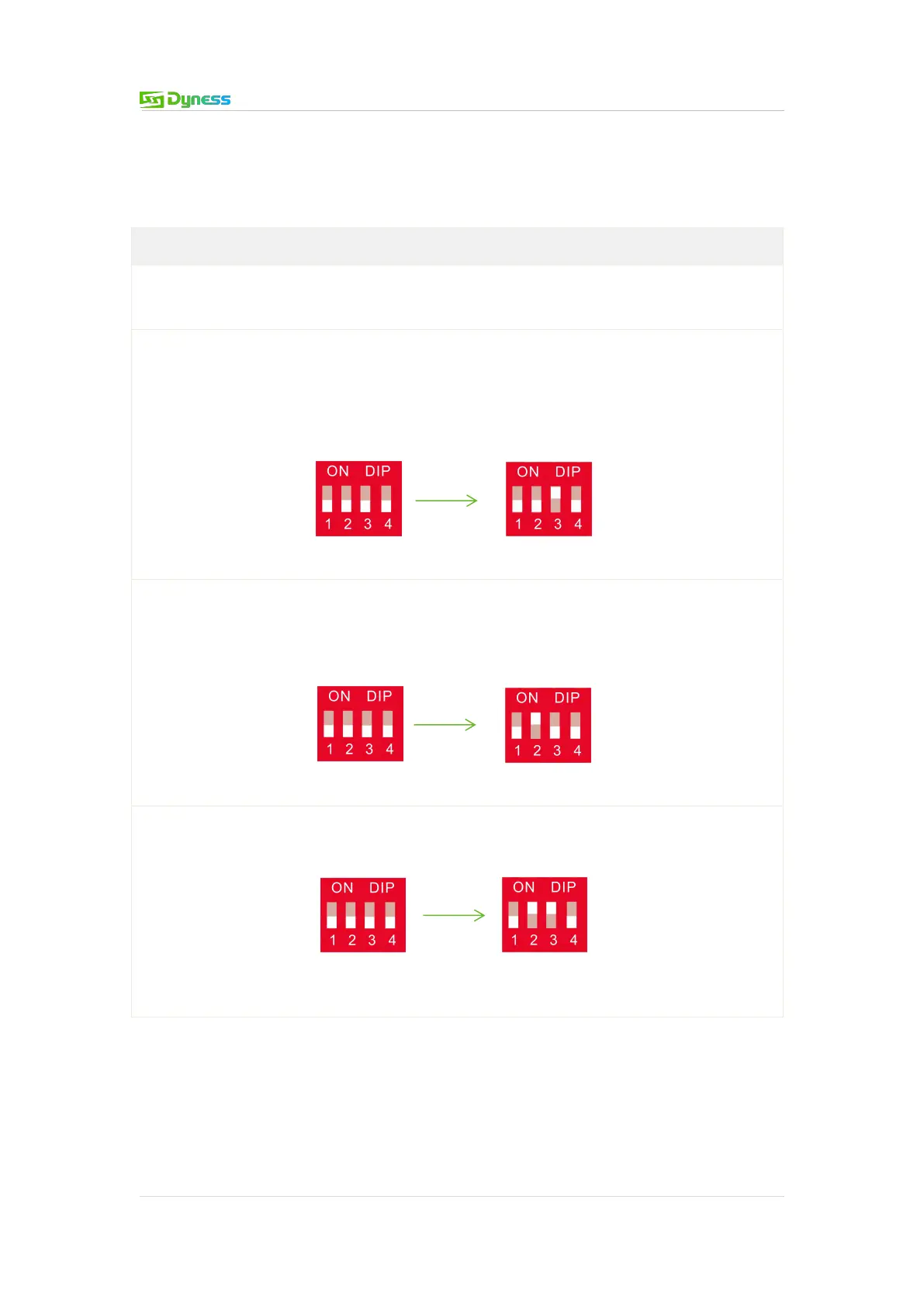
If the master is the latest B3 battery with DIP switch:
1. The communication cable from the master CAN IN to the inverter comm port should
be the correct one.
2. When the battery works with GOODWE, Solis, LUX, Sofar, DEYE(SUNSYNK), VICTRON,
IMEON, Sungrow, SMA, RENAC,DELIOS,SAJ(CAN Comm),before starting the battery,you
need to put the master DIP switch "# 3" to the "ON" position (to the top), then turn on
the batteries.
3. If the battery communicates with the Axpert-king/VMIII/MAX, Infinisolar, Growatt
SPH/SPA(CAN
comm), GMDE, turn the master DIP switch "#2" to "ON" position.
4. If the battery communicates with the Growatt SPF HVM-P/ES/WPV by RS485
communication, turn the master DIP switch "#2" and "#3" to "ON".













 To Next Page