10
Making connectionsDX-60D260A13
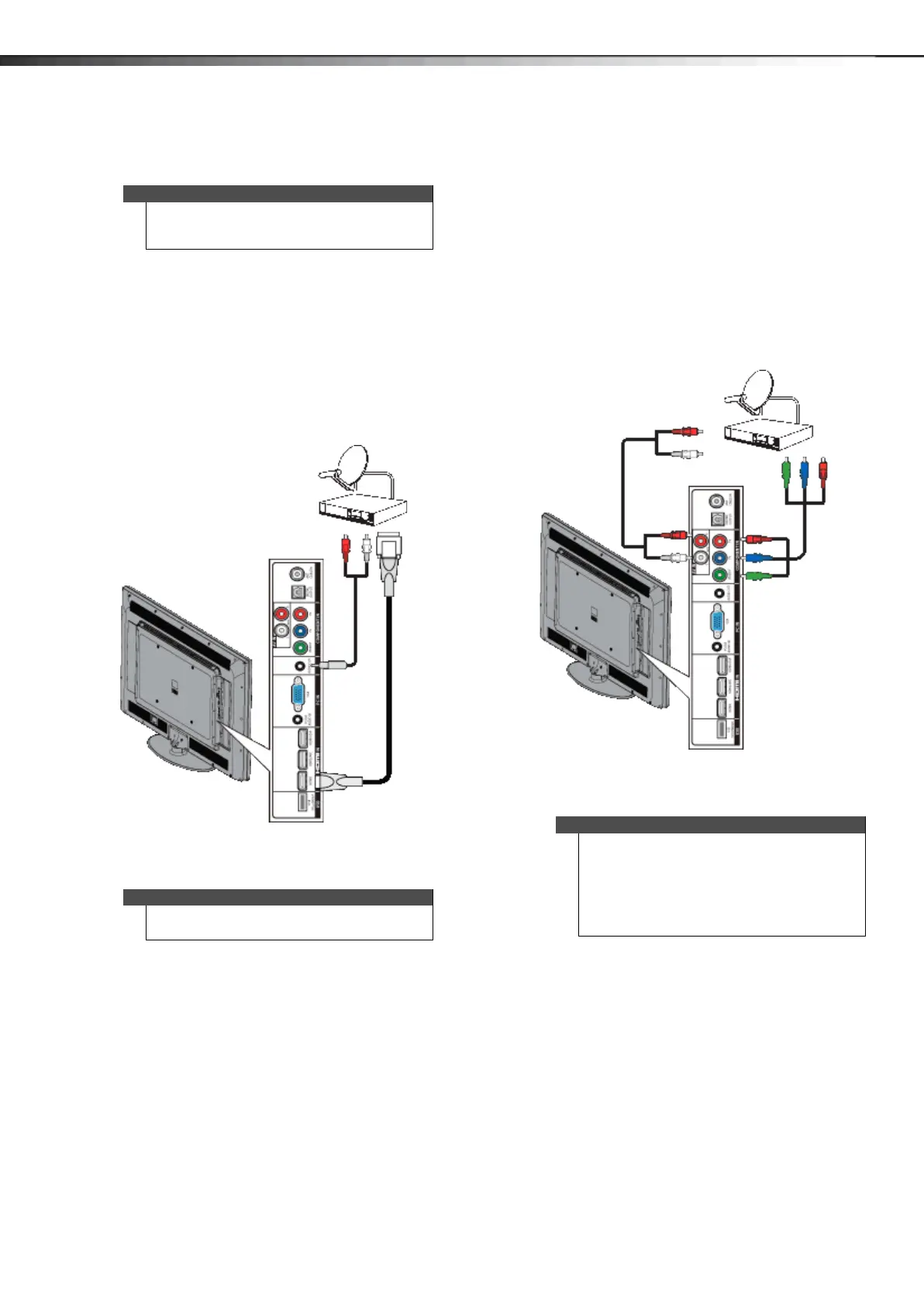
Using DVI (same as HDMI but requires an audio
connection)
To connect a cable or satellite box using DVI:
1 Make sure that your TV’s power cord is unplugged,
and all connected equipment is turned off.
2 Connect the incoming cable from the cable wall jack
to the cable-in jack on the cable or satellite box.
3 Connect an HDMI-DVI adapter (not provided) to one
end of an HDMI cable (not provided), then connect
the adapter to the DVI OUT jack on the cable or
satellite box.
4 Connect the other end of the cable to the
HDMI1/DVI jack on the side of your TV.
5 Connect a 3.5mm audio cable (not provided) to the
PC/DVI AUDIO IN jack on the side of your TV and to
the AUDIO OUT jacks on the cable or satellite box.
6 Plug your TV’s power cord into a power outlet, turn
on your TV, then turn on the cable or satellite box.
7 Press INPUT to open the INPUT SOURCE list.
8 Press or to highlight HDMI 1, then press ENTER.
Using component video (better)
To connect a cable or satellite box using component
video:
1 Make sure that your TV’s power cord is unplugged,
and all connected equipment is turned off.
2 Connect the incoming cable from the cable wall jack
to the cable-in jack on the cable or satellite box.
3 Connect a component video cable (not provided) to
the VIDEO/Y, P
B, and PR video jacks on the side of
your TV and the component video out jacks on the
cable or satellite box.
4 Connect an audio cable (not provided) to the
AV IN AUDIO L/R jacks on the side of your TV and to
the audio out jacks on the cable or satellite TV box.
5 Plug your TV’s power cord into a power outlet, turn
on your TV, then turn on the cable or satellite box.
6 Press INPUT to open the INPUT SOURCE list.
7 Press or to highlight COMPONENT/AV then
press ENTER.
Note
You must use the HDMI1/DVI jack to connect a cable
or satellite box using DVI. If you use another HDMI
jack, you will not hear sound from the TV speakers.
Note
When you connect the audio using the
PC/DVI AUDIO IN jack, the audio output is analog.
HDMI cable with HDMI-DVI adapter
3.5 mm audio cable
Cable or satellite box
Side of TV
Note
•The VIDEO/Y, PB, and PR video jacks (used to
connect a component device) share the
AV IN AUDIO L/R jacks with the VIDEO/Y jack
(used to connect a composite device).
• When you connect the audio using the
AV IN AUDIO L/R jacks, the audio output is
analog.
Side of TV
Component video cable
Audio cable
Cable or satellite box
Cables are often color-coded to match color-coded jacks.
12-1236_DX-60D260A13 MAN_V1_EN.book Page 10 Thursday, March 21, 2013 8:17 AM





 To Next Page