14
Making connectionsDX-60D260A13
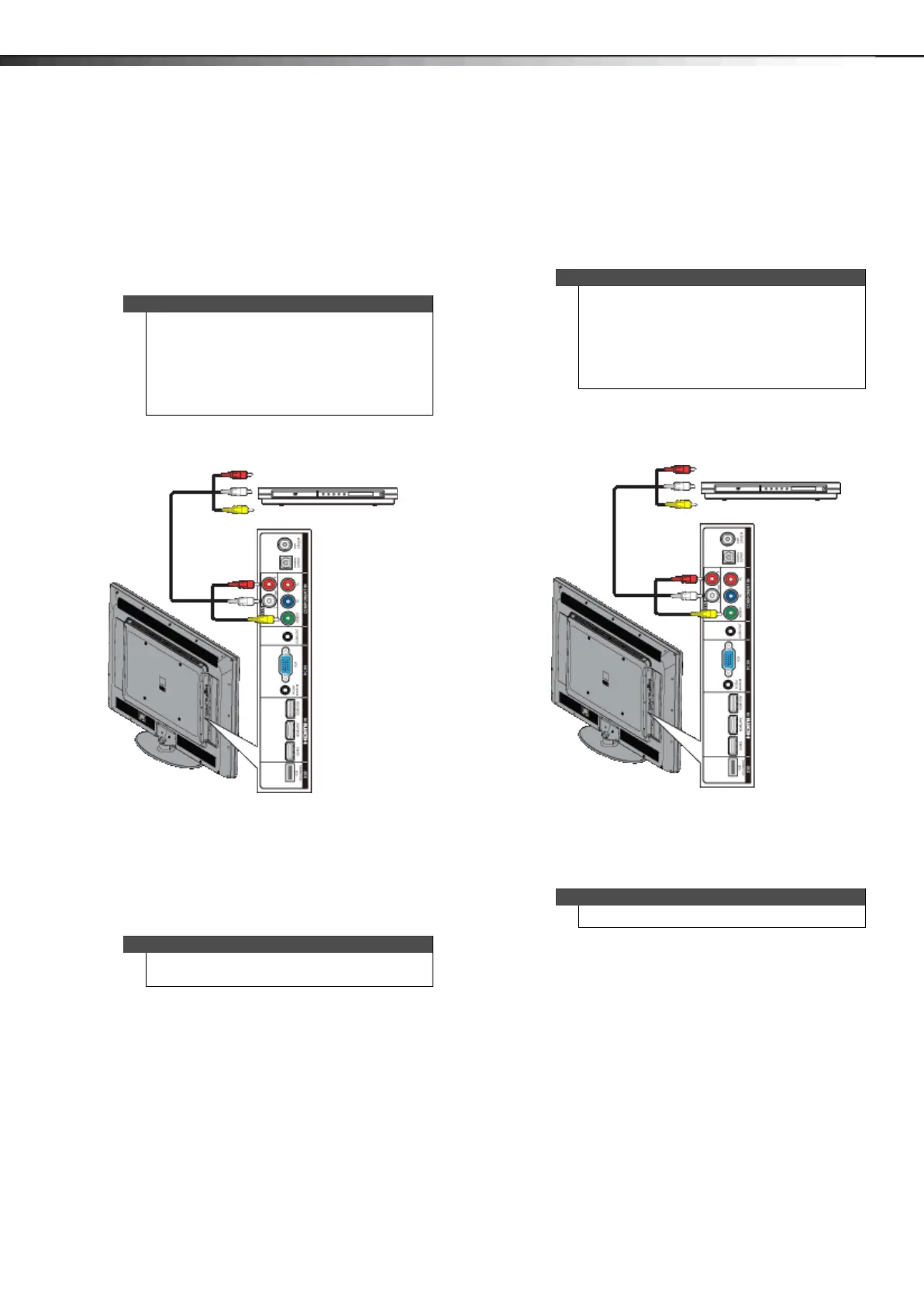
Using composite video (good)
To connect a DVD or Blu-ray player using composite
video:
1 Make sure that your TV’s power cord is unplugged
and the DVD or Blu-ray player is turned off.
2 Connect an AV cable (not provided) to the VIDEO/Y
jack and AV IN AUDIO L/R jacks on the side of your
TV and to the AV OUT jacks on the DVD or Blu-ray
player.
3 Plug your TV’s power cord into a power outlet, then
turn on your TV.
4 Turn on the DVD or Blu-ray player, then set it to the
correct output mode. For more information, see the
documentation that came with the player.
5 Press INPUT to open the INPUT SOURCE list.
6 Press or to select COMP/AV, then press ENTER.
Connecting a VCR
To connect a VCR:
1 Make sure that your TV’s power cord is unplugged
and the VCR is turned off.
2 Connect an AV cable (not provided) to the VIDEO/Y
jack and AV IN AUDIO L/R jacks on the side of your
TV and to the AV OUT jacks on the VCR.
3 Plug your TV’s power cord into a power outlet, then
turn on your TV and the VCR.
4 Press INPUT to open the INPUT SOURCE list.
5 Press or to select COMP/AV, then press ENTER.
Note
•The VIDEO/Y, PB, and PR video jacks (used to
connect a component device) share the
AV IN AUDIO L/R jacks with the VIDEO/Y jack
(used to connect a composite device).
• When you connect the audio using the
AV IN AUDIO L/R jacks, the audio output is
analog.
Notes
You can also press VIDEO to select the DVD or Blu-ray
player.
Side of TV
DVD or Blu-ray player
Composite cable
Cables are often color-coded to match color-coded jacks.
Note: The yellow video connector on the AV cable connects to the green VIDEO/Y jack.
Note
•The VIDEO/Y, PB, and PR video jacks (used to
connect a component device) share the
AV IN AUDIO L/R jacks with the VIDEO/Y jack
(used to connect a composite device).
• When you connect the audio using the
AV IN AUDIO L/R jacks, the audio output is
analog.
Note
You can also press VIDEO to select the VCR.
Side of TV
VCR
Composite cable
Cables are often color-coded to match color-coded jacks.
Note: The yellow video connector on the AV cable connects to the green VIDEO/Y jack.
12-1236_DX-60D260A13 MAN_V1_EN.book Page 14 Thursday, March 21, 2013 8:17 AM





 To Next Page