18
Using the remote controlDX-60D260A13
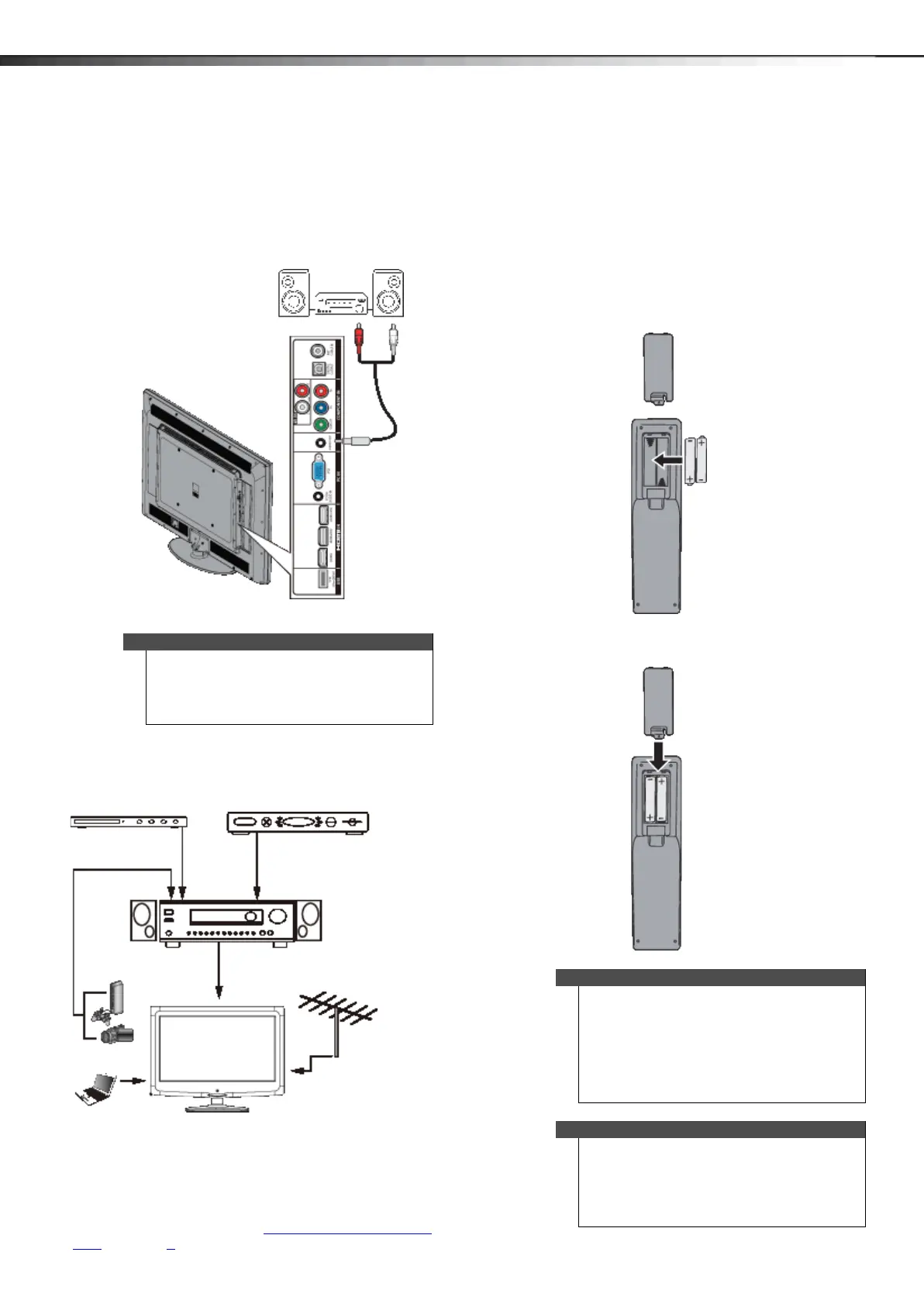
Using analog audio
To connect a home theater system using analog audio:
1 Make sure that your TV’s power cord is unplugged
and the home theater system is turned off.
2 Connect a 3.5mm audio cable (not provided) to the
AUDIO OUT jack on the side of your TV and to the
AUDIO IN jacks on the analog home theater system.
Connecting a home theater system with
multiple devices
The connections you make depend on the video and
audio jacks available on your devices. Refer to the
documentation that came with your devices for
connection information.
Just remember to use the best connection types
available for the best picture and sound. For information
about connection types, see “What connection should I
use?” on page 8.
Using the remote control
Installing remote control batteries
To install the remote control batteries:
1 Press the release button on the back of the remote
control to remove the battery compartment cover.
2 Insert two AAA batteries into the battery
compartment. Make sure that you match the + and –
symbols on the batteries with the + and – symbols in
the battery compartment.
3 Replace the cover.
Note
You can connect headphones, an amplifier, a home
theater system, or a sound bar to the AUDIO OUT
jack. If you want to use headphones, you need to
disconnect the amplifier, home theater system, or
sound bar.
3.5mm audio cable
Home theater system
Side of TV
Blu-ray player/DVD player/VCR
Cable or satellite TV box
AV receiver
Computer
Game console
or camera
Antenna or cable TV
connected directly to
the wall jack
Cautions
• Batteries should not be exposed to excessive
heat, such as sunshine, heat registers, or fire.
• Battery chemicals can cause a rash. If the
batteries leak, clean the battery compartment
with a cloth. If chemicals touch your skin, wash
immediately.
• Make sure that batteries are disposed of
correctly. Do not burn or incinerate.
Notes
• Do not mix batteries of different types.
• Do not mix old and new batteries.
• Remove batteries when the charge is depleted.
• If the remote control is not going to be used for
an extended period of time, remove the
batteries.
12-1236_DX-60D260A13 MAN_V1_EN.book Page 18 Thursday, March 21, 2013 8:17 AM




 To Next Page