Setting parental controls
29
DX-60D260A13
Setting parental control levels
You can set parental control levels for the U.S. and
Canada. Parental control settings are only applicable to
programs that have a rating signal.
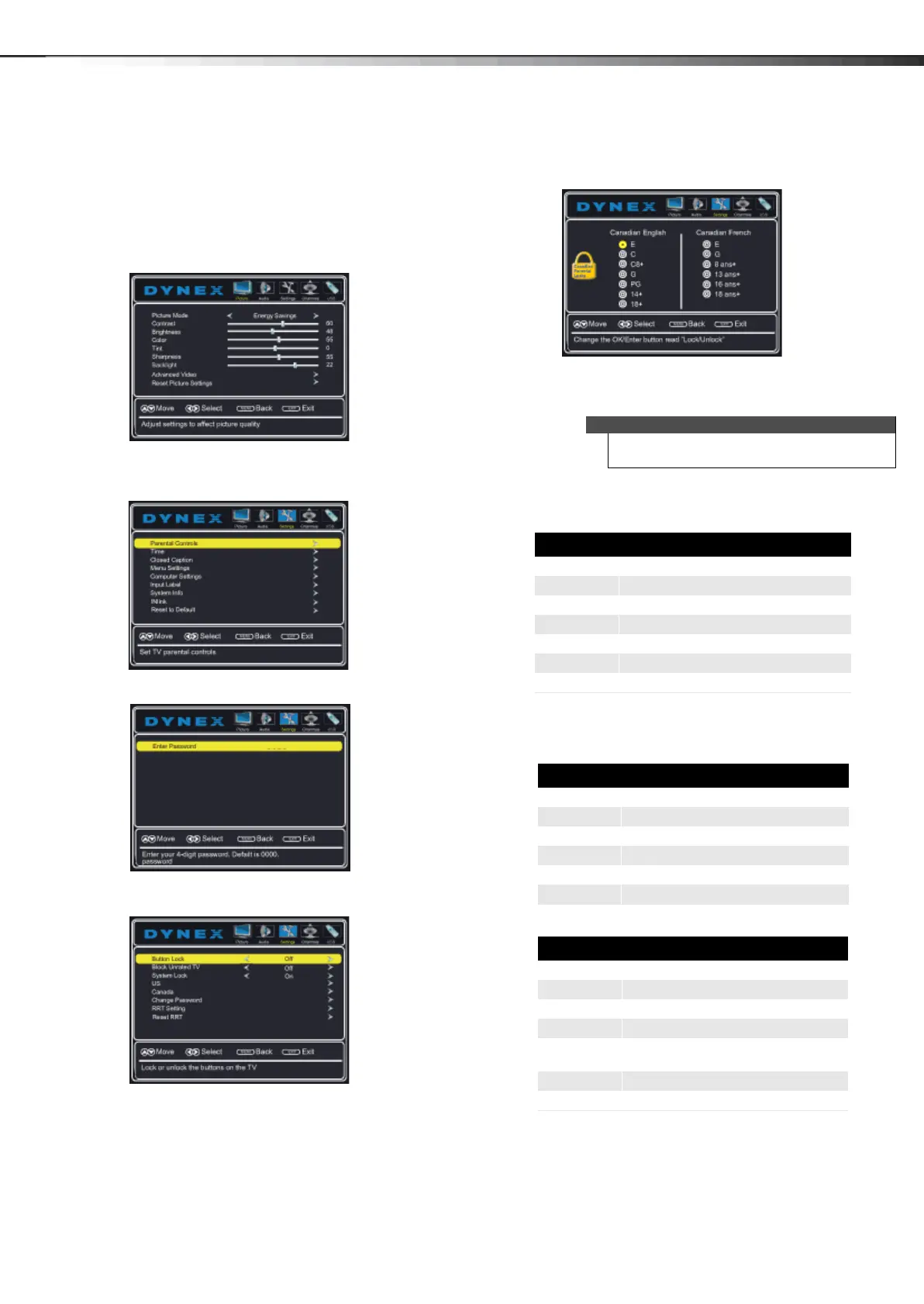
To set parental control levels:
1 Press MENU. The on-screen menu opens with the
Picture menu displayed.
2 Press or to highlight Settings, then press . The
Settings menu opens with Parental Controls
highlighted.
3 Press ENTER. The Enter Password screen opens.
4 Press the number buttons to enter the four-digit
password. The Parental Controls menu opens.
5 Press or to highlight US (or Canada to set
controls for Canada), then press ENTER. The Ratings
screen opens
6 Press or or or to highlight the rating you
want to block, then press ENTER. A lock symbol
appears when a rating is blocked.
7 Press EXIT to close the menu.
U.S. rating levels
Some of the age-based TV Parental Guidelines ratings
also have content-based ratings.
Note
When you block a rating, that rating and all higher
ratings are blocked.
U.S. TV ratings
NONE Not rated
TV-Y All children
TV-Y7 Suitable for children 7 and older
TV-G General audiences
TV-PG Parental guidance suggested
TV-14 Parental guidance strongly suggested
TV-MA Mature audiences only
U.S. TV content ratings
All All ratings are blocked
FV Fantasy violence
L Strong language
S Sexual situations
VViolence
D Suggestive dialog
U.S. movie (MPAA) ratings
None Movie not rated
G General audiences
PG Parental guidance suggested
PG-13 Suitable for children 13 and older
R Parental guidance suggested for
children under 17
NC-17 Not suitable for children under 17
X Adults only
12-1236_DX-60D260A13 MAN_V1_EN.book Page 29 Thursday, March 21, 2013 8:17 AM





 To Next Page