From lab to production,
providing a window into the process
-12-
www.dynisco.com
Rev: n/aP/N: n/a ECO: n/a
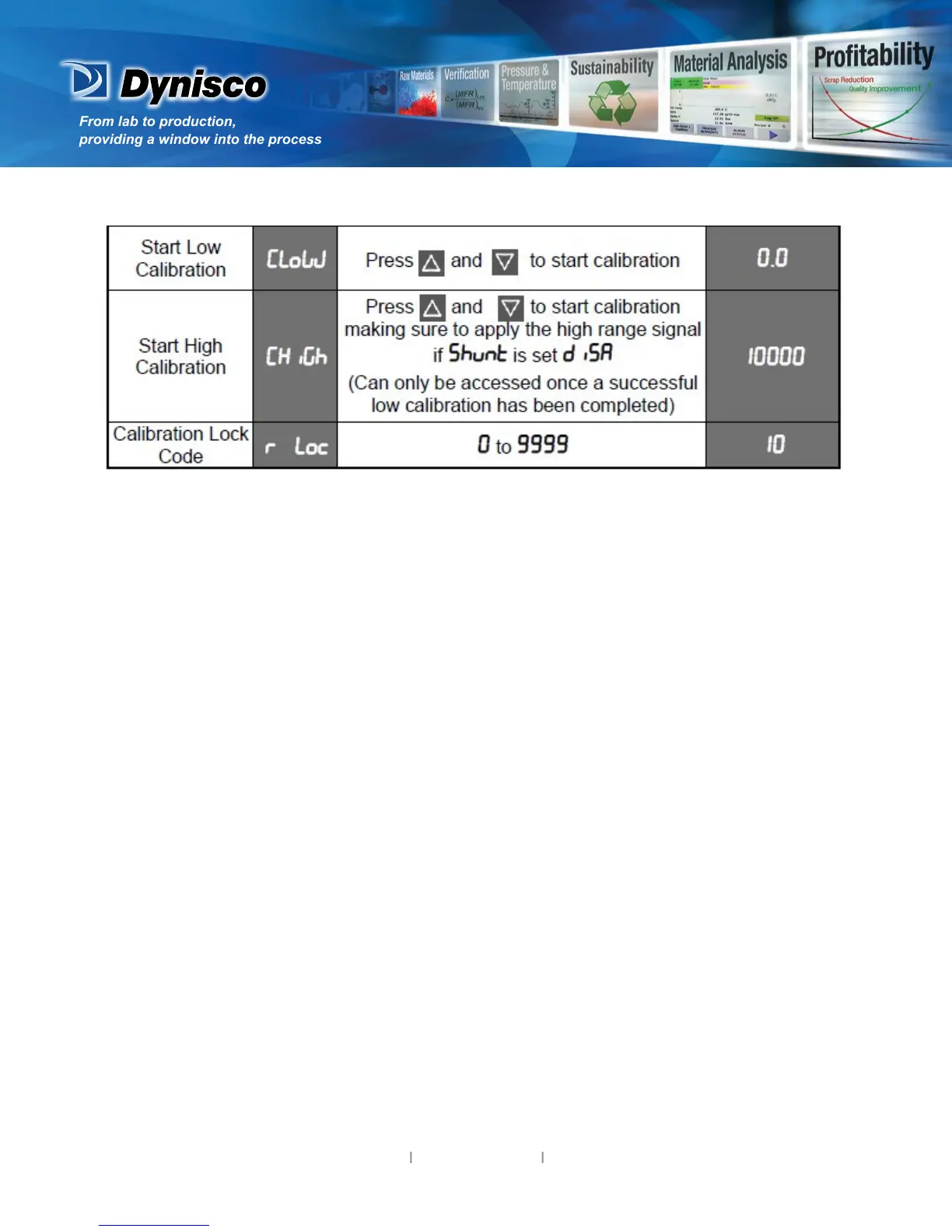
When the calibraon procedure begins ---- appears on the screen. Once the calibraon is complete
donE appears on the screen.
If there are faults detected with the calibraon the error message ErCAL will
appear.
ErCAL appears during the low calibraon step if the oset is greater than -10mV, for example -11mV.
This could signify a faulty sensor.
ErCAL appears during the high calibraon step if the count value is greater than +50mV. Again this
could signify a faulty sensor.
Note: Performing a calibraon with less than a 10mV dierence between the high and low
calibraon values will compromise the accuracy of the instrument.
6. Special Mode
7. Messages & Error Indicaons
Note: Conguraon must be completed before adjusng Special parameters.
This mode enables special features with the correct code entered; enter a value of 0 as default
otherwise please refer to your supplier for informaon on what special features are available and
which numbers invoke these.
These messages indicate that the instrument may require aenon, or there is a problem with the
signal input connecon. The message legend is shown for 1 second, followed by its value.
Cauon: Do not connue with the process unl the issue is resolved.


 To Next Page