Auto Tune Installation Guide - 1
Basic installation and placement instructions are included in
the PCV installation guide for Harley Davidson models.
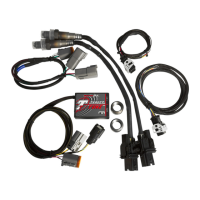
• The Autotune kit when used in conjunction with the PCV allows the bike
to be automatically tuned to a target air/fuel ratio. To use this feature
you must first enable Auto Tune in the PCV.
Go to Device Tools - Configure - Autotune.
EnablesAutotunefeature
Ifusingaswitch(notincluded)checkthisbox
Howmuchtimeafterstartingtheenginethesoft-
warewaitsuntilitstartssampling
Whattemperaturetheengineneedstoreachbe-
forethesoftwarestartssampling.
Themaximumthesoftwarewilltrimpersession
• Some models are shipped with the Autotune setup for basic mode (one
Target AFR table for both cylinders). If desired you can set different air/
fuel targets for each cylinder and each gear. Go to Device Tools -
Advance/Demote map.
Make sure that Fuel tables and Target AFR tables are set to the same
mode.
• EachHarleyDavidsonbasemapincludesabaseTargetAFRtable.These
settings are intended to deliver optimal performance while still
maintaining decent fuel mileage in the cruise area.
ToaltertheAFRtargetclickonTargetAFRinthetreeview.Expand
each cylinder and/or gear if necessary to view the corresponding table.
If necessary type in different values in the cells. Multiple cells can be
highlighted by using click/drag with the mouse.
Showscurrenttablebeingaltered

 Need help?
 General








 To Next Page