Product Operation
3-4 EFIS-D10A Pilot’s User Guide
CYCLING BETWEEN SCREENS
There are two methods for cycling between pre-defined screens: via the
menu and via hotkeys.
Screen Cycling Using the SCREEN LIST
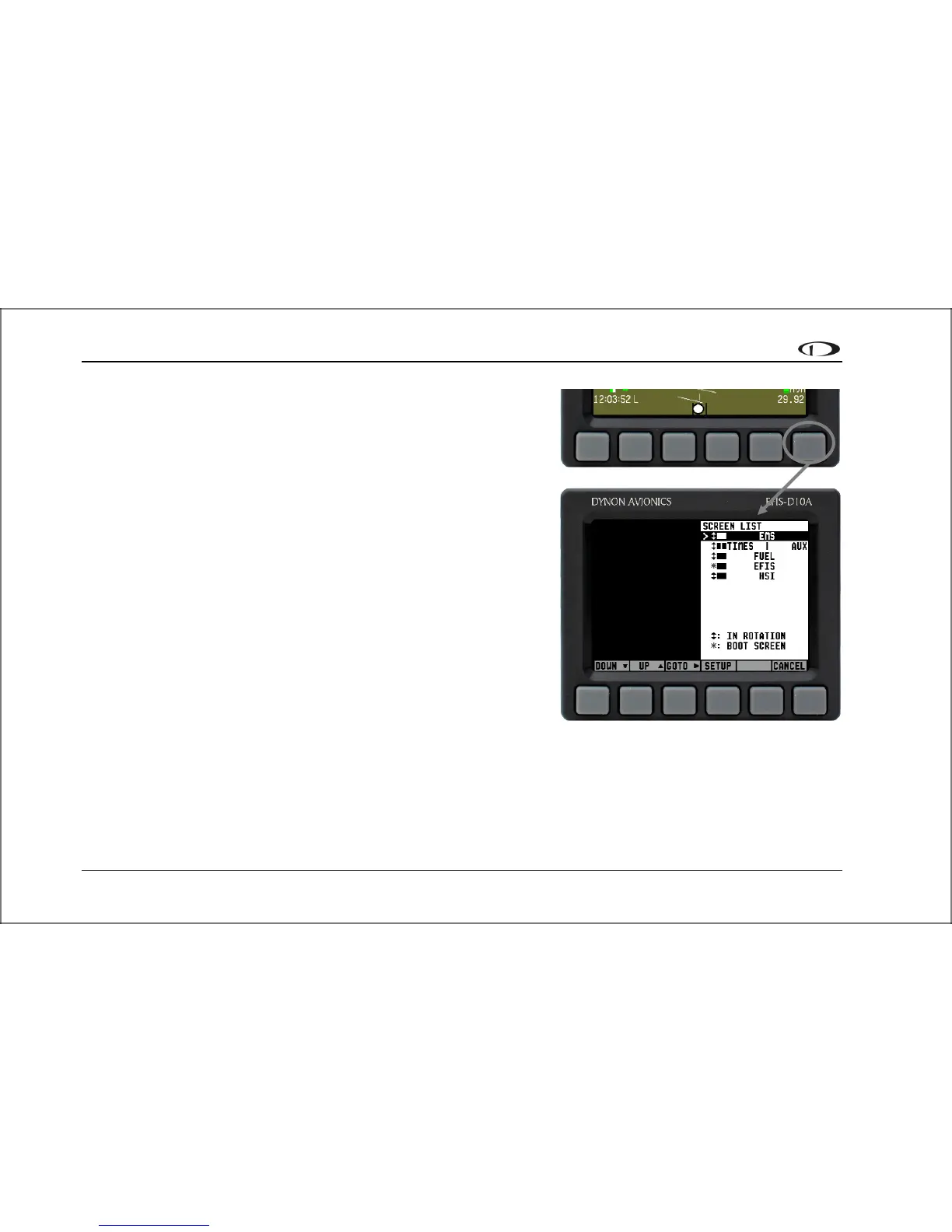
Navigate to the SCREEN LIST menu by holding button six for at least
two seconds when no menu is present (see the figure to the right). Note
that if you only press button six momentarily, the display cycles to the
next screen in your screen rotation. Use the DOWN▼/UP▲ buttons to
move the caret (>). The caret denotes the selected screen. Press GOTO►
to remove the SCREEN LIST and display the selected screen. If you wish
to stay on the same screen, you may either select your currently displayed
screen with the caret and press GOTO►, or press CANCEL.
Screen Cycling Using Hotkeys
With no menu displayed, press button one to cycle to the previous screen
in your rotation. Likewise, press button six to cycle to the next screen in
your rotation (see the figure on the next page). Cycling via hotkeys only
allows you to display screens that are in your screen rotation. They are
meant to give you quick access to the screen configurations that are most
important to you. If you wish to access screens that are not in your
rotation, use the SCREEN LIST as described above.
With no menus displayed, pressing button
six for two seconds displays the SCREEN
LIST menu, from which you may switch
to, and set up, various screen
configurations.
Hold for two seconds



 To Next Page