
 Need help?
Do you have a question about the E-Image GH03 and is the answer not in the manual?
Thanks for purchasing E-IMAGE professional heads and tripods. Suggests reading the manual carefully for proper use, safety, and maintenance.
Introduces the EIMAGE GENTING series fluid heads, highlighting design, functions, payload range, and LED bubble level.
Detailed specifications for various E-IMAGE fluid head models, including capacity, drag, and tilt range.
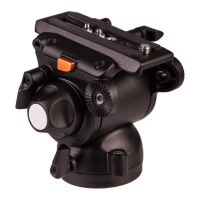
Labels and identifies the main components of the GH03 fluid head.
Instructions on how to install and adjust the panbar for the fluid head.
Steps for safely removing the quick release plate from the fluid head.
Guidance on how to adjust the tilt position of the fluid head.
Instructions for adjusting the pan position of the fluid head.
How to adjust the pan and tilt drag for smooth camera movements.
Instructions for attaching the slide plate to the camcorder with screws.
Steps to mount the camera onto the fluid head platform, ensuring balance.
Describes the special quick action feature of the GH03/GH06 plates for fast mounting.
Lists and labels the various parts of the GH06-GH25 fluid head series.
Instructions for installing and adjusting the panbar on GH06-GH25 heads.
Steps to mount the fluid head onto the tripod and level it.
Guide for removing the quick release plate using the safety button.
Instructions for attaching the slide plate to a camcorder adapter.
Steps to insert the slide plate into the adapter's mounting system.
How to mount the camcorder on the adapter and adjust its balance.
Instructions for attaching the slide plate to the camera body.
Steps to mount the camera onto the fluid head and ensure stability.
How to adjust the counterbalance dial to keep the camera in position hands-free.
Guide on adjusting the tilt drag for smooth vertical camera movement.
How to adjust the pan drag dial, with a warning about turning the dial correctly.
Explains the function of the illuminated leveling bubble and its automatic shut-off.
Steps to access the battery compartment for GH08/GH08L/GH10/GH10L models.
Instructions for replacing the button cells in the battery holder, noting polarity.
Steps to access the battery compartment for GH15/GH25 models.
Instructions for replacing the 7# batteries in the battery holder, noting polarity.
Overview of EIMAGE GENTING series tripods, highlighting materials, design, and compatibility.
Table detailing specifications for various E-IMAGE tripod models, including size, material, and payload.
Labels and identifies the various parts of the AT7402A tripod.
Instructions on how to loosen and lock the leg tubes for height adjustment.
Steps to adjust the tripod's height by loosening and locking leg knobs.
How to use and remove the anti-slide rubber feet for stability.
Steps for folding the tripod, including adjusting legs and securing with the hook.
Labels and identifies the various parts of the GA101/GC101 tripod.
Labels and identifies the various parts of the GA102/GC102 tripod.
Labels and identifies the various parts of the GA/GC751/GA/GC752 tripod.
Instructions for loosening and locking the leg tubes on these tripod models.
How to adjust the middle spreader by turning the locking knob of each arm.
Steps to adjust the ground spreader by turning the locking knob of each arm.
Instructions on how to remove the mid-level spreader if not needed.
Guide for installing and removing the ground spreader.
Procedures for folding the tripod, including adjusting spreaders and securing.
Guidelines for daily maintenance, storage, transport, and function inspection.
Procedures for cleaning the tripod with a lint-free cloth and proper storage.
Warnings regarding operating temperatures, cleaning, and avoiding seawater use.
Advice on seeking help from distributors or authorized agents for questions or defects.
 General
| Brand | E-Image |
|---|---|
| Model | GH03 |
| Category | Camera Accessories |
| Language | English |

 To Next Page