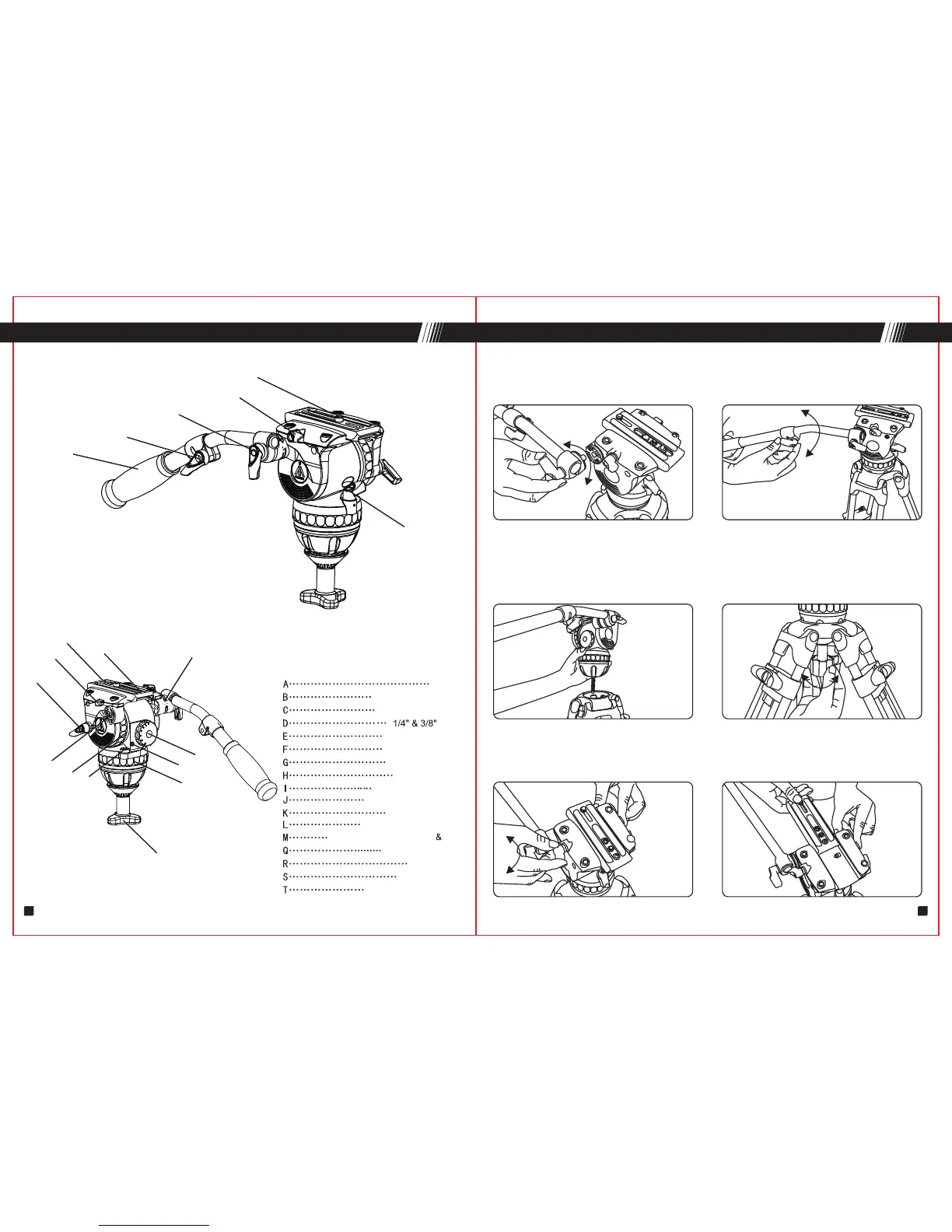
A
B
C
D
E
K
T
S
Q
G
H
M
J
R
L
I
F
N
A
M
B
C
E
G
screw
Plate locking knob
Insurance button
Bowl locking knob
Tilt locking knob
Tilt drag adjusting knob
Pan locking knob
Pan drag adjusting knob
Bubble level
Rubber washer
loose
lock
loose
lock
F
loose
lock
lock
loose
Connection part of handle head
1. Installing Panbar
Open the panbar, screwing the panbar knob "A" to "M" hole, and lock it. Loose
knob "B" , you can extend the length and adjust the pan bar angle,that you like.
2. Installing fluid head to tripod
Please adjust the tripod to your required height and lock every stage tightly.
Put the head on the tripod, level the fluid head using the bubble level.Then
tighten the bowl locking knob "F" .
3. Removing quick release plate
Loose plate locking knob "E" , pull the slide plate to the rear of the fluid head
whilst pressing the safety button "G" .
Pan bar
Pan bar locking knob
Counterbalance knob
Quick release plate
Pan bar locking washer
G
SET UP & USE(GH06-GH25)
Length adjusting knob
PARTS(GH06~GH25)
7 8


 To Next Page