G
D
E
F
loose
lock
C
B
loose
lock
loose
lock
J
lock
loose
H
ReduceIncrease
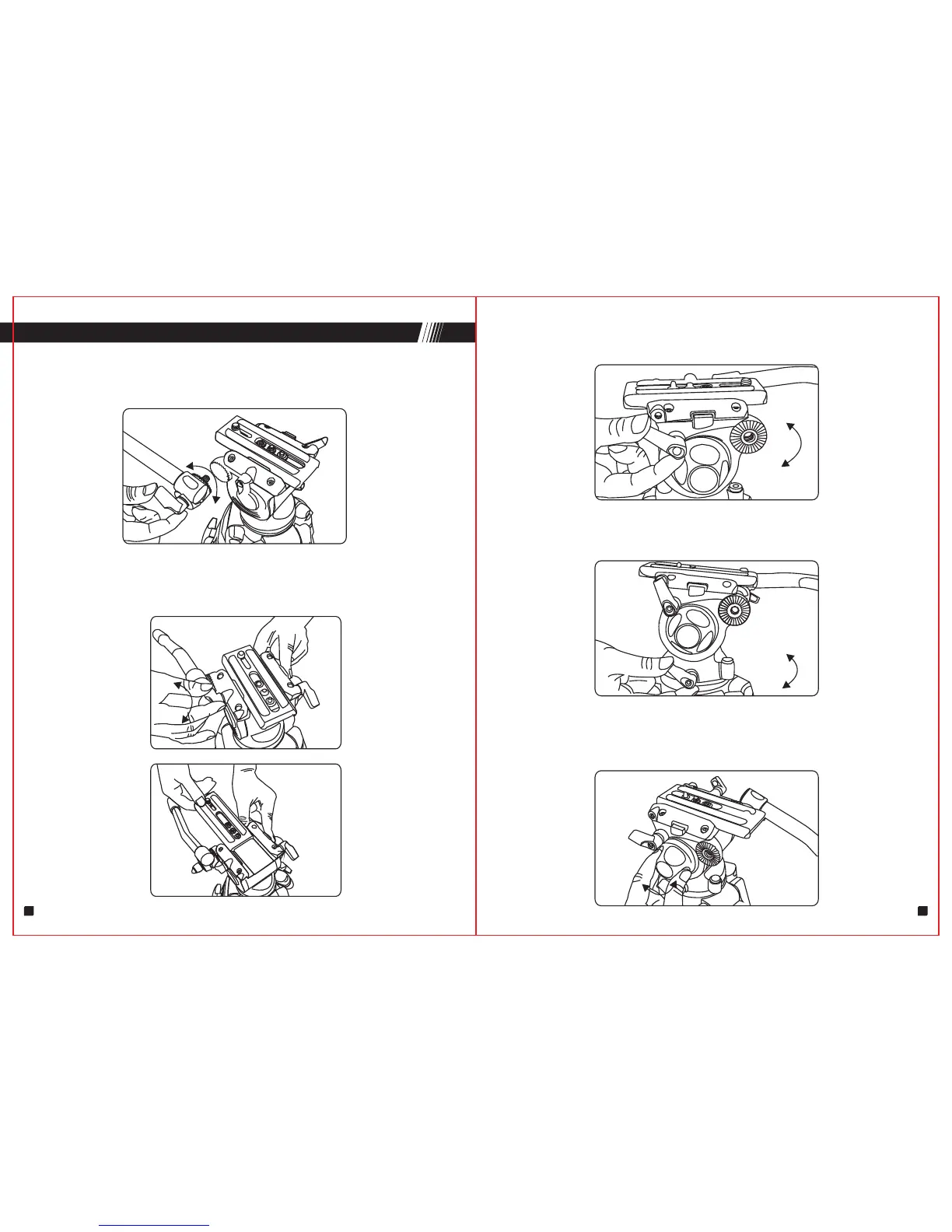
1.Install Panbar
Open the panbar,adjust the panbar to your request position, then screwing
the panbar knob "D" to "F " hole, and lock it.
2. Removing quick release plate
Loose plate locking knob "B" , pull the slide plate to the rear of the fluid head
whilst pressing the safety button "C" .
5.Pan & Tilt drag adjustment
Screwing or loose tilt locking knob "H" , then slowly move the fluid head
vertically until find your required drag. (GH03 is with fixed pan drag)
C
3.Adjusting tilt position
Lock or Loose locking knob "G" to adjust tilt position.
4.Adjusting pan position
Lock or Loose locking knob "J" to adjust pan position.
SET UP & USE (GH03)
3 4


 To Next Page