SHANGHAI ESURVEY GNSS CO., LTD.
18
4 Basic Operations
It introduces basic process of starting working with the device.
4.1 Insert a SIM Card and TF Card
The device supports an external TF card with expansion up to 32 GB for static data
storage, and a nano SIM card for network working mode.
To insert a SIM card and TF card, open the cover of battery slot A.
4.2 Insert the Battery
It is suggested to remove battery if the receiver is not in use for a long time.
To insert the battery, do the following:
1. Turn the battery cover lock to unlocked status.
2. Remove the cover of battery slot A / B.
3. Insert the battery and slide it as follows:
4. Put the cover back, and turn the battery cover lock to locked status.
4.3 Charge the Battery
The device is equipped with two batteries and you can charge the two batteries at the
same time.
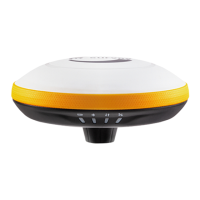
Before charging the battery, press the battery button on the battery to check the battery
level:
Number of green indicator



 To Next Page