SHANGHAI ESURVEY GNSS CO., LTD.
21
4.7 Start Tilt Measurement
The device can support both E-bubble and IMU, which is determined by the activation
code and service you purchase, but you cannot use both of them at the same time.
4.7.1 Start E-bubble Tilt Measurement
It is required when tilt measurement is used and E-bubble is used.
Before starting E-bubble tilt measurement, to enable E-bubble tilt measurement, in SurPad
software, press main menu Device → Device Setting, and set tilt survey to E-Bubble.
To Start E-bubble tilt measurement in SurPad software, do the following:
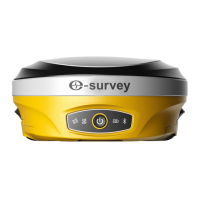
1. Press main menu Survey → Point Survey to enter the main interface of point
survey, select in the point type area, and press . Tilt Point interface
shows:
2. Optional: To modify antenna parameters, press Antenna Parameters, and set
antenna parameters.
3. To start collecting tilt points, press Start.
4. Incline the pole with the inclined angle greater than 5°. The SurPad software
automatically collects the first tilt point.


 To Next Page