18/52
DCBS User Manual / Ref. MAN_DCBS_GM_EN_V1.0
Settings 1/2
PREFERENCES ////////
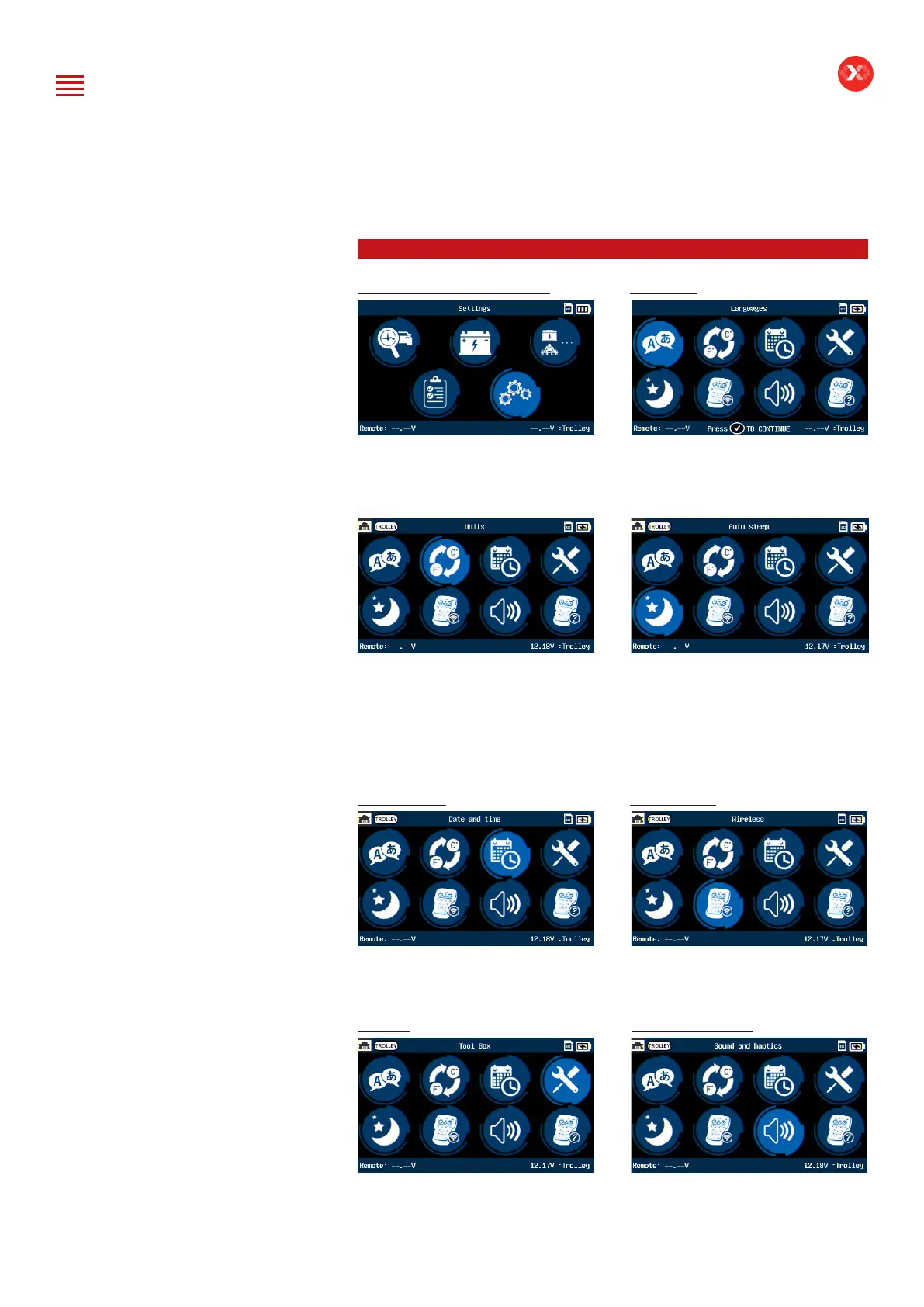
Personalize the user experience Languages
From the Main Menu, the “Settings
icon allows the user to personalize the
user experience.
From the Settings Menu, choose
“Language” and then select your
preferred language.
Units Auto Sleep
Units can be set up on DCBS. The
user has the option to select between
Celsius and Fahrenheit.
DCBS Remote is equipped with
energy saver mode to reduce power
consumption automatically if the
device is not used for a certain period
of time. The device will power off
automatically after 5 minutes if device
is not used. It can be disabled or can
be set from 1 to 60 minutes.
Date and Time Wi-Fi Settings
Date and Time will be set automatically
during and update, however, there is a
manual setting of the date and time.
Wi-Fi settings to connect Remote to
Trolley or Remote to Network (for job
syncing to Argos). Follow respective
instructions for this setting.
Tool Box Sounds and Haptics
“Tool Box” has a Voltmeter and a
thermal IR temperature reader.
The user has the option to turn the
sound and haptics on or off in the
settings menu.
Table of Content
Introduction
Safety Guidelines
Maintenance and Storage
Before Use
Usage Precautions
Disassembly/Damage/Removal
Cleaning the Product
Getting Started
Safety Reminders
Appearance and Dimensions
Trolley LED’s
Remote Presentation
Remote Job Storage
Accessories
Initial Setup
Installation
Battery Cable Clamps Connection
Power Cable Connection and Power On
Dealer Id. N°
Wi-Fi Connection (Remote to Trolley)
Physical Connection (Remote to Trolley)
Update
Settings
Preferences
Other Settings
Diagnostic and Charge
Remote handheld diagnostic tester
-Manual Selection of Battery
-Vehicle Selection from Database
-Start Diagnostic & Results
Trolley Diagnostic
-Complete Diagnostic & Results
-Pre Delivery Inspection Test (PDI) & Results
-Charge & Results
-Load Test & Results
-Enhanced Diagnostic Mode (EDM) & Results
-Reserve Capacity Test & Results
History (Results Storage)
Optimus
-Optimus Installation
-Using Optimus
Support Information
-Batteries
-Error Messages
Warranty


 To Next Page