51/52
DCBS User Manual / Ref. MAN_DCBS_GM_EN_V1.0
Support Information 2/2
ERROR MESSAGES ////////
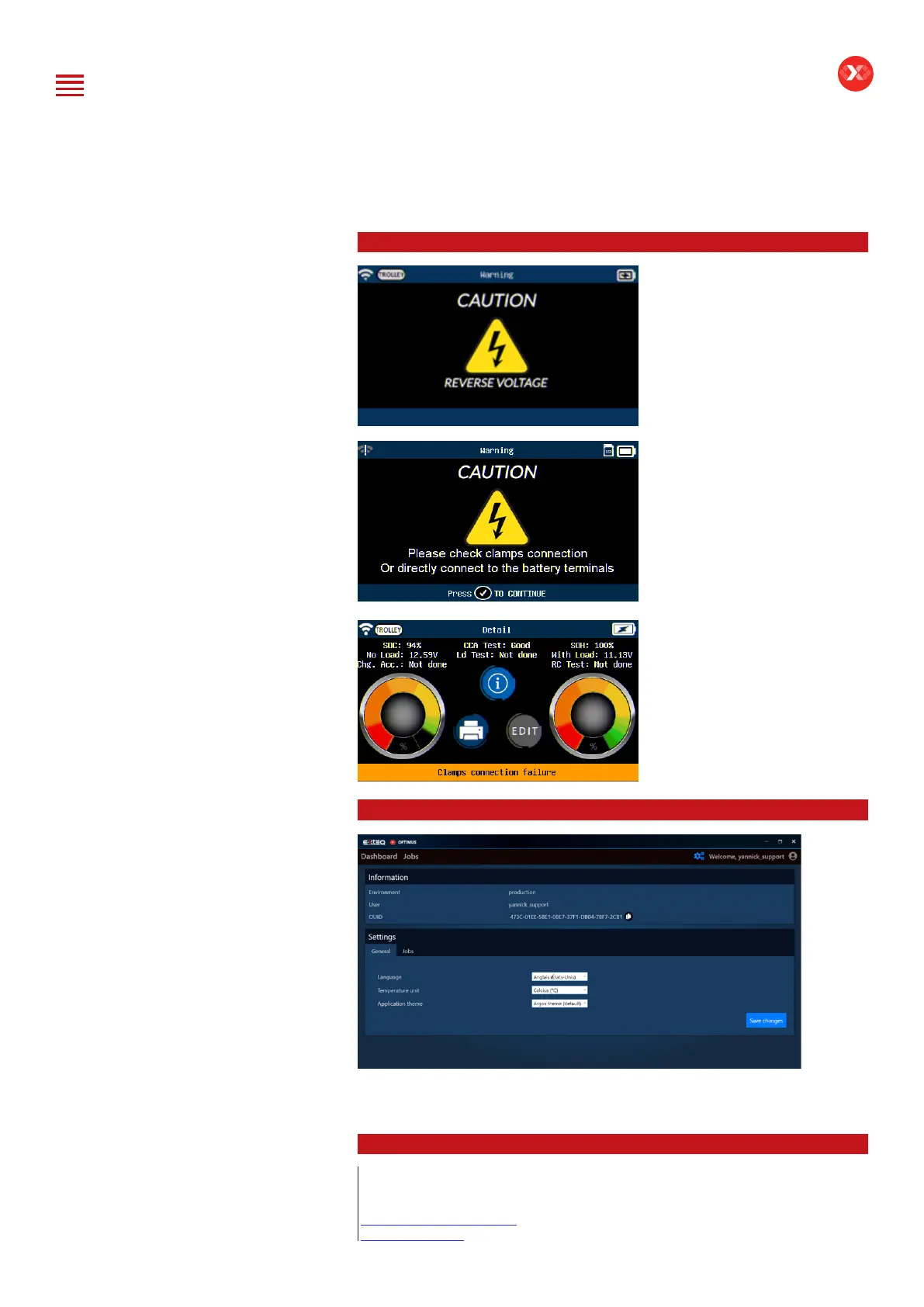
If the battery is connected
on the opposite polarity, the
screen “Reverse Voltage” will
appear.
If an issue is found with the
connection of the battery, the
screen “Please check clamps
connection or directly connect
to the battery terminals” will
appear.
If the test is interrupted, or the
clamps are not detecting the
battery correctly, the result
will come back as “Clamps
connection failure“ and the
test must be performed again.
ERROR MESSAGES ////////
If you have a problem with OPTIMUS requiring support, please note your
OUID Number (OPTIMUS/Settings). OUID number will be requested by the
customer support service.
LOCAL SUPPORT ////////
North America:
E-XTEQ Technical Support
1-877-453-3265
support.usa@e-xteq.com
www.e-xteq.com
Table of Content
Introduction
Safety Guidelines
Maintenance and Storage
Before Use
Usage Precautions
Disassembly/Damage/Removal
Cleaning the Product
Getting Started
Safety Reminders
Appearance and Dimensions
Trolley LED’s
Remote Presentation
Remote Job Storage
Accessories
Initial Setup
Installation
Battery Cable Clamps Connection
Power Cable Connection and Power On
Dealer Id. N°
Wi-Fi Connection (Remote to Trolley)
Physical Connection (Remote to Trolley)
Update
Settings
Preferences
Other Settings
Diagnostic and Charge
Remote handheld diagnostic tester
-Manual Selection of Battery
-Vehicle Selection from Database
-Start Diagnostic & Results
Trolley Diagnostic
-Complete Diagnostic & Results
-Pre Delivery Inspection Test (PDI) & Results
-Charge & Results
-Load Test & Results
-Enhanced Diagnostic Mode (EDM) & Results
-Reserve Capacity Test & Results
History (Results Storage)
Optimus
-Optimus Installation
-Using Optimus
Support Information
-Batteries
-Error Messages
Warranty


 To Next Page