66
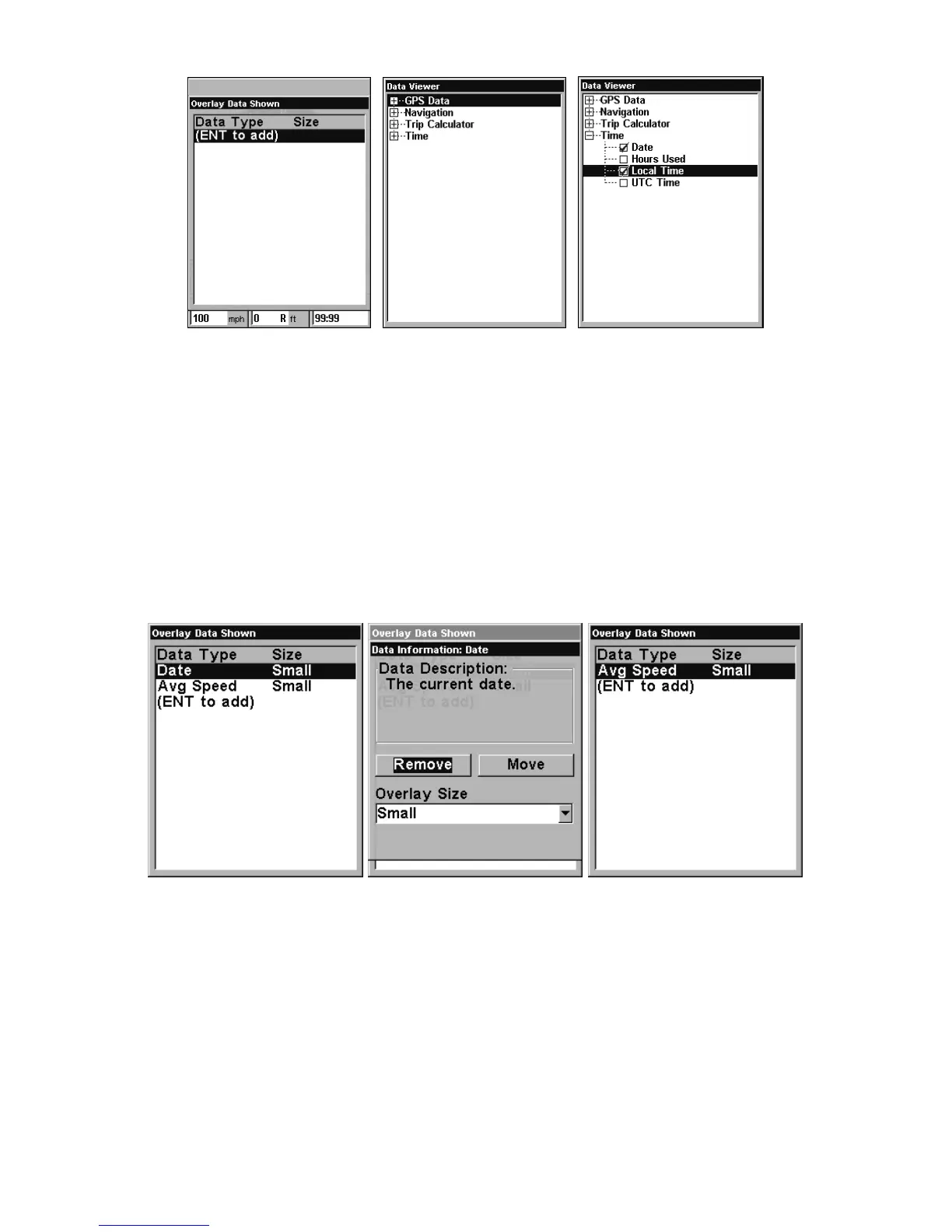
From Overlay Data Shown (left) press ENT to see Data Viewer (center).
Select a category and press ENT. Select a data option you want over-
laid on the screen and press ENT.
To remove overlaid data:
1. While on the Page that shows the item or items you want to remove,
press
MENU|↓ to OVERLAY DATA|ENT.
2. Select the item you want to remove from your display and press
ENT|ENT. To remove another item, select the item and press ENT|ENT.
3. When you have finished removing items from the screen, press
EXIT
to return to the page display.
Overlay Data Shown with Date option selected (left). Press ENT to ac-
cess R
EMOVE option (center). Press ENT again to remove item and return
to Overlay Data Shown (right).
To move overlaid data:
To rearrange data floating on the main page display.
1. Press
MENU|↓ to OVERLAY DATA|ENT.
2. The Overlay Data Shown menu will appear. Select the item you want
to move and press
ENT|→ to MOVE|ENT.



 To Next Page