11
eagletone.com
EAGLETONE electronic keyboard MPW300 USB User’s manual
supports and anchors the other chord notes. The distance (or
interval) between adjacent notes of a triad in root position is
either a major or a minor third.
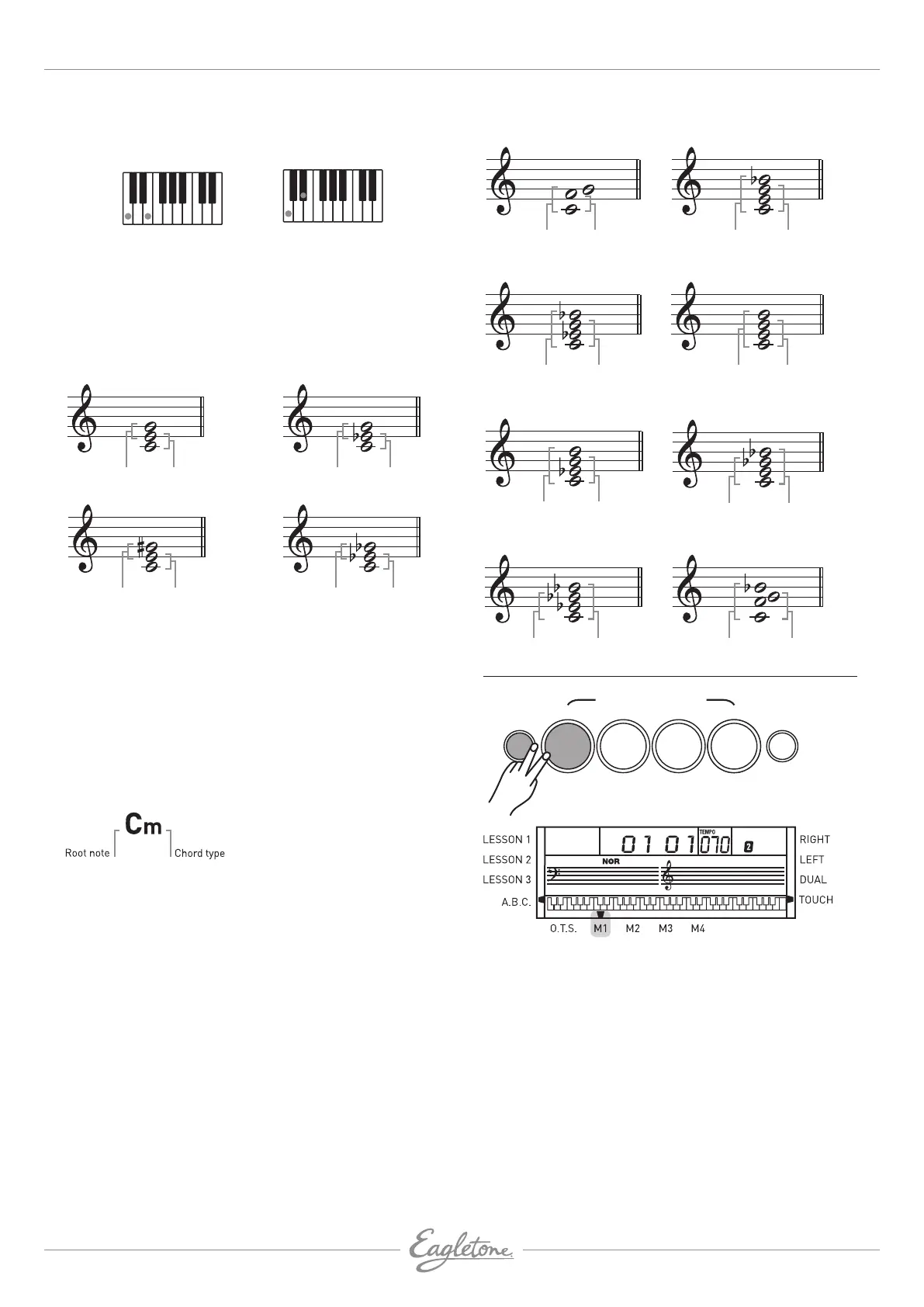
Major third:
four semitones
Minor third:
three semitones
The lowest interval in our root-position triad (between the root
and the third) determines whether the triad is a major or minor
chord, and we can shift the highest note up or down by a semitone
to produce two additional chords, the augmented and diminished
chord, as shown below:
Major 3
rd
Minor 3
rd
M
Minor 3
rd
Major 3
rd
m
Minor 3
rd
Minor 3
rd
Diminished chord - Cdim
Major 3
rd
Major 3
rd
Augmented chord - Caug
The basic characteristics of the chord sound remain intact
even if we change the order of the notes to create different
inversions. For example, successive chords in a chord
progression can be connected smoothly by choosing the
appropriate inversions.
READING CHORD NAMES
Chord names tell you all you need to know about them
(apart from inversion/voicing). The chord name tells you
what the root of a chord is, whether it is a major, a minor or
a diminished one, whether it requires a major or a flatted
seventh, what alterations or tension it uses, and all that at a
glance.
SOME CHORD TYPES
Perfect 4
th
Perfect 5
th
Suspended 4
th
- C
sus
Major
chordFlatted 7
th
7
th
- C
7
Minor
chordFlatted 7
th
Minor 7
th
- Cm7
7
th
chordFlatted 5
th
7
th
, flatted 5
th
- C7
(5)
Minor 7
th
chordFlatted 5
th
Minor 7
th
, flatted 5
th
- Cm7
(5)
S
chordFlatted 7
th
7
th
, suspended 4
th
- C7sus4
Minor
chordMajor 7
th
Minor/major 7
th
- CmM7
Major
chordMajor 7
th
Major 7
th
- CM7
MEMORY
STYLE
ONE TOUCH SETTING
STORE
M1 M2 M3 M4
OTS
1. 4 memory banks are provided for you to store your
personal settings.
2. While holding down the [STORE] button, press the [M1]
button (or [M2]-[M4] buttons) to store the data into the M1
(or M2-M4) bank.
The data stored in the memory are as follows:
• VOICE DATA: VOICE 1, VOICE 2
• VOICE EFFECTS: TOUCH ON/OFF, SUSTAIN ON/OFF,
TRANSPOSE, OCTAVE, SPLIT POINT
• ACCOMPANIMENT DATA:
STYLE NUMBER, TEMPO, A.B.C. ON/OFF, NORMAL/
VARIATION STATUS


 To Next Page