9
eagletone.com
EAGLETONE clavier électronique MPW300 USB Manuel de l’utilisateur
Si le mode A.B.C. est activé, jouez n’importe quelle touche
dans la section gauche du clavier et le style démarrera avec
la basse et l’accord.
Si le mode A.B.C. est désactivé, jouez n’importe quelle
touche sur le clavier et le style démarrera avec seulement la
batterie.
DÉMARRAGE AVEC INTRODUCTION
STYLE
Clignotant
STYLE
A.B.C.MAIN/FILLINTRO/ENDSTART/STOP SYNC
STYLE
SONG
A.B.C.MAIN/FILLINTRO/ENDSTART/STOP SYNC
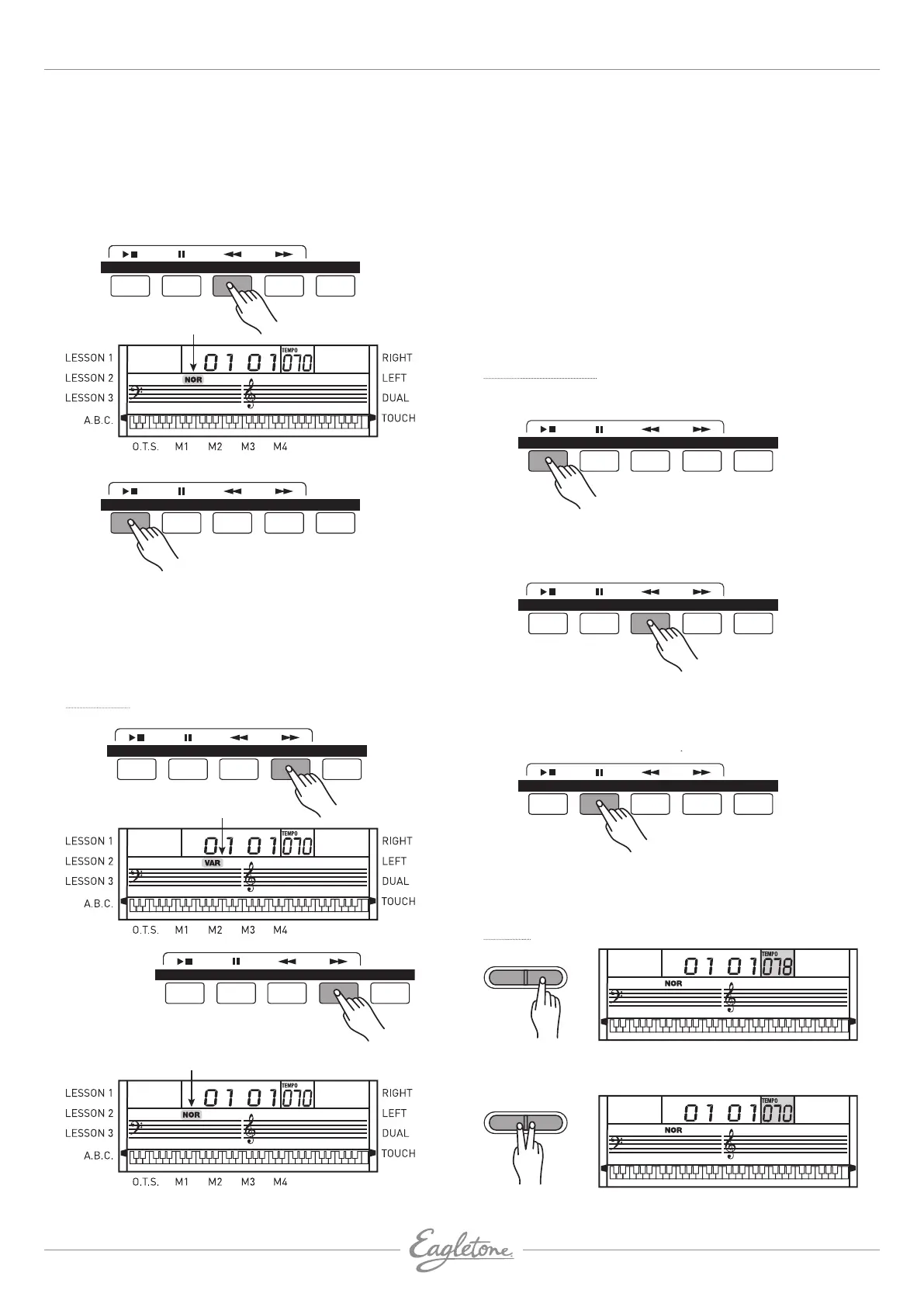
• Pressez le bouton [INTRO/END] alors que le style est arrêté,
le témoin NOR (normal) ou VAR (variation) clignote à l’écran
LCD, indiquant que la section d’introduction est prête à être
jouée. La longueur de l’intro varie en fonction du style.
• Pressez le bouton
[START/STOP] et le style démarre avec
une section d’introduction suivie de la section principale.
Main/Fill
Pressez et
tenez enfoncé
Clignote jusqu’à ce que
le bouton soit relâché
STYLE
SONG
A.B.C.MAIN/FILLINTRO/ENDSTART/STOP SYNC
STYLE
Clignotant
STYLE A.B.C.MAIN/FILLINTRO/ENDSTART/STOP SYNC
STYLE
1. En mode Main (section principale), pressez le bouton
[MAIN/FILL] pour insérer une transition d’une mesure.
Le témoin VAR clignote à l’écran. Une fois la mesure de
transition exécutée, le clavier passe au style VARIATION.
2. En mode VARIATION, pressez le bouton [MAIN/FILL]
pour insérer une transition d’une mesure. Le témoin
NOR clignote à l’écran. Une fois la mesure de transition
exécutée, le clavier revient au style principal MAIN.
3. Maintenez le bouton [MAIN/FILL] enfoncé pendant
l’exécution du style pour que le motif de transition (FILL)
sélectionné soit répété jusqu’au relâchement du bouton.
REMARQUE : Pendant que le style est arrêté, pressez le
bouton
[MAIN/FILL] pour alterner entre VAR et NOR. Le
témoin correspondant s’allumera à l’écran.
Arrêt d’un Style
ARRÊT IMMÉDIAT
STYLE
A.B.C.MAIN/FILLINTRO/ENDSTART/STOP SYNC
STYLE
SONG
A.B.C.MAIN/FILLINTRO/ENDSTART/STOP SYNC
STYLE
SONG
A.B.C.MAIN/FILLINTRO/ENDSTART/STOP SYNC
L’accompagnement peut être stoppé à tout moment en
pressant le bouton [START/STOP].
ARRÊT FINAL
STYLE
SONG
A.B.C.MAIN/FILLINTRO/ENDSTART/STOP SYNC
STYLE
A.B.C.MAIN/FILLINTRO/ENDSTART/STOP SYNC
STYLE
SONG
A.B.C.MAIN/FILLINTRO/ENDSTART/STOP SYNC
Appuyez sur le bouton [INTRO/END] pour que le style s’arrête
après l’ajout d’une section finale.
La section finale (Ending) commence à la mesure suivante.
ARRÊT SYNCHRONISÉ
STYLE
SONG
A.B.C.MAIN/FILLINTRO/ENDSTART/STOP SYNC
STYLE
SONG
A.B.C.MAIN/FILLINTRO/ENDSTART/STOP SYNC
STYLE
SONG
A.B.C.MAIN/FILLINTRO/ENDSTART/STOP SYNC
Pressez le bouton [SYNC] pour stopper le jeu du style quand
vous relâchez l’accord; le mode de démarrage synchronisé
sera activé.
Tempo
STYLE
1. Pressez le bouton [TEMPO +] ou [TEMPO -] pour changer le
tempo.
STYLE
2. Pressez simultanément les boutons [TEMPO +] et [TEMPO-]
pour ramener le tempo à sa valeur par défaut.


 To Next Page