22
eagletone.com
User’s manual EAGLETONE electronic keyboard MPW300 USB
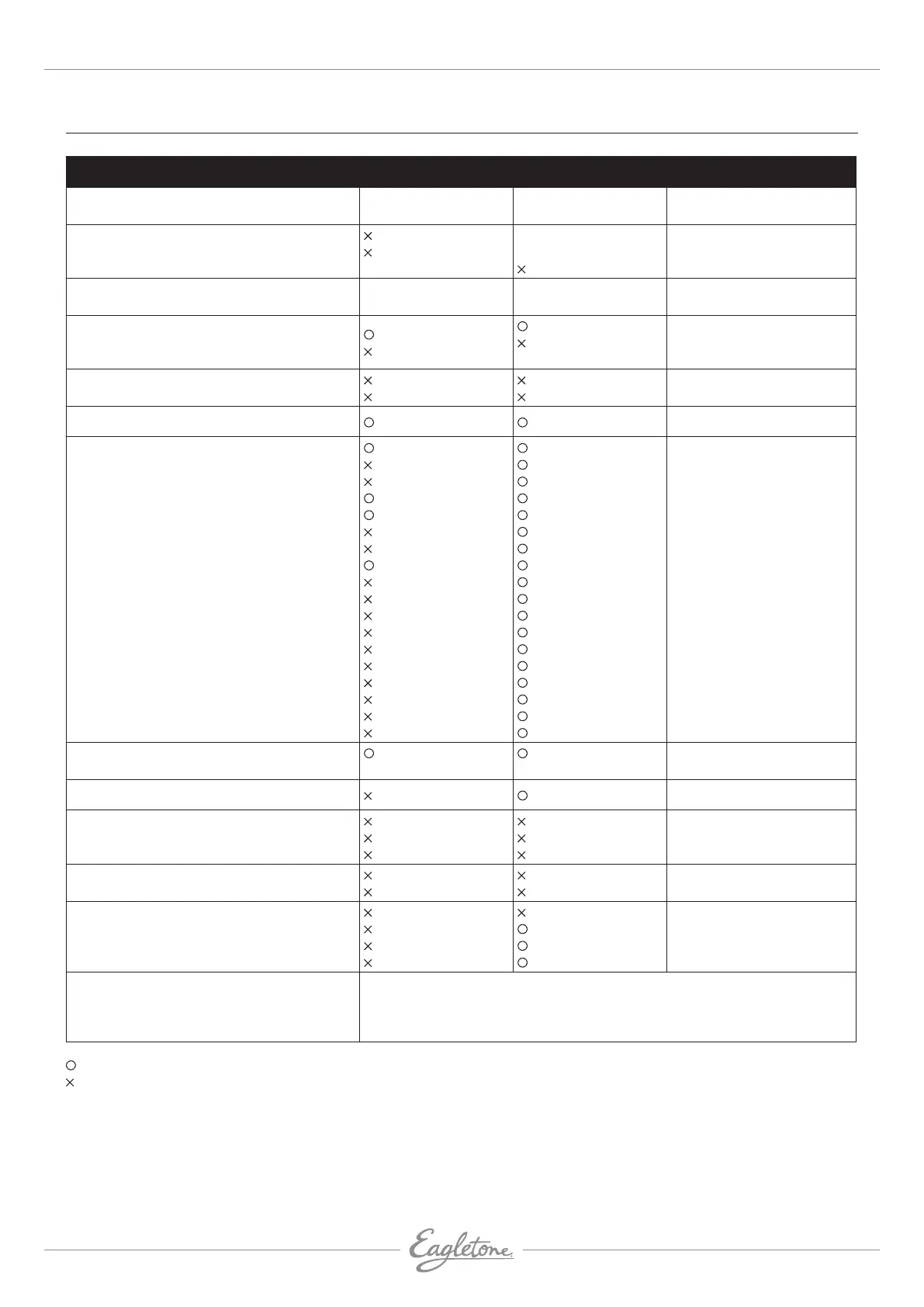
MIDI IMPLEMENTATION CHART
FUNCTION TRANSMITTED RECOGNIzED REMARK
Basic Default
Channel Changed
1
1-16
All
1-16
Mode Default
Messages
Altered
***********
3
3
Note
Number: True voice
18-114
***********
0-127
0-127
Velocity Note on
Note off
9nH,d=1-127
(9nH,d=0)
9nH,d=1-127
(9nH,d=0; 8nHn,
d= 0-127)
Aftertouch Keys
Chs
Pitch Bend
Control Change 0
1
5
6
7
10
11
64
65
66
67
80
81
91
93
120
121
123
Bank Select
Modulation
Portamento Time
Data Entry
Volume
Pan
Expression
Sustain Pedal
Portamento On/Off
Sostenuto Pedal
Soft Pedal
Reverb program
Chorus program
Reverb Level
Chorus Level
All Sound Off
Reset All Controllers
All Notes Off
Program
Change: True #
*********** 0-127
System exclusive
Common : Song Position
Messages : Song Select
: Tune
Real Time : Clock
messages : Commands
*1 *1
AUX Messages: LOCAL ON/OFF
: All Notes Off
: Active sensing
: Reset
Note:
*1 A FAH message is transmitted when the accompaniment is started.
A FCH message is transmitted when the accompaniment is stopped.
When a FAH message is received, the accompaniment is started.
When a FCH message is received, the accompaniment is stopped.
= Yes
= No
Mode 1: OMNI ON, POLY Mode 2: OMNI ON, MONO
Mode 3: OMNI OFF, POLY Mode 4: OMNI OFF, MONO


 To Previous Page