15
Let’s Continue To Get Charged Up
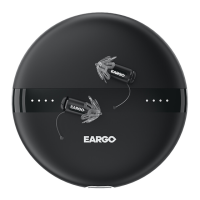
CRADLE INDICATOR LIGHTS
CHECK CRADLE INDICATOR LIGHTS • When the cradle
lights under the Eargo device change from solid blue to
solid white, charging will begin. The charging lights may
flash blue for a few seconds before turning solid white
when you first insert the Eargo devices into the cradle.
This is normal - the charger is just calibrating.
But, if the charging lights continue to flash blue for an
extended period of time, or remain solid blue, the Eargo
devices are not inserted correctly. Remove and re-insert the
Eargo devices.
You will know you’re all set when the charging lights under
the Eargo devices remain solid white, and the Eargo Device
Indicator Lights on the front of the charger turn on and
start scrolling.


 To Next Page