FS Series Modbus Master v1.0
7
Configuring the Modbus Serial Network
The architecture of the driver is a tiered, parent/child structure as indicated below. The network object can be
placed anywhere in the Sedona apps. It is recommended to create a separate folder for each network to allow
logical identification of each “parent” network and the associated “child” devices and points.
Network
Device
Points
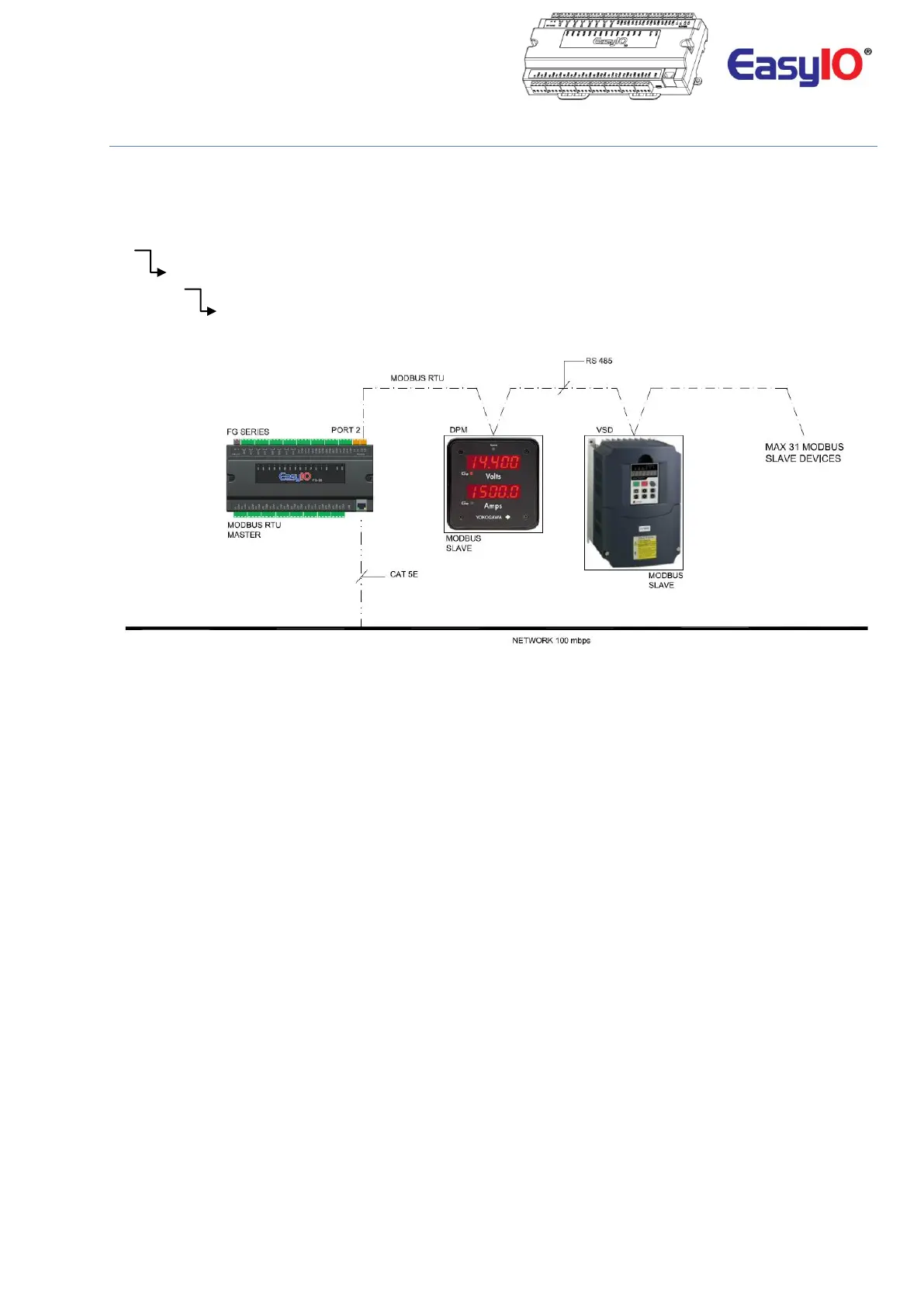
Image shows the schematic diagram of FG32 as a Modbus RTU master.
**Note**
In order to configure the MODBUS driver 3 kits need to be installed. These kits are included in the release package.
Installation of the kits is shown in the following steps
1. easyioFGModbus – 1.0.45.51.28 or higher
2. easyioFGDriver - 1.0.45.51.3 or higher
3. easyioFGSerial – 1.0.45.51.2 or higher
Step 1
Connect to the controller with CPT Tool.
Default login credentials are as below;
IP address : 192.168.10.12
Username : admin
Password :<no password>


 To Next Page