Need help?
Do you have a question about the Easymax Voice and is the answer not in the manual?
Guidance on contacting healthcare professionals or visiting the EASYMAX website for support and diabetes management tools.
Crucial safety, usage, and handling guidelines for the meter, including diagnostic use, storage, and biohazard warnings.
Information on how health conditions like dehydration, humidity, and hematocrit can impact blood glucose test accuracy.
Advice to refer to test strip instructions for additional health-related information and proper usage.
Explanation of common symbols found in the manual and on the device, covering usage, safety, and regulatory information.
Detailed breakdown of symbols displayed on the EASYMAX meter screen for various functions like date, time, results, and errors.
List of spoken messages and alerts provided by the meter for different operations, status updates, and error conditions.
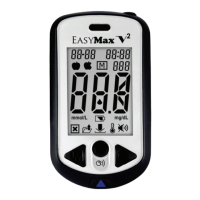
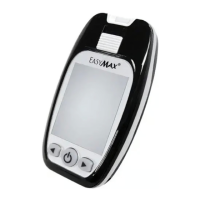
Introduction to the EASYMAX Voice meter, detailing its display, buttons, test strip slot, and phone jack for connectivity.
Illustration and explanation of the components of the EASYMAX blood glucose test strip, including electrode, reaction area, and collection area.
Diagram and explanation of the lancing device parts like the sliding barrel, trigger button, sleeve, and adjustable tip for lancet insertion.
Explains why running control solution tests is important to verify the accuracy and reliability of the meter and test strips.
Instructions on selecting the appropriate depth setting for the lancing device and safety notes on using sterile lancets.
Information on Alternate Site Testing (AST), including when it is appropriate and situations where fingertip testing is recommended.
Information on the meter's memory capacity, how test results are stored with time/date, and the importance of correct settings.
Procedure for inserting batteries, understanding the low battery indicator, and meter behavior after battery replacement.
Explanation and resolution steps for 'Humidified/Used strips' and 'Low power' error messages displayed by the meter.
Troubleshooting guidance for 'Volume detector error', 'Memory fault', and 'System fault' messages, including battery checks.
Explanation of 'HI' (high result) and 'LO' (low result) error messages and recommended actions for each.
Information on 'HE' (high temperature) and 'LE' (low temperature) errors, advising relocation to appropriate operating temperatures.
Detailed technical specifications for the EASYMAX meter, including range, test time, operating conditions, and measurement principles.
 General
| Measuring Time | 5 seconds |
|---|---|
| Memory | 450 test results with date and time |
| Battery | Two 1.5V AAA alkaline batteries |
| Test Time | 5 seconds |
| Voice Feature | Yes |
| Operating Humidity | 10 - 90% RH |
| Blood Sample | Capillary whole blood |
| Measuring Range | 20-600 mg/dL |
| Sample Type | Whole blood |
| Operating Temperature | 10-40°C |

 To Next Page