English
English
31
13 1280x960 60 Hz
14 1280x1024 60 Hz
15 1280x1024 75 Hz
16 1400x1050 60 Hz
17 1440x900 60 Hz
18 1440x900 75 Hz
19 1920x1080 60 Hz
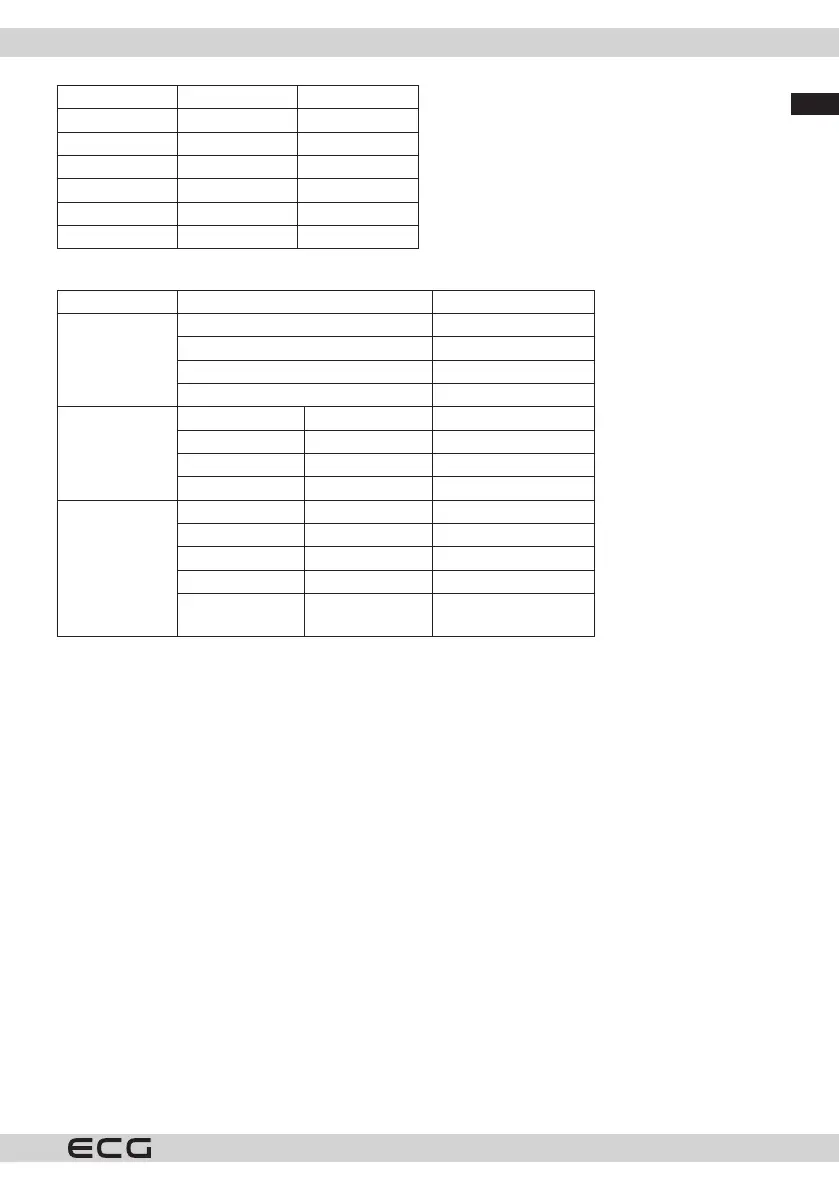
AV and HDMI compatibility
Source Supported signals Availability
Rear AV
PAL O
SECAM O
NTSC4.43 O
NTSC3.58 O
YPbPr
480i, 480p 60 Hz O
576i, 576p 50 Hz O
720p 50Hz,60Hz O
1080i 50Hz,60Hz O
HDMI
480i, 480p 60 Hz O
576i, 576p 50 Hz O
720p 50Hz,60Hz O
1080i 50Hz,60Hz O
1080p
24Hz, 25Hz,
30Hz, 50Hz, 60Hz
O
(X: Not available, O: Available)
In some cases, the TV signal may not be displayed correctly. The problem may be incompatibility with
equipment (DVD, Set-top box, etc.). If you encounter this problem, contact your dealer as well as the equipment
manufacturer.
CONNECTION
Cable connection
Connecting to a wired network
• You must have a modem/router connected to an active broadband connection.
• Connect the TV to the modem/router with an Ethernet cable. There is a LAN port on the back of your TV.



 To Next Page