14
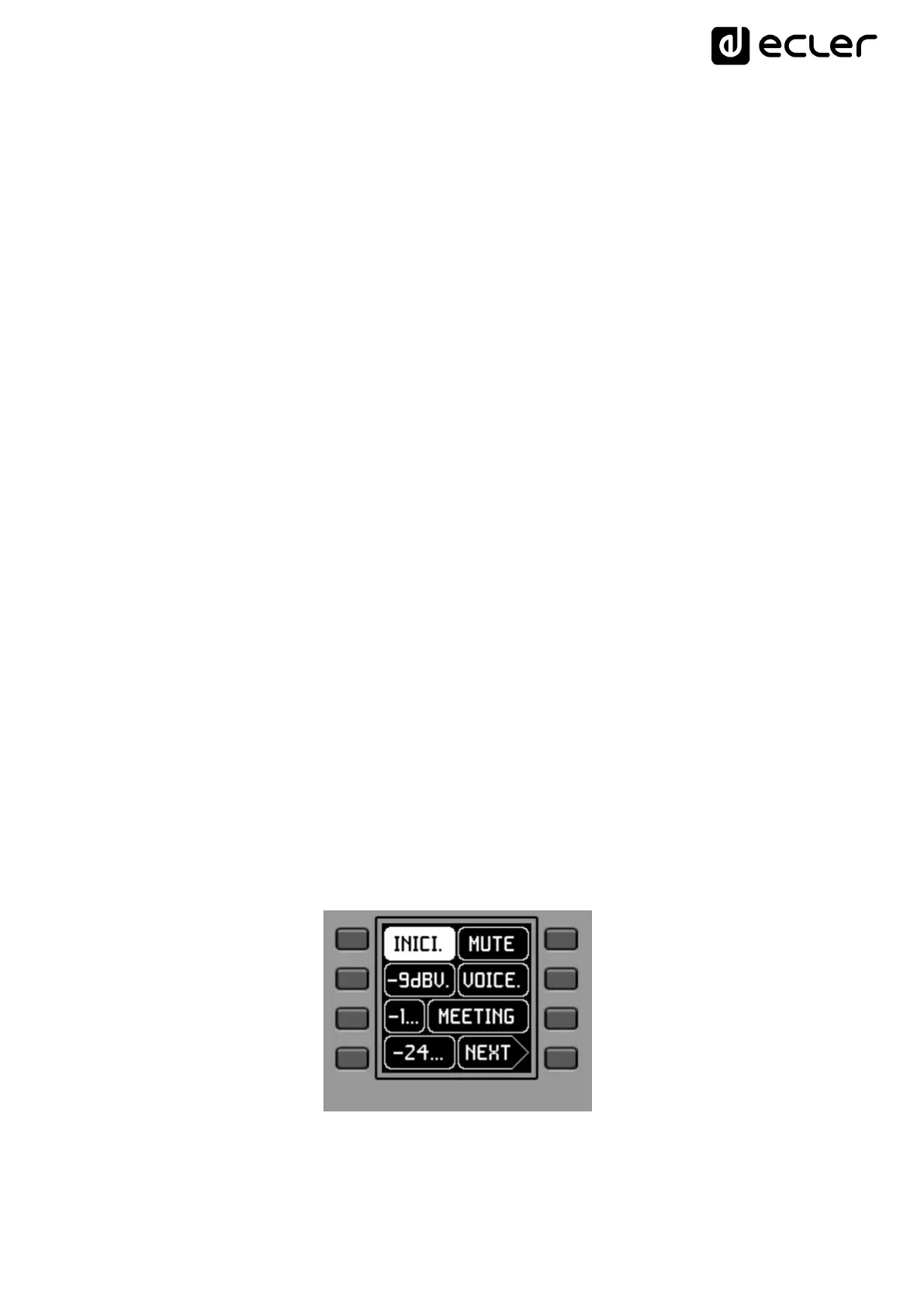
Text fields S1 to S7 show the first seven options that can be selected using keys K1 to
K7. Field S8 shows the text "NEXT", inviting you to press the K8 key to display more
options suitable for selection. The total number of selectable options is defined by
managing carousels of audio inputs (sound sources) or presets for each control panel,
using the EclerNet Manager application.
If there are 8 or fewer selectable options, the screen will show them directly in fields S1
to S8, without adding the "NEXT" function as an option associated with the K8 key.
In the example above, which uses a carousel of prests as selectable options, we see the
following information:
S1, option 1 (currently selected = shown in negative): Active preset, stored in the
MIMO4040DN configuration and labeled START. The information on the screen in
this case does not show all the characters of its label (name) in this general view,
since sometimes they do not fit in the space reserved for the texts. In such cases, a
dot is added to the end of the displayed text. Selectable (=actionable) by pressing
the key K1
S2 toS7, options 2 to 7: presets labelled “-9dBV”, “-15dBV”, “-24dBV”, “MUTE”,
“VOICE”, “MEETING”. The information on the screen in some of these cases does
not show all the characters of its label (name) in this general view, since
sometimes they do not fit in the space reserved for the texts. In such cases, a dot
is added to the end of the displayed text. Selectable (=actionable) by pressing the
keys K1 to K7
S8, option 8: Move to the next screen of valid options by pressing the K8 key.
By pressing one of the keys K1 to K7, the display will go on to show the extended text
information, without making the relevant selection yet. The following example shows
the display after pressing the K7 key once, indicating the extended S7 text information
("MEETING" instead of "MEETI."):



 To Next Page