50
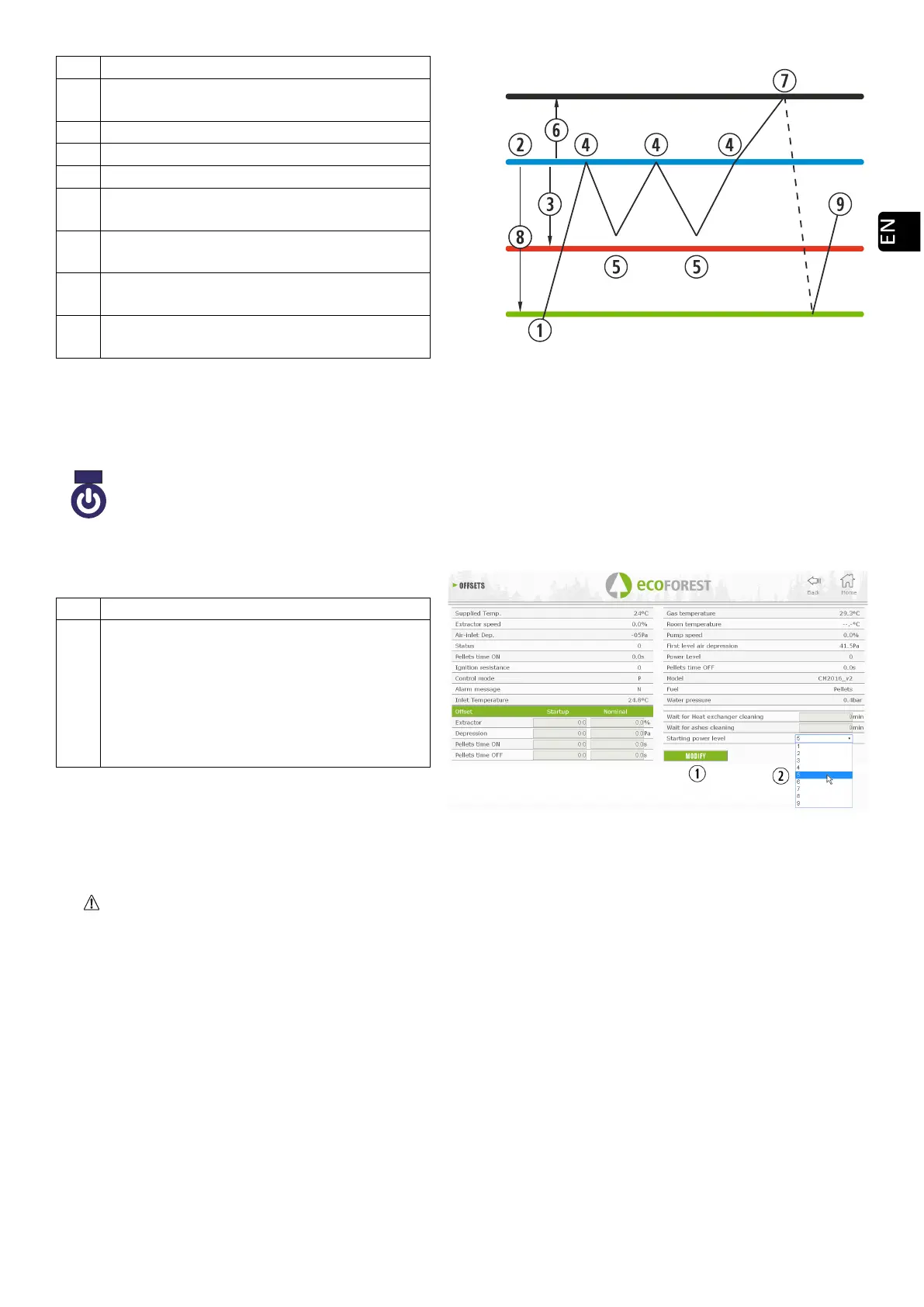
The user turns on the stove manually.
Target temperature selected in the main
menu.
It changes to level 1 (minimum).
It changes to working level 9.
OFF
Temperature difference for turning
the device off.
Turning off the stove using the room
temperature.
ON
Temperature difference for turning the
device on.
Turning on the device following the
temperature order.
Drawing 40
When the stove is off in any and all temperature mode and it is ready to be restarted, the following icon shall
appear on the main screen:
5.6. OFFSET MENU.
Drawing 41
5.7. WEB PROGRAMMING TIMETABLE.
The keyboard does not change time zones automatically. Therefore, the timetable must always be configured
using the same method (via keyboard or WEB). Time offset problems between the keyboard and the Web may
arise if the timetable is configured simultaneously using different means (via keyboard and via WEB).
Templates may be used to programme the stove se puede realizar de forma semanal renovable, programmes
registered by the manufacturer, which can be totally configured by the user, in a personalised way by selecting the
time, temperature and fuel drop range. We can programme hasta 90 days ahead from the current date.
Such programming shall always be performed graphically, configuring the three parameters easily and quickly.
Thus, we have to press the calendar-shaped icon. Once the desired programming has been completed, either
using a template or a specific personalized programming, we will activate such programming by pressing second figure
42. Such point shall be deselected in order to disabled the programming.
Navy blue
The icon will remain in navy blue to indicate the stove has been stopped, waiting
to be started, either after being programmed or according to temperature.
Modify offset. (T.S) Technical service
Air models: Maximum power level to which
the stove will be limited in temperature
mode.
Water models: Power level at which the
machine will start in temperature mode,
automatically adjusting to meet the
setpoints.



 To Next Page