60
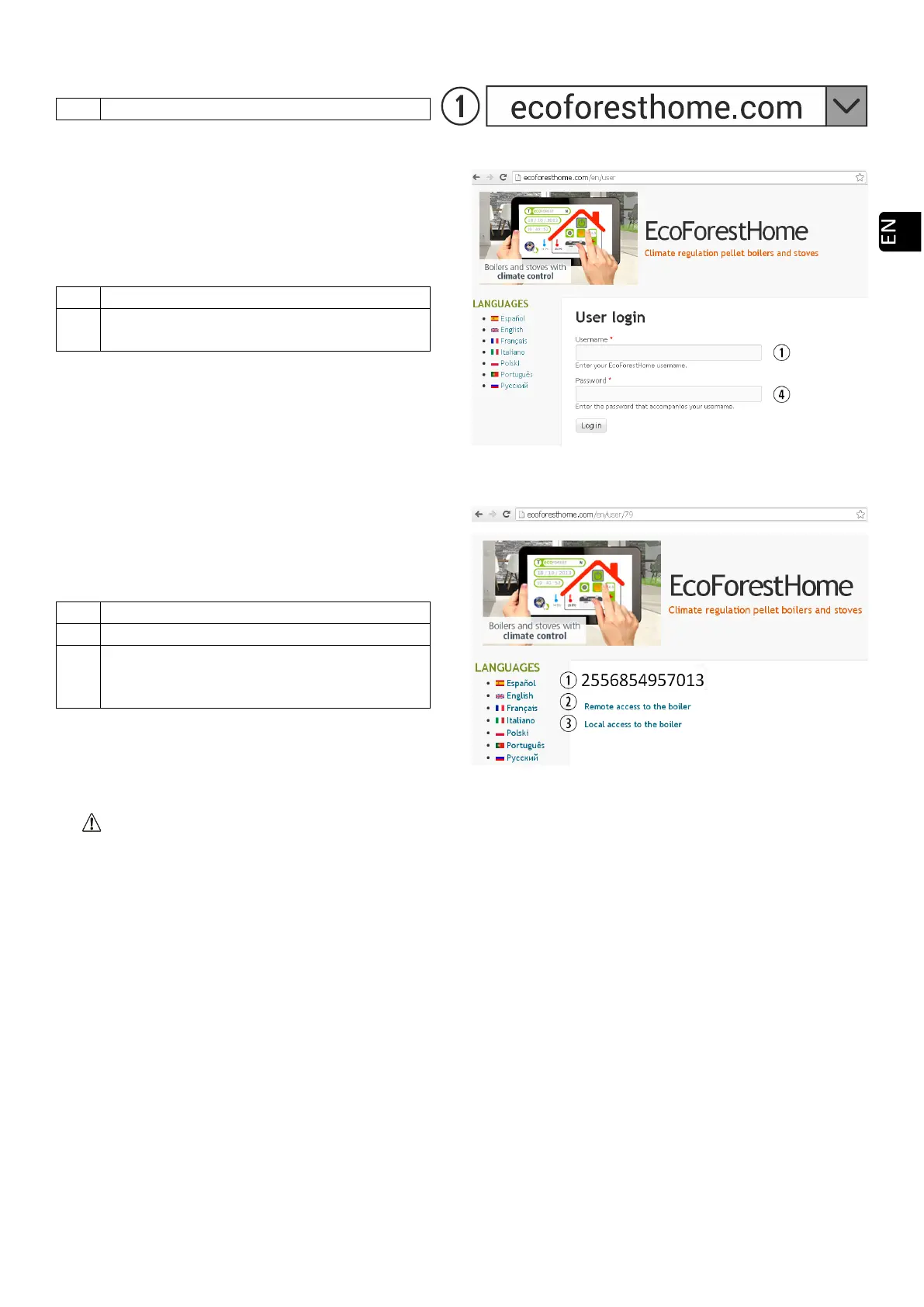
5.9.3. ACCES FROM INTERNET.
Drawing 52
SN: CPU serial number - Name - User.
Password for Access to Stove’s website (8
digits)
Drawing 53
SN: CPU serial number - Name - User.
Access to the machine from anywhere.
Access to the machine within range of
installation router. Recommended when we
Drawing 54
If the device has been connected to the internet for the first time, the links may take up to 15 minutes to
appear after completing the process indicated in section 5.9.2.
5.9.4. PROBLEMS.
Result 'Unsuccesful' in the WiFi configuration:
• Check that there is good coverage between the machine and the router of the installation.
• Review name and password of your wireless home network. Avoid spaces and unusual characters
((/[()¿?{}ºª<>$^¨ "&'#\=/.,;!¡*:]/, etc.). If necessary, modify name and password of your home’s wireless
network.
• Check type of wireless network security. Supported only: WPA / WPA2. Contact ISP to change the type
of protection, if necessary.
• If there are signal repeaters in the installation, they must respect the name and password of the main
router.
• It is recommended that the router broadcasts on a low emission channel (1-5).
• It is not possible to connect to WiFi 5GHz networks, exclusively 2.4GHz networks.



 To Next Page