61
After ‘Successful’ and save correctly. There is no local or remote access.
• Verify that the machine and the router or repeaters, if any, are working correctly.
• Verify that the IP shown on the keyboard corresponds to the one assigned by the router, depending
on the WiFi or Ethernet connection.
• Verify if any modification has been made to the router (changes in its configuration or in its location).
• Coverage between stove and router if it has been configured via WiFi.
• Check the connection of the Ethernet cable between the machine and the router, as well as the good
condition of the cable if the connection is done via Ethernet.
After ‘Successful’ and save correctly. Accessible in local mode but not in remote mode.
• Contact your distributor.
• Some 4G, WiMax, radio or satellite connections could block the VPN between the machine and the
Ecoforest servers. VPN Passthrough and IPsec Passthrough must be enabled on the router. If the
network uses CG-NAT protocol, remote access may not be possible. Check these points with your
internet service company.
5.9.5. NETWORK DIAGNOSIS.
The quality of external communications with the device depends on various factors. Accessing the WiFi menu
and pressing the analyze network icon, a connection diagnosis will be carried out:
• Strength of the signal received by the CPU from the router. According to the icon shown, it is considered:
• Report results.
Speed
No communication problems should be encountered.
Communication problems might be encountered.
% of frames or data packets lost.
Result
Satisfactory report result.
Unsatisfactory report result. Serious communication problems.
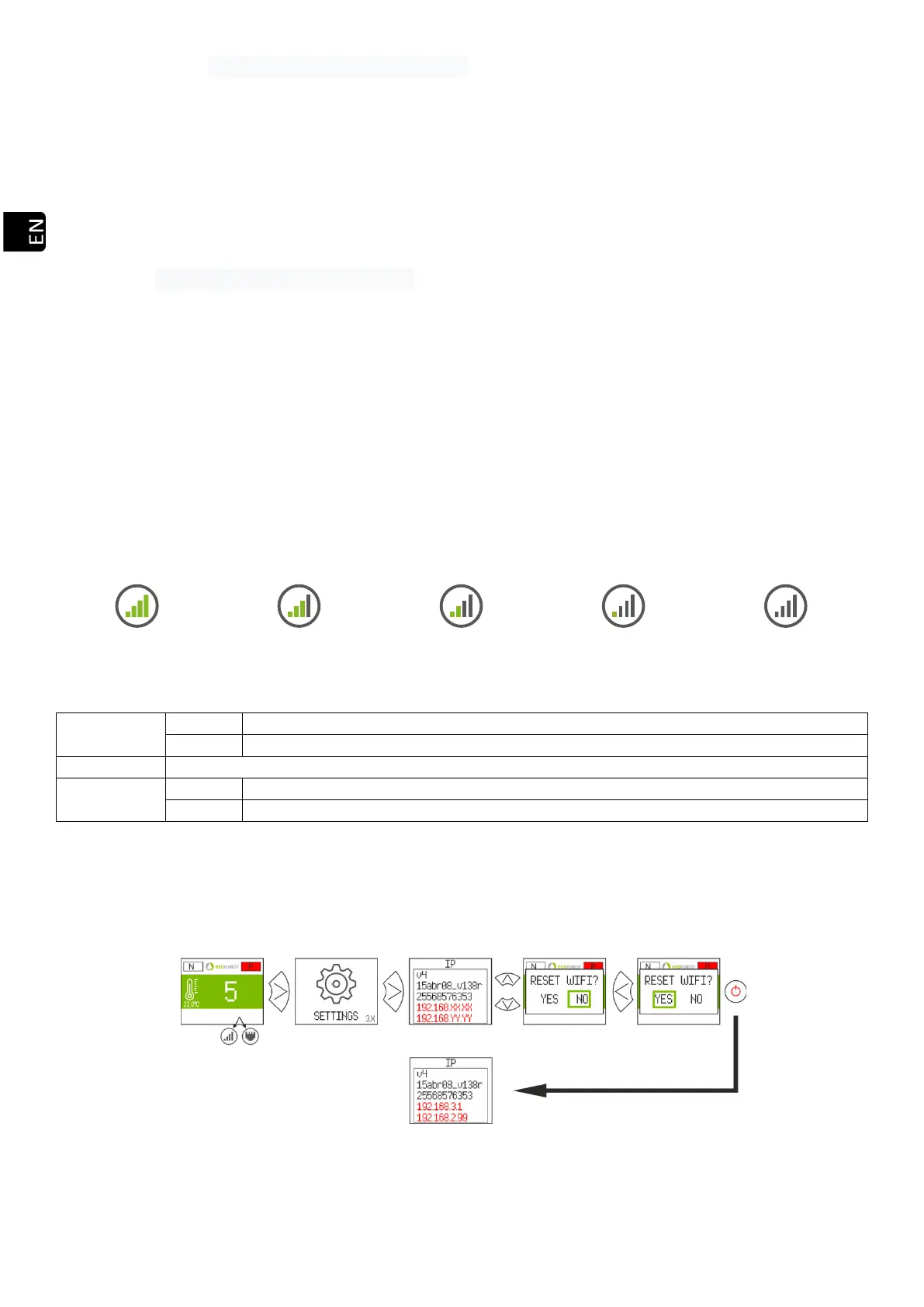
5.9.6. RECOVER THE ORIGINAL WiFi NETWORK.
You can restore the original WiFi network of the stove in different ways:
• From the web: In the remote connection menu (point 5.9.2.), selecting "AP-WiFi Original " and "Save".
• From the display: Restart from the IP addresses information screen.
Drawing 55



 To Next Page