62
5.10. APPLICATION (app).
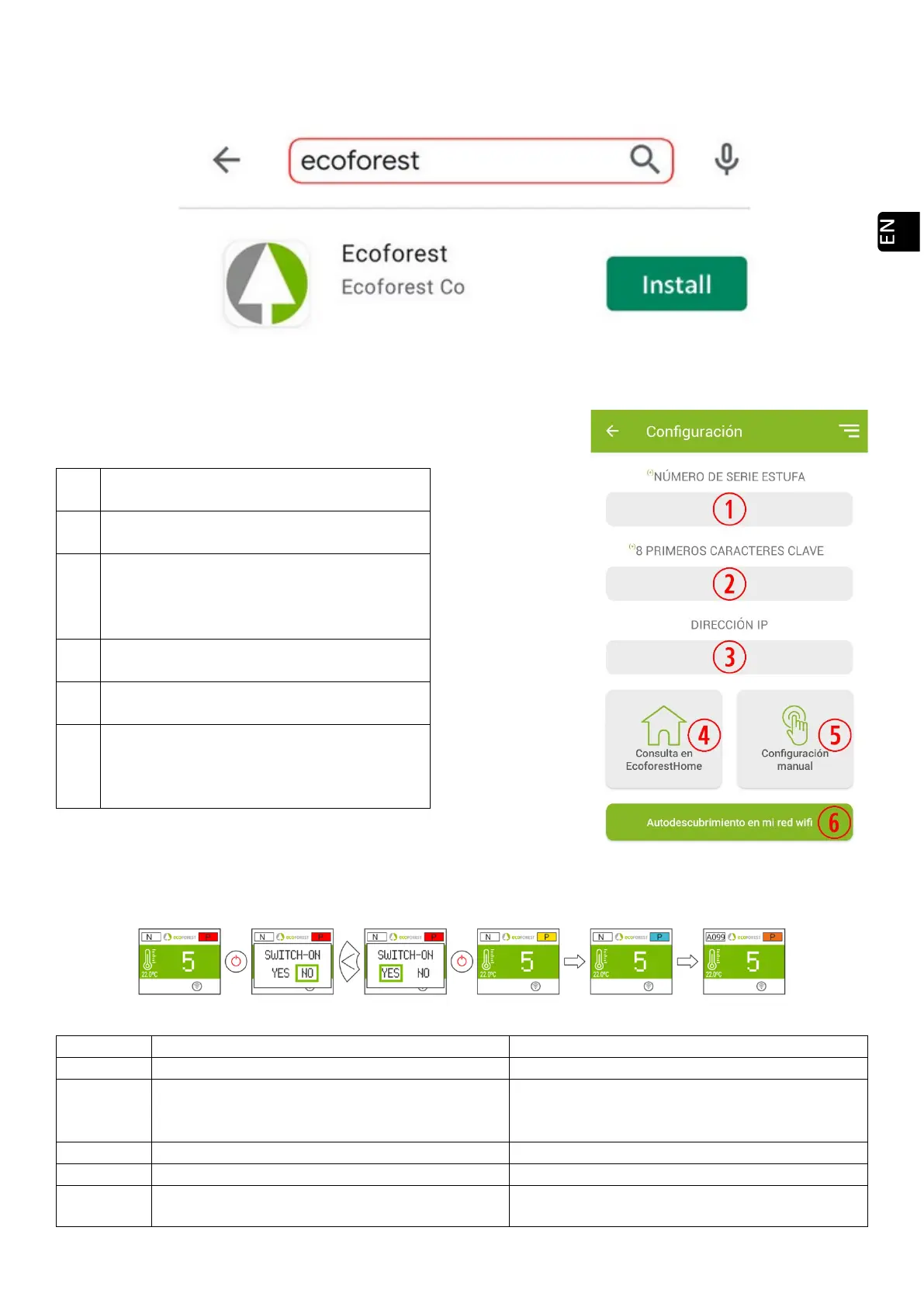
Open the corresponding Store, write Ecoforest in the search engine and Install:
Drawing 56
App configuration:
Drawing 57
6. ALARMS.
Drawing 58
Will appear if it is unplugged by an active alarm.
• Don´t unplug, use the keyboard.
A001 Low air intake depression.
• Open door.
High air intake depression.
• Excess of air during the installation.
Minimum gas output temperature.
• The stove run out of pellet.
A004 Maximum gas output temperature.
• Maximum operating temperature has been
reached.
SN: CPU serial number - Name - User.
Mandatory field. See figure 29
Password for Access to Stove’s website ( First 8
characters). Mandatory field. See figure 29
• Machine with original WiFi: 192.168.3.1.
•
Machine connected to the internet: IP to
which the remote access of ecoforesthome
If the machine is connected to the internet, it
automatically fills in the field
Allows you to manually enter the IP address
of the machine in the
If the machine is connected to the internet,
and the device is connected to the same
network as the machine, it automatically fills
from the WiFi network itself.



 To Next Page