ECD2800 / ECD2600
33 / 47
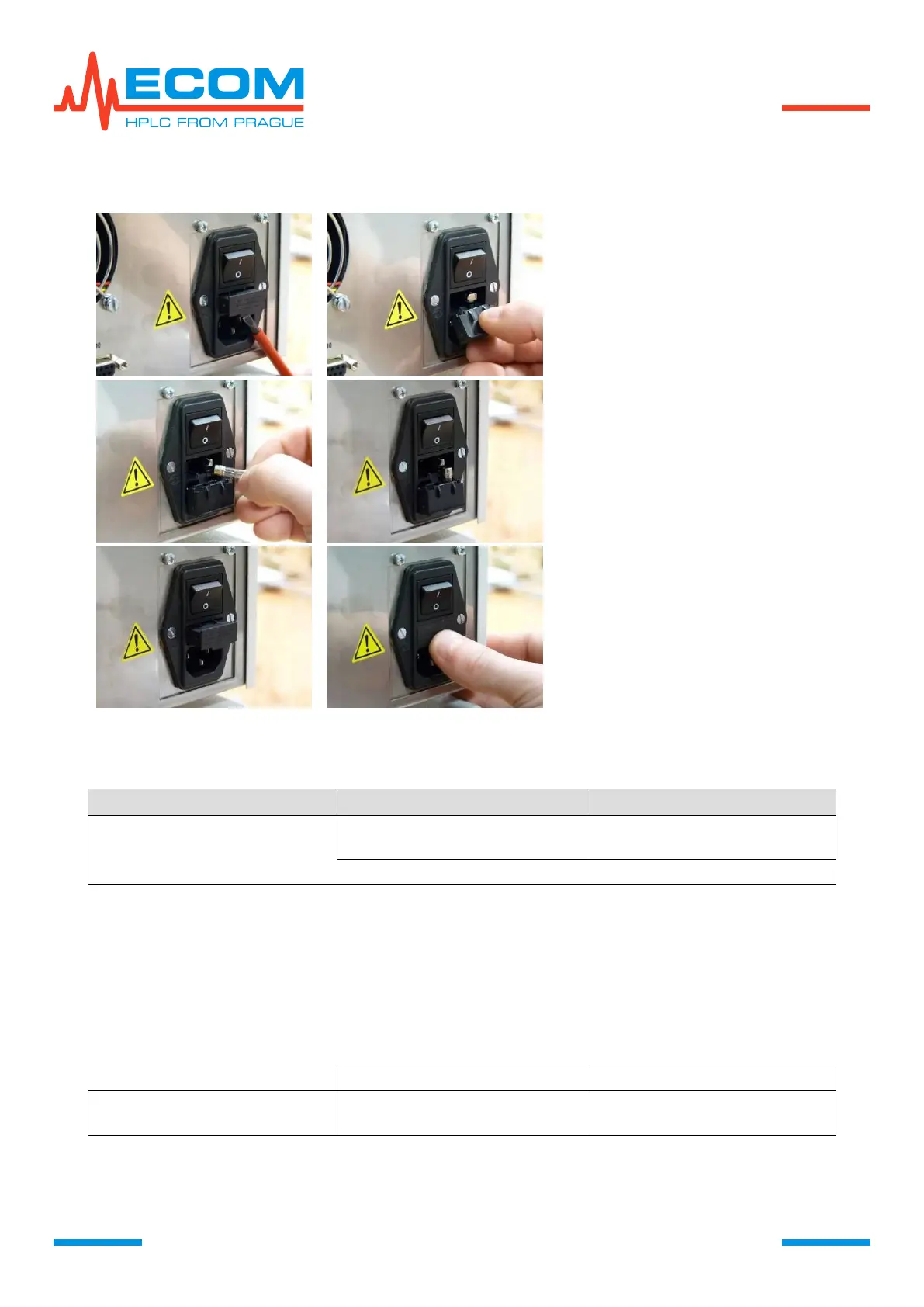
9. REPLACEMENT OF LINE FUSE
Disconnect the unit from power
source!!!
Using a flat-tip screwdriver release
the fuse holder from its bottom.
Take out the fuse holder.
Remove old line fuse
Insert in the holder new line fuse
noted on the product label, which
is a part of detector accessories.
Insert the fuse holder back.
Push the fuse holder all the way
inside.
After unit switch-on none LED
diode lights up, neither display
on front panel
Check main fuse in rear side
of the unit, see 9.
Leaking cell, dirty cell, gas
bubbles, nontransparent
mobile phase, old/defective
lamp, flow and temperature
fluctuations.
Perform Lamp test, see
6.6.8.1 and Cell test, see 14.2.
Check cell connection.
Check mobile phase.
Check cell purity manually.
Check pump.
Stabilize the external
environment. Heat the lamp
sufficiently.
Electronic / optic failure
Broken cell window,
Defective seal.
Repair or exchange cell, see
chapter 14.



 To Next Page