12 13
MANUAL FOR ECOSOFT COMPACT WATER SOFTENERS
This manual is the intellectual property of Ecosoft. Copying and reprinting is prohibit
This manual is the intellectual property of Ecosoft. Copying and reprinting is prohibited. © 2023 ecosoft.com
6 QUICK SET UP GUIDE
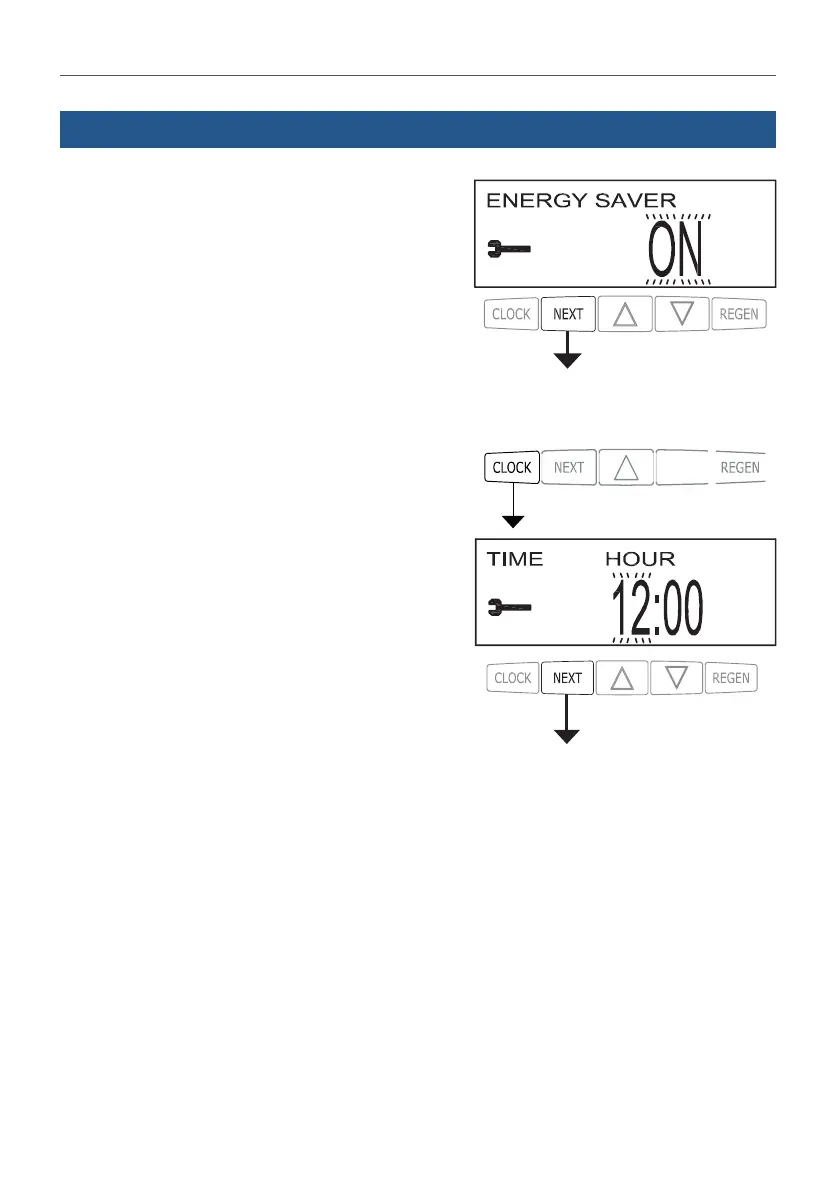
STEP 5. Choose whether to Turn off display backlight
5 minutes after last keypad input event (only
accessible in CE valves). Pressing NEXT will exit the
menu.
STEP 6. Enter current time setting by pressing CLOCK.
STEP 7. Set current time, hours then minutes.
NORMAL MODE
NORMAL MODE



 To Next Page