12
MANUAL FOR ECOSOFT COMPACT WATER SOFTENERS
ecosoft.com
6 QUICK SET UP GUIDE
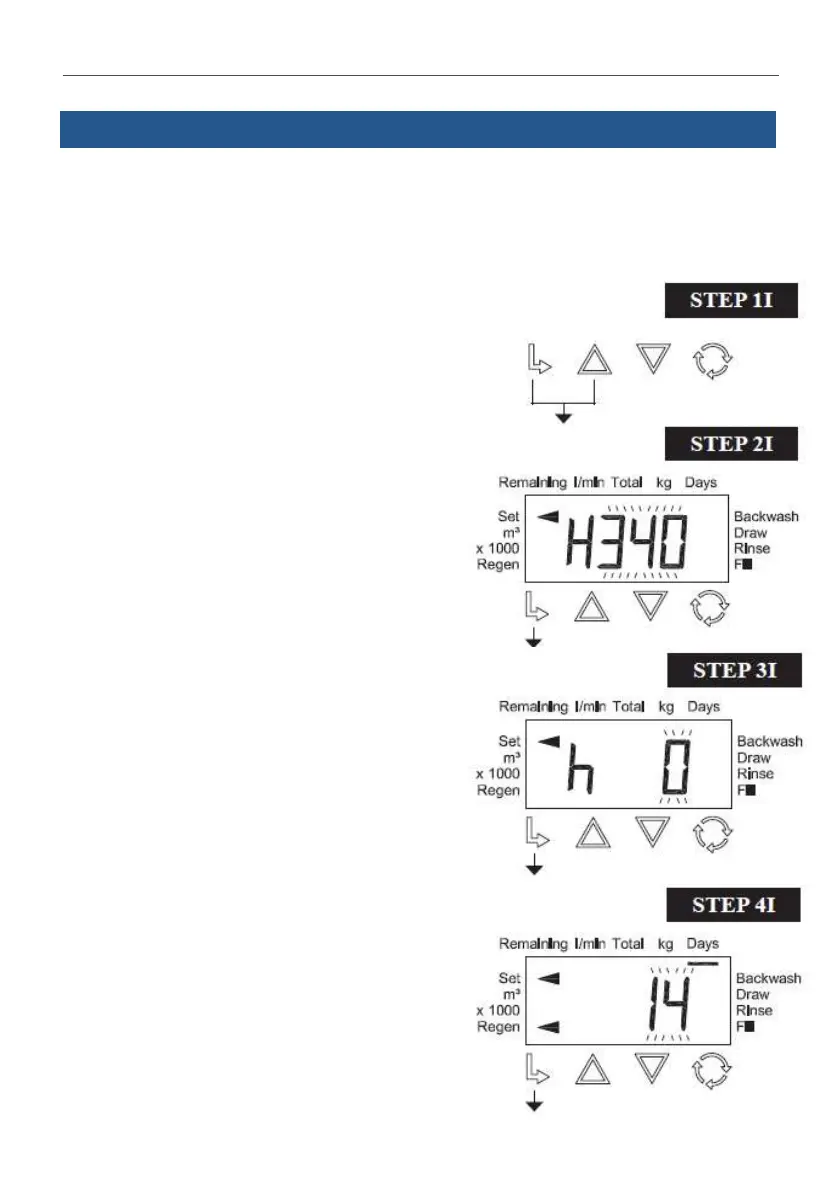
After installing and powering up an Ecosoft FU or FK system,set display language, water hardness,
current me, and regeneraon opons in the Installer menu of control valve.
Use ▲ and ▼ buons to change seng; NEXT buon to save and go to next step; CLOCK to save and
exit menu; REGEN to move back one step.
To proceed, hold NEXT and ▲ buons simultaneously
for 3 seconds.
STEP 2I. Hardness: Set the amount of hardness as
calcium carbonate per PPM, using ▼ or ▲.
Press NEXT to go to Step 4I.
Press REGEN to exit Installer Display Settings
STEP 3I. Service Water Hardness (PPM): If a mixing
valve is installed in the valve, service hardness needs
to be set. Setting range is always less than the setting
in Step 2I. This screen will only appear if Step 4S is set
to rES. Press NEXT to go to Step 4I. Press REGEN to
return to previous step.
STEP 4I. Set Day Override to 1 – 28 days or OFF using
▲ or ▼. Press NEXT to go to Step 5I. Press REGEN to
return to previous step.
This manual is the intellectual property of Ecosoft. Copying and reprinting is prohibited. © 2023



 To Next Page