2 1
No Icon Description
5 1
6 1
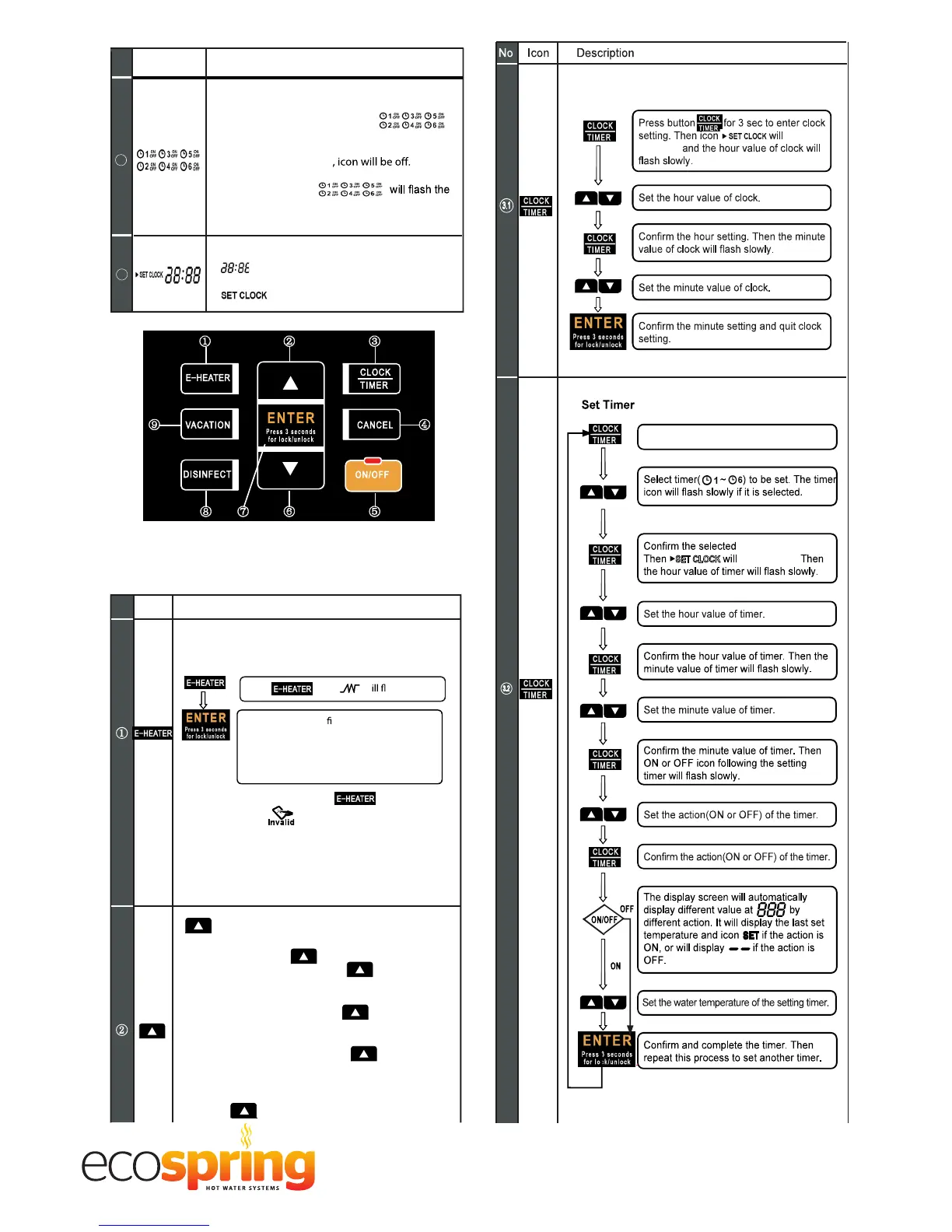
Timer:
There are six timers available.
If anyone of them has been set,
the corresponding icon will illuminate when
screen is unlocked.
If no timers has been set
If timer is being set,
corresponding icon with 2Hz frequency and
illuminate the timer which has been set.
Clock and clock setting:
Shows the clock.
Whenever clock is set,
will illuminate.
No. Icon Description
Manually turning E-heater ON:
If E-heater is OFF, follow these steps below to
manually turn it on.
If E-heater is already ON, Press
the invalid icon will show on the display.
By holding the E-heater key for 10s the temperature
can shift to set the temperature display unit from "F" to
"C" or from "C" to "F". The default is "C" (when it's
shifted to display "F", it still will display "C" while it
operates spot check).
INCREASE:
If screen is unlocked, corresponding value will
increase by pushing .
When setting temperature, press more
than 1s, Temperature value will be increased
continuously.
When Setting clock/timer, press more
than 1s, Clock/timer value will be inc
reased
continuously.
When setting vacation days, press more
than 1s, day value will be increased continuously.
On querying, check items will page up by
pressing .
1
2
Only in unlocked state, pressing the button is functional.
Press , Icon w ash.
Press ENTER to con
rm. The E-heater
is now activated to heat up water
to the target temperature. If E-heater needs
to be manually turned on again, repeat
these steps.
Table . 8-2
① ③
④⑨
⑦ ⑥ ⑤
②
⑧
SET CLOCK
Enter timer setting.
Set Clock
illuminate
illuminate.
timer setting.



 To Next Page