37
CYCLE TIMES
U
se these features to change the following conditioner/
refiner operations:
=Backwash time
=S
econd backwash (On/Off)
=Second backwash time
=Fast rinse time
To display these screens:
1. From any of the rolling status screens, press the
SELECT (¡) button to display the Main menu.
2. Press the DOWN (6) button to scroll through the
menu options until Advanced settings is highlighted
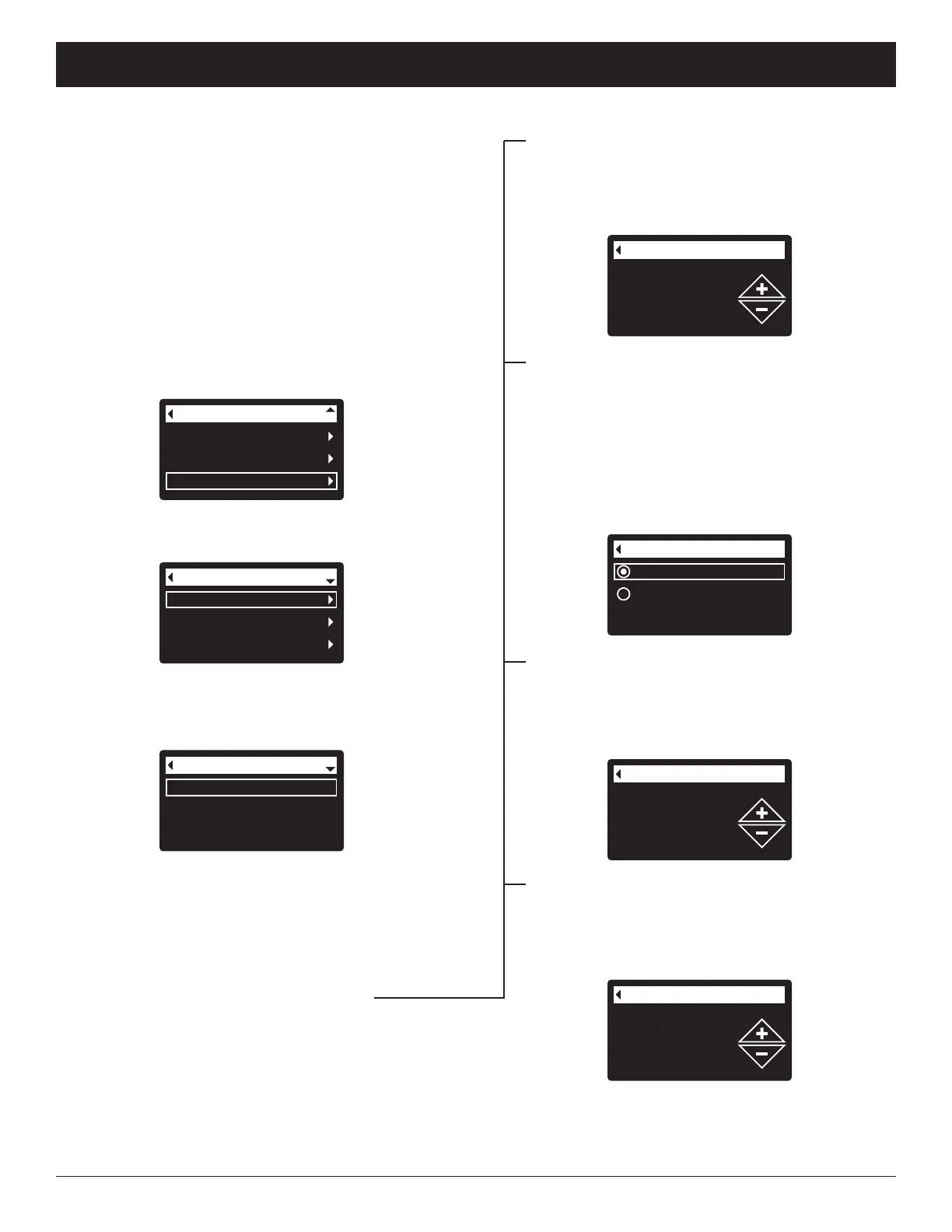
(See Figure 128).
Backwash time
2nd backwash (On/Off)
2nd backwash time
Cycle times
FIG. 130
FIG. 131
6. Press the DOWN (6) button to scroll through the
menu options until the desired option is highlighted
(See list at the top of this column).
7. Press the SELECT (¡) button to display the desired
cycle time screen (See Figures 131-134).
8. See the right column on this page for specific
instructions on each cycle time screen.
9. Press the SELECT (¡) button. The display will go
back to the Cycle times menu (Figure 130).
10. Press the LEFT (3) button three times to return to
the rolling status screens.
8
a. Backwash time: Press the UP (5) or DOWN
(6) buttons to change the backwash time.
Hold the button down to rapidly advance. The
backwash time can be set from 1 to 30 min-
utes* (See Figure 131).
Cycle times
Special features
Troubleshooting
Advanced settings
FIG. 129
4. Make sure Cycle times is highlighted.
5. Press the SELECT (¡) button to display the Cycle
times menu (See Figure 130).
User preferences
System information
Advanced settings
Main menu
FIG. 128
3. Press the SELECT (¡) button to display the
Advanced settings menu (See Figure 129).
Off
On
2nd backwash (On/Off)
FIG. 132
8b. Second backwash (On/Off): If the desired
option already has a dot next to it (See Figure
132), go to Step 9. Otherwise, press the
DOWN (6) or UP (5) buttons to scroll to the
other option, then press SELECT (¡) to choose
it. Setting this feature On adds a second back-
wash and rinse at the beginning of the recharge
cycle. Default is Off. Set this feature On if your
water supply contains a lot of sediment or iron.
2nd backwash time
7 minutes
FIG. 133
8c. Second backwash time: Press the UP (5) or
DOWN (6) buttons to change the second back-
wash time. Hold the button down to rapidly
advance. The time can be set from 0 to 30
minutes (See Figure 133).
FIG. 134
8d. Fast rinse time: Press the UP (5) or DOWN
(6) buttons to change the fast rinse time. Hold
the button down to rapidly advance. The fast
rinse time can be set from 1 to 30 minutes*
(See Figure 134).
ECOWATER
S Y S T E M S
Conditioner/Refiner Operation
*Reducing the backwash and fast rinse times below a
conditioner/refiner model’s default settings can result in
salty water after recharges.



 To Next Page